What is the Best Product to Clean a Controller?
Fast answer first. Then use the tabs or video for more detail.
- Watch the video explanation below for a faster overview.
- Game mechanics may change with updates or patches.
- Use this block to get the short answer without scrolling the whole page.
- Read the FAQ section if the article has one.
- Use the table of contents to jump straight to the detailed section you need.
- Watch the video first, then skim the article for specifics.
The best product to clean a controller is a soft, lint-free cloth dampened with 70% isopropyl alcohol (IPA). This combination effectively removes grime, disinfects, and minimizes the risk of damage to the controller’s sensitive components. Avoid harsh chemicals and excessive moisture.
The Controller Cleaning Conundrum: A Deep Dive
Let’s face it: controllers get grimy. Hours of intense gaming sessions lead to a buildup of sweat, grease, crumbs (yes, crumbs!), and a host of other unmentionables. Keeping your controller clean isn’t just about aesthetics; it’s crucial for hygiene and extending the lifespan of your beloved gaming peripheral. But with so many cleaning products available, how do you choose the right one? And more importantly, how do you avoid accidentally damaging your precious gear? Let’s break it down.
Why 70% Isopropyl Alcohol is the Champion
The recommendation of 70% isopropyl alcohol isn’t arbitrary. It’s based on a combination of factors:
-
Effectiveness: Isopropyl alcohol is a potent disinfectant, killing bacteria and viruses that can accumulate on frequently touched surfaces. It effectively dissolves grease and grime, lifting it away from the controller’s surface.
-
Evaporation Rate: 70% IPA has a higher water content compared to 90% or 99% IPA. This water content slows down the evaporation rate, giving the alcohol more time to penetrate and disinfect. While higher concentrations might seem more effective, they can evaporate too quickly, leaving behind residue and reducing their disinfecting power.
-
Safety: While still a chemical, 70% IPA is generally safe for use on plastics and electronic components when applied correctly. The water content helps to minimize the risk of damaging sensitive materials, especially when compared to stronger solvents.
The Method Matters: How to Clean Your Controller Like a Pro
Simply having the right product isn’t enough. Here’s a step-by-step guide to cleaning your controller effectively and safely:
-
Power Down and Disconnect: Before you even think about cleaning, ensure your controller is turned off and disconnected from any power source or console. This prevents accidental shorts or damage. If it’s a wireless controller, remove the batteries.
-
Dry Dusting: Use a dry, soft-bristled brush (like a toothbrush or a detailing brush) to gently remove loose dust, dirt, and debris from the controller’s surface, crevices, and around buttons. A can of compressed air can also be helpful for blasting out stubborn particles.
-
Dampen, Don’t Soak: Lightly dampen a lint-free microfiber cloth with 70% isopropyl alcohol. Never spray the alcohol directly onto the controller. You want the cloth to be damp, not dripping.
-
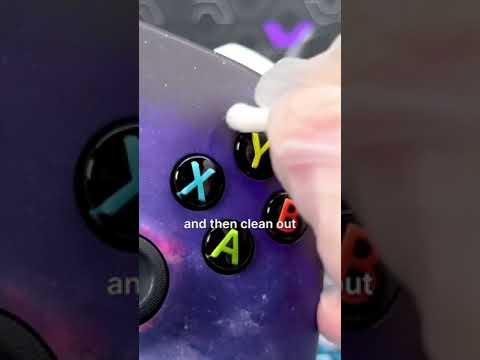
Wipe and Clean: Carefully wipe down the controller’s surfaces, paying particular attention to high-touch areas like the buttons, analog sticks, D-pad, and grips. For tight spaces, use a cotton swab dampened with alcohol.
-
Crevice Cleaning: Use a toothpick or a plastic spudger (the kind used for opening electronics) to gently remove grime from seams and crevices. Be careful not to apply excessive pressure, as you could scratch the plastic.
-
Drying Time: Allow the controller to air dry completely before reassembling (if necessary) and reconnecting it. This ensures that any residual alcohol evaporates, preventing potential damage.
-
Battery Compartment Precautions: If you’re cleaning a wireless controller, avoid getting any moisture inside the battery compartment. Use a dry cotton swab to gently clean the battery contacts if necessary.
Alternatives and What to Avoid
While 70% IPA is the gold standard, other options exist, and some should be avoided entirely:
- Safe Alternatives: Mild dish soap and water (use very sparingly and dry thoroughly), pre-moistened electronic wipes (ensure they are alcohol-based and safe for plastics).
- Products to Avoid: Bleach, hydrogen peroxide, ammonia-based cleaners (like Windex), strong solvents (acetone, paint thinner), abrasive cleaners. These can damage the controller’s plastic, finish, and internal components.
Why Regular Cleaning Matters
Consistent cleaning isn’t just about keeping your controller looking pristine; it’s about:
- Hygiene: Controllers are breeding grounds for bacteria. Regular cleaning reduces the risk of spreading germs.
- Performance: Grime and debris can interfere with button responsiveness and analog stick movement. Cleaning ensures optimal performance.
- Longevity: Removing corrosive substances extends the lifespan of your controller.
- Resale Value: A clean controller is more appealing to potential buyers if you ever decide to sell it.
The Games Learning Society emphasizes the importance of responsible gaming habits, and that extends to maintaining your equipment. Visit GamesLearningSociety.org for more information on how to enhance your learning experience.
Controller Cleaning: Frequently Asked Questions (FAQs)
1. Can I use hand sanitizer to clean my controller?
No. While hand sanitizer contains alcohol, it also often includes other ingredients like moisturizers and fragrances that can leave a sticky residue on your controller. Stick to 70% isopropyl alcohol.
2. Is it safe to use Clorox wipes on my controller?
While some sources suggest Clorox wipes are safe, they contain bleach, which can damage the plastic and finish of your controller over time. It’s best to avoid them and stick to isopropyl alcohol.
3. Can I use Windex to clean my Xbox controller?
Microsoft specifically recommends against using disinfectant wipes on the Xbox Elite Wireless Controller Series 2. While they suggest Windex is safe, it’s best to stick to the recommended 70% IPA solution.
4. What concentration of isopropyl alcohol is best for cleaning electronics?
70% isopropyl alcohol is the generally recommended concentration. While higher concentrations like 90% or 99% are effective, they evaporate too quickly, potentially reducing their disinfecting power and leaving behind residue.
5. How often should I clean my controller?
The frequency depends on how often you use it. For regular gamers, cleaning once a week is a good practice. If you share your controller with others or use it extensively, clean it more frequently.
6. Can I use a dishwasher to clean my controller?
Absolutely not! This will almost certainly destroy your controller. Keep it far away from any significant amount of water.
7. What’s the best way to clean sticky buttons on my controller?
Dampen a cotton swab with 70% isopropyl alcohol and gently rub it around the sticky button, working the alcohol into the crevices. Press the button repeatedly to loosen any debris.
8. Can I use WD-40 to clean my controller?
While WD-40 Specialist Contact Cleaner is designed for electronics, it’s best to use it only on internal components and electrical contacts, not on the controller’s plastic exterior.
9. How do I clean dead skin out of the seams and crevices of my controller?
Use a toothpick or a plastic spudger to gently scrape out any dead skin or grime. Follow up with a cotton swab dampened with 70% isopropyl alcohol.
10. Are disinfecting wipes safe for controllers?
Generally, no. Many disinfecting wipes contain harsh chemicals that can damage your controller. Stick to 70% isopropyl alcohol.
11. Can I use Lysol wipes to clean my controller?
While Lysol states their wipes are safe for electronics, it’s always best to check the manufacturer’s cleaning instructions for your specific device and consider using 70% isopropyl alcohol instead for safer cleaning.
12. Is it okay to use rubbing alcohol on the battery compartment of my wireless controller?
Avoid getting any moisture, including rubbing alcohol, inside the battery compartment. If necessary, use a dry cotton swab to gently clean the battery contacts.
13. What if I accidentally sprayed cleaning solution directly onto my controller?
Immediately disconnect the controller and turn it off. Use a dry microfiber cloth to absorb as much of the liquid as possible. Then, use a slightly damp cloth with 70% isopropyl alcohol to gently wipe down the affected areas. Allow the controller to air dry completely before reassembling.
14. How can I prevent my controller from getting dirty in the first place?
Wash your hands before each gaming session. Avoid eating while using your controller. Consider using controller grips or skins to protect the surface.
15. My controller has a strong odor after cleaning. What should I do?
The odor should dissipate as the isopropyl alcohol evaporates. If the smell persists, try wiping the controller down with a clean, slightly damp cloth (water only) and then dry it thoroughly. Avoid using scented cleaners.
Cleaning your controller doesn’t have to be a daunting task. With the right products and techniques, you can keep your controller clean, hygienic, and performing at its best for years to come. Game on!