GPU vs. Graphics Card: Untangling the Tech Jargon
Fast answer first. Then use the tabs or video for more detail.
- Watch the video explanation below for a faster overview.
- Game mechanics may change with updates or patches.
- Use this block to get the short answer without scrolling the whole page.
- Read the FAQ section if the article has one.
- Use the table of contents to jump straight to the detailed section you need.
- Watch the video first, then skim the article for specifics.
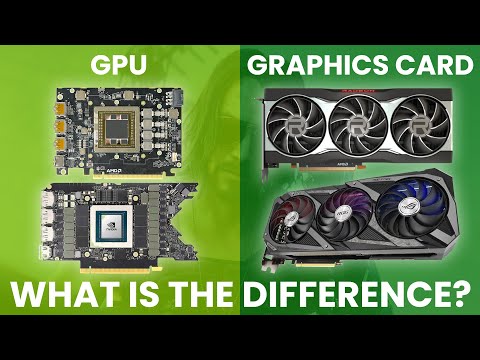
The terms GPU and graphics card are often used interchangeably, causing confusion for many. Think of it this way: The GPU is like the engine in a car, while the graphics card is the entire vehicle. The GPU performs the heavy lifting of rendering images, while the graphics card provides the platform and resources for it to operate effectively.
Understanding the Core Components
At its heart, a GPU (Graphics Processing Unit) is a specialized electronic circuit designed to rapidly manipulate and alter memory to accelerate the creation of images in a frame buffer intended for output to a display device. Put simply, it’s a processor dedicated to graphics. These processors are incredibly powerful because they are designed for parallel processing, meaning they can perform multiple calculations simultaneously. This is crucial for rendering complex scenes in games, editing high-resolution videos, and creating detailed 3D models.
A graphics card, also known as a video card, is an add-in board that plugs into your computer’s motherboard. It contains the GPU, along with other essential components such as:
- Video Memory (VRAM): This is dedicated memory used solely for storing textures, frame buffers, and other graphics-related data. More VRAM allows the GPU to handle higher resolutions, more complex textures, and more demanding graphical tasks.
- Cooling System: GPUs generate a lot of heat, so graphics cards typically have a heatsink and fan, or even liquid cooling, to dissipate the heat and prevent the card from overheating.
- Connectors: These are the ports on the back of the card that allow you to connect it to your monitor(s). Common connectors include HDMI, DisplayPort, and DVI.
- Power Delivery System: The graphics card needs power to operate, which it receives from the computer’s power supply unit (PSU) through dedicated power connectors.
The Analogy: CPU vs. Motherboard
A helpful analogy is to compare the GPU and graphics card to the CPU and motherboard. The CPU (Central Processing Unit) is the brain of your computer, responsible for general-purpose processing. The motherboard is the platform that connects all the components together, including the CPU, RAM, and storage. Similarly, the GPU is the graphics-processing brain, and the graphics card is the platform that houses the GPU and connects it to the rest of the system.
Integrated vs. Dedicated Graphics
It’s also important to understand the difference between integrated and dedicated graphics.
- Integrated Graphics: This is a GPU that is built into the CPU or the motherboard. Integrated graphics solutions are typically less powerful than dedicated graphics cards, but they are sufficient for basic tasks like web browsing, document editing, and watching videos.
- Dedicated Graphics: This refers to a graphics card that is separate from the CPU and motherboard. Dedicated graphics cards offer significantly better performance than integrated graphics, making them essential for gaming, video editing, and other graphically demanding applications.
Why a Dedicated Graphics Card Matters
While integrated graphics have improved over the years, a dedicated graphics card is still necessary for anyone who wants to push their computer’s graphical capabilities. Here’s why:
- Improved Performance: Dedicated GPUs are far more powerful than integrated GPUs, leading to smoother frame rates in games, faster rendering times in video editing software, and a better overall visual experience.
- Dedicated Memory: Dedicated graphics cards have their own VRAM, which means they don’t have to share system memory with the CPU. This frees up system resources and further improves performance.
- Advanced Features: Dedicated graphics cards often support advanced features like ray tracing and DLSS (Deep Learning Super Sampling), which enhance the visual quality of games.
Factors to Consider When Choosing a Graphics Card
Choosing the right graphics card depends on your needs and budget. Here are some factors to consider:
- Resolution and Refresh Rate: If you want to game at 4K resolution with a high refresh rate, you’ll need a powerful graphics card.
- Game Requirements: Different games have different graphical requirements. Check the recommended specifications for the games you want to play to ensure your graphics card can handle them.
- Budget: Graphics cards range in price from a few hundred dollars to several thousand dollars. Set a budget before you start shopping.
- VRAM: The amount of VRAM you need depends on the resolution and textures you want to use. 4GB is generally sufficient for 1080p gaming, while 8GB or more is recommended for 1440p and 4K gaming.
- Power Supply: Make sure your computer’s power supply unit (PSU) has enough wattage to support the graphics card.
Frequently Asked Questions (FAQs)
1. Do I need a GPU and a graphics card?
Technically, if you have a graphics card, you inherently have a GPU because the GPU is a component within the graphics card. If your CPU has integrated graphics, you may not require a separate graphics card for basic tasks. However, for gaming, video editing, or 3D rendering, a dedicated graphics card is almost always essential.
2. Can you have a GPU and a graphics card?
Yes. Many modern computers have both integrated graphics (the GPU built into the CPU) and a dedicated graphics card. This allows you to switch between the two, using the integrated graphics for less demanding tasks and the dedicated card for more intensive applications.
3. Is Nvidia a GPU or graphics card?
Nvidia is a company that designs and manufactures GPUs. They also produce and sell graphics cards based on their GPUs. So, Nvidia makes both GPUs and graphics cards.
4. Does a better GPU mean better graphics?
Generally, yes. A more powerful GPU will result in better graphics performance. Factors like clock speed, memory bandwidth, and the number of processing cores all contribute to the GPU’s overall performance.
5. How do I know what graphics card I need?
Consider your primary use case. For basic tasks, integrated graphics might suffice. For 1080p gaming, a mid-range card is suitable. For 1440p or 4K gaming, you’ll need a high-end card. Also, check the recommended specifications for the games or applications you plan to use.
6. Is GPU only for gaming?
No. While GPUs are commonly used for gaming, they are also crucial for video editing, 3D rendering, scientific simulations, machine learning, and many other applications that require intensive parallel processing.
7. What’s better Nvidia or AMD?
It depends on your priorities and budget. Nvidia generally leads in high-end performance and ray tracing, while AMD often offers better value at lower price points. Both companies release excellent cards, and the “better” choice often comes down to specific models and your individual needs.
8. Which is better GTX or RTX graphics card?
RTX cards are generally superior to GTX cards. RTX cards offer advanced features like ray tracing and DLSS, which GTX cards lack. RTX cards are typically more powerful overall.
9. What is a GPU for dummies?
A GPU is like a specialized brain in your computer that’s really good at drawing pictures and videos. It takes the information it’s given and quickly turns it into images you see on your screen.
10. Why have 2 graphics cards?
Some users run multiple graphics cards to increase performance in specific applications or to support multiple monitors. However, multi-GPU setups (like SLI or Crossfire) are becoming less common as single-card performance improves.
11. Which is the best graphics card in the world?
Currently, the Nvidia GeForce RTX 4090 is widely considered the best graphics card for pure performance.
12. What does GPU stand for?
GPU stands for Graphics Processing Unit.
13. What does GTX mean in graphics cards?
GTX stands for “Giga Texel Shader eXtreme” and is a designation used by Nvidia for their older generation of graphics cards, typically lacking the advanced features of the RTX series.
14. Why should I buy a graphics card?
If you plan to play video games, edit videos, create 3D models, or run other graphically intensive applications, a dedicated graphics card is essential for a smooth and enjoyable experience.
15. Can a computer run with GPU alone?
A computer requires a processor to run; it cannot function with a GPU alone. The CPU handles the core operating system functions, while the GPU handles the specific calculations for graphics processing.
Conclusion
Hopefully, this has clarified the distinction between a GPU and a graphics card. Remember, the GPU is the processor itself, while the graphics card is the entire package that houses the GPU and enables it to function within your computer. Understanding this difference, along with the factors discussed above, will help you make informed decisions when upgrading or building your next PC. Also, if you want to learn more about games or how to design games consider the Games Learning Society, check them out at GamesLearningSociety.org.