Unveiling the Wii’s Resolution Limits: What’s the Highest It Can Go?
Fast answer first. Then use the tabs or video for more detail.
- Watch the video explanation below for a faster overview.
- Game mechanics may change with updates or patches.
- Use this block to get the short answer without scrolling the whole page.
- Read the FAQ section if the article has one.
- Use the table of contents to jump straight to the detailed section you need.
- Watch the video first, then skim the article for specifics.
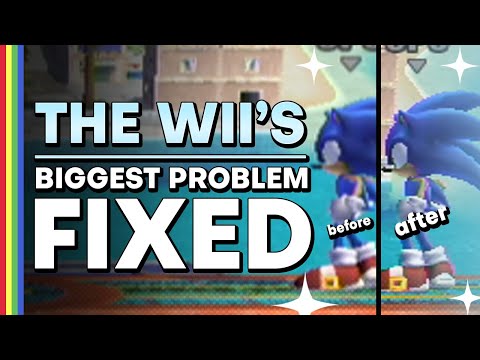
The Nintendo Wii, a console celebrated for its innovative motion controls and accessible gameplay, often sparks debate about its graphical capabilities. The straight answer is this: the Wii’s maximum native output resolution is 480p. This means the highest resolution the console itself can generate is 480 progressive scan lines. While you might see claims of 720p or even 1080p, these are achieved through upscaling done by external devices or certain Wii U settings when playing Wii games, not by the Wii itself. Let’s delve deeper into why this is the case and explore the nuances of the Wii’s video output.
Understanding Native Resolution vs. Upscaling
The term “native resolution” refers to the actual resolution the console’s hardware is producing. In the Wii’s case, its GPU (Graphics Processing Unit), codenamed “Hollywood,” is designed to output a maximum of 480p. This resolution, 640×480 pixels in progressive scan mode, was a common standard during the Wii’s lifespan (2006-2017) but is considerably lower than modern HD standards like 720p (1280×720), 1080p (1920×1080), or 4K (3840×2160).
Upscaling, on the other hand, is a process where an external device, such as a Wii2HDMI adapter or the television itself, takes the lower-resolution 480p signal and attempts to artificially increase the number of pixels to match a higher resolution, like 720p or 1080p. While this can make the image appear sharper on an HDTV, it doesn’t actually add any new detail. It essentially stretches the existing pixels, which can sometimes result in a blurry or distorted image if not handled well. It’s important to remember that the HDMI converter is what’s upscaling and outputting 720p/1080p, not the Wii itself.
Why 480p and Not Higher?
Nintendo’s design philosophy for the Wii prioritized affordability and accessibility over raw graphical power. The “Hollywood” GPU was designed to be efficient and cost-effective, allowing Nintendo to sell the Wii at a competitive price point while still delivering engaging gameplay experiences. Focusing on innovative motion controls and strong game design meant that pursuing higher resolutions wasn’t a priority for Nintendo at the time. They invested more in innovative gameplay and strong characters and franchises.
The choice of 480p also reflects the prevalent television technology at the time of the Wii’s release. While HDTVs were becoming more common, many households still used standard-definition (SD) televisions. Supporting 480p allowed the Wii to offer a visually appealing experience on both types of displays.
Connecting Your Wii for the Best Possible Image
To achieve the best possible picture quality on your Wii, using component cables is the most direct route to 480p output. These cables separate the video signal into three channels (Y, Pb, Pr), resulting in a cleaner and more vibrant image compared to composite (RCA) cables, which combine the signal into a single channel.
When using component cables, ensure that your Wii’s TV resolution settings are configured correctly. Navigate to the Wii’s system settings, select “Screen,” then “TV Resolution,” and choose “EDTV or HDTV (480p).” Selecting “Standard TV (480i)” will limit the output to interlaced 480i, which is a lower-quality signal.
Wii to HDMI adapters offer another option for connecting your Wii to an HDTV, as many modern televisions no longer have component inputs. While these adapters upscale the image, the quality of the upscaling can vary significantly depending on the adapter. Some offer better image processing than others, so it’s worth researching and choosing a reputable brand.
The Role of Emulation
If you’re truly seeking a higher-resolution Wii gaming experience, emulation is the way to go. Emulators, such as Dolphin, allow you to play Wii games on a PC or other devices at significantly higher resolutions, often up to 4K or even higher. These emulators also provide options for improving textures, applying anti-aliasing, and enhancing other graphical aspects, resulting in a vastly improved visual experience.
It’s important to note that emulation requires a powerful computer and may involve obtaining game ROMs, which can raise legal and ethical considerations depending on the source.
Frequently Asked Questions (FAQs) About Wii Resolution
1. Can the Wii output 1080p?
No. The Wii cannot natively output 1080p. Any claims of 1080p output are due to upscaling performed by external devices.
2. Does a Wii2HDMI adapter make my games 1080p?
A Wii2HDMI adapter will upscale the Wii’s output to 720p or 1080p, but it doesn’t magically create detail that wasn’t there originally. The image may appear sharper, but it’s still based on the original 480p source.
3. What resolution is a standard Wii game?
Most Wii games are designed to run at a 480p resolution. Some support 480i.
4. Is the Wii capable of 720p?
The Wii itself is not capable of 720p. However, Wii to HDMI converts can upscale to 720p.
5. How do I get 1080p on my Wii?
You cannot get true 1080p output directly from the Wii console. You need an HDMI converter for it.
6. Why do my Wii graphics look so bad on my HDTV?
The Wii’s low native resolution of 480p can appear pixelated or blurry when displayed on a modern HDTV with a much higher resolution. Your TV is trying to stretch the image.
7. Can the Wii do 1080i?
While the Wii can output 480i, it cannot output 1080i. The only way to get the image to display with a higher resolution is to make the Wii think it is attached to an SDTV.
8. How do I increase the resolution on my Wii?
You can increase the output quality by using component cables and setting the TV resolution in the Wii’s system settings to “EDTV or HDTV (480p).”
9. What GPU does the Wii use?
The Wii uses a GPU called “Hollywood,” designed by ATI (now AMD).
10. Will the Wii work on a 4K TV?
Yes, the Wii will work on a 4K TV, but the image quality will be limited by the Wii’s native resolution of 480p. You may need an adapter to connect the Wii to your 4K TV.
11. Why does my Wii look pixelated?
The Wii’s 480p resolution is much lower than the native resolution of most modern TVs, which results in pixelation when the image is scaled up.
12. Does the Wii support 240p?
While the Wii can output 480i, which can be deinterlaced to 240p on some displays, it doesn’t natively support 240p output.
13. What resolution is Wii component video?
Wii Component Video allows you to hook up your Wii console system to a high-definition TV (HDTV) or enhanced-definition TV (EDTV) to view 480p progressive output.
14. Is the Wii better vertical or horizontal?
The Wii can be placed either vertically or horizontally, depending on your preference and the available space in your entertainment center. Consider how you want to decorate.
15. Does 720p look bad on 1080p?
When you’re running at 720p on a 1080p monitor, the image has to be upscaled which leads to degradation in quality and the degradation can be clearly seen on the screen compared to 1080p on the same monitor.
Embracing the Wii’s Legacy
While the Wii’s graphical capabilities may seem dated by today’s standards, its impact on the gaming industry remains undeniable. Its innovative motion controls, accessible gameplay, and strong library of games made it a commercial success and a beloved console for millions. Understanding the Wii’s resolution limitations allows us to appreciate its strengths and explore ways to enhance the visual experience through emulation or carefully chosen adapters. Learn more about gaming and its educational impact through the Games Learning Society or GamesLearningSociety.org.