Unlocking the Secrets of Your PSP’s Memory Card: A Comprehensive Guide
Fast answer first. Then use the tabs or video for more detail.
- Watch the video explanation below for a faster overview.
- Game mechanics may change with updates or patches.
- Use this block to get the short answer without scrolling the whole page.
- Read the FAQ section if the article has one.
- Use the table of contents to jump straight to the detailed section you need.
- Watch the video first, then skim the article for specifics.
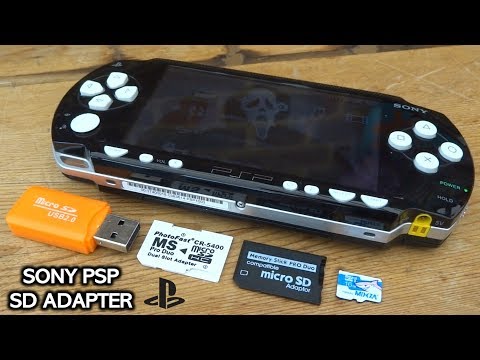
The root of the PSP memory card, in simple terms, is the top-level directory or the main folder you see when you access the card’s contents. It’s the starting point for navigating the file system of your Memory Stick Duo (or MicroSD adapter), much like the C:/ drive is the root directory in Windows. Think of it as the base of a tree; all the other branches (folders) extend from it.
Diving Deep into PSP Memory Cards
The PlayStation Portable (PSP) revolutionized handheld gaming, and a key component to its functionality was its external storage. While the PSP Go had internal storage, most PSP models relied heavily on Memory Stick Duo cards for saving game data, storing music, videos, and other media. Understanding the root directory and how these memory cards function is crucial for maximizing your PSP experience.
Understanding the File System Hierarchy
The PSP’s file system is structured hierarchically. This means that files are organized into folders within folders, all stemming from the root directory. When you connect your PSP to a computer, the memory card appears as a drive. Opening this drive reveals the root directory. You can then create folders within the root to organize your files as you see fit. Common folders include:
-
PSP: This folder is critical. Within it, you’ll find subfolders like:
- GAME: Stores PSP game files.
- MUSIC: Where you place your MP3s and other audio files.
- VIDEO: For storing your videos.
- PHOTO: Where you store photos.
- SAVEDATA: Contains game save files.
-
PICTURE: Another location for storing images.
-
Other folders for various homebrew applications and utilities.
Importance of Proper File Placement
Placing files in the correct directories is vital for the PSP to recognize and utilize them. If you put a game file outside the PSP/GAME folder, the PSP won’t be able to launch it. Similarly, music files must be in the PSP/MUSIC folder or a subfolder within it to be played through the PSP’s music player.
Memory Card Formatting Considerations
The PSP prefers a specific formatting scheme for its memory cards, usually FAT16 or FAT32. If you format a memory card using your computer with a different file system (like NTFS), the PSP might not recognize it. The PSP itself has an option to format the memory card, ensuring it’s compatible. Back up your data before formatting!
Frequently Asked Questions (FAQs) About PSP Memory Cards
1. What type of memory card does the PSP use?
The PSP primarily uses Memory Stick Duo cards. However, you can use MicroSD cards with adapters designed to fit the Memory Stick Duo slot.
2. Is there a maximum storage size the PSP can support?
While older documentation suggested limitations, it’s been proven that PSPs can handle up to 128GB with the right adapters and potentially even larger. The key is using a reliable MicroSD-to-Memory Stick Pro Duo adapter.
3. Does a PSP need a memory card to work?
No, a memory card isn’t strictly required to turn on the PSP. However, you will need one to save game progress, store media, or play games downloaded from the PlayStation Store. The PSP Go is the exception as it has internal storage, but the Memory Stick Duo slot can be used for additional storage on that device, too.
4. Why isn’t my PSP detecting my memory card?
Several reasons can cause this. The card might be formatted incorrectly (NTFS instead of FAT16/FAT32), the card reader in the PSP might be faulty, or the card itself could be damaged. Try reformatting the card through the PSP’s system settings.
5. How do I format a memory card using the PSP?
Go to Settings > System Settings > Format Memory Stick. Important: Back up any data on the card before formatting, as this process will erase everything.
6. Can I use any MicroSD card adapter with my PSP?
While most adapters will work, it’s recommended to use a dual MicroSD adapter. This allows you to use two MicroSD cards simultaneously, effectively doubling your storage capacity.
7. What’s the best way to organize my files on the PSP memory card?
Use the standard folder structure (PSP/GAME, PSP/MUSIC, PSP/VIDEO). Create subfolders within these folders to further organize your content. For example, create folders for individual albums within the PSP/MUSIC directory.
8. Can I update my PSP without a memory card?
PSP-2000/3000 series system may allow you to update via the internet. However, you will need a Memory Stick™ media inserted if you are using a PSP-1000 series system.
9. What is the USB mode on the PSP used for?
USB mode allows you to connect your PSP to a computer via a USB cable, enabling you to transfer files between your computer and the Memory Stick Duo.
10. How do I fix a corrupted memory card?
First, try connecting the card to a computer and running a disk repair utility (like CHKDSK on Windows). If that doesn’t work, you might need to reformat the card (after attempting to recover any important files). In some cases, the card may be beyond repair.
11. What are the benefits of using a MicroSD adapter over a standard Memory Stick Duo?
MicroSD cards are generally cheaper and more readily available than Memory Stick Duo cards. Using an adapter gives you greater flexibility in choosing your storage capacity and brand.
12. My PSP battery is dead. Can I still use it with just the AC adapter?
Yes, the PSP can operate without a battery if it’s plugged into the AC adapter. However, be cautious about unplugging it during a save process, as this could lead to data corruption.
13. Is it safe to remove the memory card while the PSP is on?
No. Removing the memory card while the PSP is on or actively reading/writing data can lead to data corruption or damage to the card. Always power off the PSP before removing the memory card.
14. What’s the difference between Memory Stick Pro Duo and Memory Stick Micro (M2)?
Memory Stick Pro Duo is the larger format used by the PSP. Memory Stick Micro (M2) is a smaller format used in some mobile phones. They are not directly interchangeable without an adapter.
15. Where can I learn more about game design and the educational power of games?
Explore the Games Learning Society at https://www.gameslearningsociety.org/ for resources on game-based learning and game design principles. GamesLearningSociety.org is a fantastic resource!
By understanding the root of your PSP’s memory card and how it interacts with the device, you can unlock the full potential of this classic handheld console. Enjoy your gaming!