Decoding the Dreamcast’s Video Output: A Deep Dive
Fast answer first. Then use the tabs or video for more detail.
- Watch the video explanation below for a faster overview.
- Game mechanics may change with updates or patches.
- Use this block to get the short answer without scrolling the whole page.
- Read the FAQ section if the article has one.
- Use the table of contents to jump straight to the detailed section you need.
- Watch the video first, then skim the article for specifics.
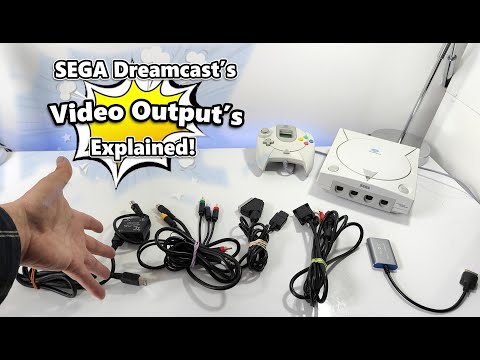
The Sega Dreamcast, a console remembered fondly for its innovative games and online capabilities, offered a surprisingly versatile range of video output options for its time. The Dreamcast primarily uses a multi-AV port for video and audio output, allowing compatibility with various connection types. The standard outputs include composite video (RCA) and S-Video. However, the Dreamcast is best known for its support of VGA (Video Graphics Array), which, through the use of a VGA box or cable, can deliver a significantly sharper and clearer image. In addition, with the right cables, the Dreamcast can also output RGB SCART and, through modern adapters, HDMI. The console outputs 480i, 240p, and 480p, depending on the game and connection method used.
Unveiling the Dreamcast’s Video Capabilities
The Dreamcast’s ability to output different resolutions was a game-changer at the time. The console’s video output versatility directly impacted the gaming experience and its appeal to a wider audience with varying display technologies.
Composite and S-Video: The Standard Connections
The most basic connections are composite and S-Video, available via the standard AV cable. These provide a decent picture on older televisions, but the image quality is noticeably softer and less detailed compared to other options. Composite video combines all color and brightness information into a single signal, resulting in potential color bleed and lower resolution. S-Video separates the brightness and color information, offering a slightly improved picture quality over composite.
The VGA Advantage: Clarity and Sharpness
The VGA output is where the Dreamcast truly shines. By using a VGA box or cable, you can connect the console to a computer monitor or HDTV. This setup delivers a progressive scan 480p signal, resulting in a much sharper and clearer image with vibrant colors. This is because VGA carries the red, green, and blue color signals separately, eliminating the interference issues inherent in composite video. Most Dreamcast games support VGA output.
RGB SCART: A European Favorite
RGB SCART was a popular connection standard in Europe and provided a high-quality video signal similar to VGA. Using a dedicated RGB SCART cable, the Dreamcast could output a clean RGB signal for a superior picture on compatible TVs. This method is very effective and delivers crisp images with accurate colors.
Modern Solutions: HDMI Conversion
As modern TVs primarily use HDMI, several HDMI converters are available for the Dreamcast. These adapters convert the Dreamcast’s video signal (usually VGA) to HDMI, allowing you to play your favorite games on modern displays. While the quality depends on the converter, a good HDMI adapter can provide a clear and sharp image with minimal lag.
Resolutions: 480i, 240p, and 480p
The Dreamcast supports various resolutions:
-
480i (interlaced): The standard resolution for most games, especially when using composite or S-Video. Interlaced video displays half the lines of an image at a time, alternating between odd and even lines.
-
240p (progressive): Some games and homebrew applications output in 240p, a low-resolution progressive scan mode. This mode is cherished by retro gamers for its authentic look on CRT TVs.
-
480p (progressive): The highest resolution the Dreamcast can natively output, achievable with a VGA box or cable. Progressive scan displays the entire image at once, resulting in a sharper and more stable picture.
Frequently Asked Questions (FAQs) About Dreamcast Video Output
-
What is the best video output option for the Dreamcast?
For the best possible picture quality, VGA (480p) is generally considered the best option, followed by RGB SCART. If you’re using a modern TV, an HDMI converter with a VGA input can provide excellent results.
-
Do all Dreamcast games support VGA?
No, most Dreamcast games support VGA, but some do not. There are workarounds like the Codebreaker disc for some games to enable VGA output, but compatibility varies. You can find compatibility lists online.
-
Can I connect my Dreamcast directly to an HDMI TV?
Not without an adapter. The Dreamcast doesn’t have a native HDMI output. You’ll need an HDMI converter that takes either VGA or the AV port output (composite/S-Video) and converts it to HDMI.
-
What is a Dreamcast VGA box/cable?
A VGA box or cable allows you to connect your Dreamcast to a monitor or TV with a VGA input. It outputs a 480p progressive scan signal, providing a much sharper and clearer image compared to composite or S-Video.
-
What is RGB SCART, and why is it considered good?
RGB SCART is a European connection standard that carries red, green, and blue color signals separately. This results in a cleaner, more vibrant picture with less interference compared to composite video.
-
What does 480i, 240p, and 480p mean?
These are different resolutions and scan types. 480i is interlaced, 240p is progressive scan (lower resolution, often favored for retro gaming on CRTs), and 480p is progressive scan (higher resolution, sharper image).
-
How do I know if a Dreamcast game supports VGA?
Unfortunately, the game box usually doesn’t explicitly state VGA support. You’ll need to consult online resources and compatibility lists. A quick search for “[Game Title] Dreamcast VGA compatibility” will usually provide the answer.
-
Are HDMI converters for Dreamcast worth it?
Yes, a good HDMI converter is worth it if you want to play your Dreamcast on a modern TV with the best possible picture quality. Look for converters with good reviews and that specifically support 480p output.
-
Can I use a standard composite cable with my Dreamcast?
Yes, the Dreamcast comes with a standard composite AV cable. It will work on any TV with composite inputs (yellow, red, and white RCA connectors), but the picture quality will be the lowest available.
-
Is S-Video better than composite for Dreamcast?
Yes, S-Video is better than composite because it separates the brightness and color signals, resulting in a slightly sharper and clearer image. However, it’s still not as good as VGA or RGB SCART.
-
Where can I buy Dreamcast video cables and adapters?
You can find Dreamcast video cables and adapters on online retailers like Amazon and eBay. Also, many specialty retro gaming stores offer these cables and adapters.
-
What’s the difference between a VGA box and a VGA cable for Dreamcast?
The difference is minimal. A VGA box might offer additional features like audio outputs, but both a VGA box and a dedicated VGA cable perform the same function: enabling VGA output from the Dreamcast.
-
Does the Dreamcast support Component video?
No, the Dreamcast doesn’t natively support component video. You can achieve a similar result by using an RGB SCART cable connected to a SCART-to-component video converter.
-
Why did Sega choose VGA for the Dreamcast?
Sega chose VGA to provide a high-quality video output option for users who had computer monitors. This allowed for a sharper picture than the standard composite or S-Video connections.
-
Will using a better video output cable improve the graphics of Dreamcast games?
No, the graphics remain the same, but a better video output method, like VGA or HDMI, will improve the clarity and sharpness of the image. You’ll see the same details, but they’ll appear much clearer and more defined.
The Sega Dreamcast remains a beloved console for many reasons, and its range of video output options is a testament to its innovative design. Whether you’re connecting it to an old CRT TV or a modern HDTV, understanding the different output methods can help you get the best possible gaming experience. The evolution and preservation of video game history is a crucial mission for researchers and enthusiasts alike, contributing to the broader understanding of how technology and culture intersect. For more information on gaming, education, and digital culture, explore the resources available at the Games Learning Society through GamesLearningSociety.org.