Dreamcast Resolutions: A Deep Dive into Sega’s Visual Masterpiece
Fast answer first. Then use the tabs or video for more detail.
- Watch the video explanation below for a faster overview.
- Game mechanics may change with updates or patches.
- Use this block to get the short answer without scrolling the whole page.
- Read the FAQ section if the article has one.
- Use the table of contents to jump straight to the detailed section you need.
- Watch the video first, then skim the article for specifics.
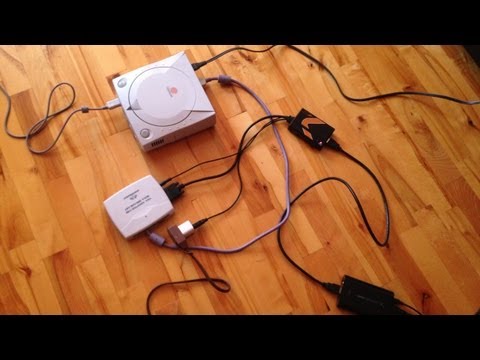
The Sega Dreamcast was a console ahead of its time, boasting impressive graphics for its era. The most common resolution for Dreamcast games was 640×480 (480p), but the system was capable of a range of resolutions depending on the game. Many games took advantage of this flexibility to deliver stunning visuals.
Understanding Dreamcast Resolution Capabilities
The Dreamcast’s hardware could output several different resolutions. While 480p was the standard, developers also utilized lower resolutions like 320×240 and 640×240, or even slightly higher resolutions. This versatility allowed for optimizing performance and visual fidelity based on the needs of each specific game. Some games even supported progressive scan output, enhancing clarity.
Beyond the Numbers: Visual Impact
While resolution is a key factor, it’s important to remember that the Dreamcast’s visual appeal stemmed from more than just pixel count. Its powerful (for the time) GPU, coupled with clever programming and artistic direction, allowed developers to create games that still look impressive today. The Dreamcast also used techniques like anti-aliasing to smooth out jagged edges, improving the overall visual quality.
Frequently Asked Questions (FAQs) About Dreamcast Resolutions
1. What is Progressive Scan and did the Dreamcast support it?
Progressive scan (480p) displays each line of the image sequentially, rather than interlacing even and odd lines separately. This results in a sharper, more stable image with less flickering. The Dreamcast did support progressive scan, but only some games were programmed to take advantage of it. Games like Soul Calibur and NFL 2K were known for their enhanced 480p support.
2. What cables are needed to get the best picture quality from a Dreamcast?
For the best picture quality, VGA cables were the preferred choice for Dreamcast owners. VGA cables output a true 480p signal, providing a significantly sharper and clearer image than composite or S-Video cables. Another good option is Component video cables, but these require additional adapters.
3. Why didn’t all Dreamcast games use 480p?
While 480p offered a superior visual experience, it came at the cost of performance. Running at a higher resolution demanded more processing power. Some games, especially those with complex environments or a large number of on-screen characters, needed to use lower resolutions to maintain a smooth and playable frame rate. It was a trade-off between visual fidelity and performance.
4. How can I tell if a Dreamcast game supports 480p?
Unfortunately, there isn’t a universal indicator on the game case or in the game’s menu. The easiest way to check is by consulting online resources, such as dedicated Dreamcast websites and forums, or by simply experimenting with your console’s video output settings and observing the results on your display.
5. Does resolution affect the gameplay of Dreamcast games?
While resolution primarily impacts visual clarity, it can indirectly affect gameplay. A lower resolution might result in a blurrier image, making it harder to spot details or react quickly in fast-paced games. Conversely, a higher resolution can improve visual clarity and potentially enhance the overall gameplay experience.
6. Did any Dreamcast games run in resolutions higher than 640×480?
While 640×480 was the practical maximum resolution due to hardware limitations and the standard for TVs at the time, a few games pushed the boundaries. There were techniques employed to effectively upscale the image, creating the impression of a higher resolution. However, true resolutions significantly exceeding 640×480 were not common.
7. How does the Dreamcast’s resolution compare to other consoles of its generation?
The Dreamcast’s resolution capabilities were generally on par with or slightly ahead of its competitors, such as the PlayStation and Nintendo 64. While the PlayStation 2 eventually surpassed the Dreamcast in terms of raw graphical power, the Dreamcast’s visual presentation was still impressive, especially considering its earlier release date.
8. What is the significance of anti-aliasing in Dreamcast games?
Anti-aliasing is a technique used to smooth out jagged edges, or “jaggies,” that can appear in video games, particularly at lower resolutions. The Dreamcast utilized anti-aliasing effectively, helping to create a more visually appealing and less pixelated image. This was especially crucial for enhancing the appearance of 3D models and environments.
9. Can I upscale Dreamcast games to higher resolutions on modern displays?
Yes, it’s possible to upscale Dreamcast games to higher resolutions using various methods. Some modern TVs have built-in upscaling capabilities, while dedicated upscalers like the RetroTINK or OSSC (Open Source Scan Converter) can provide even better results. These devices intelligently process the Dreamcast’s video signal to improve its appearance on high-resolution displays.
10. What factors besides resolution contribute to the visual quality of Dreamcast games?
Besides resolution, several other factors played a crucial role in the visual quality of Dreamcast games. These include:
- Texture quality: High-resolution textures add detail and realism to the game world.
- Lighting effects: Dynamic lighting and shadows create depth and atmosphere.
- Model complexity: Detailed 3D models enhance the visual fidelity of characters and objects.
- Artistic design: A cohesive and visually appealing art style can elevate the overall look of the game.
11. Are there any homebrew or fan-made patches that improve the resolution of Dreamcast games?
While not widespread, some dedicated fans and modders have created patches that improve the resolution or graphical quality of certain Dreamcast games. These patches typically require specific hardware modifications or emulators to run, and their availability varies depending on the game.
12. How does the Dreamcast handle different aspect ratios?
The Dreamcast primarily outputted in a 4:3 aspect ratio, which was the standard for televisions at the time. Some games offered options for widescreen display, but these were often letterboxed, meaning black bars were added to the top and bottom of the screen to maintain the original aspect ratio.
13. What role did the PowerVR2 GPU play in the Dreamcast’s resolution capabilities?
The PowerVR2 GPU was a key component of the Dreamcast’s hardware. It was responsible for rendering the graphics and outputting the video signal. Its capabilities directly influenced the resolutions that the console could support. The PowerVR2 was designed to efficiently handle 3D graphics and effects, allowing developers to push the boundaries of visual fidelity within the constraints of the available resolution.
14. How did developers optimize games for the Dreamcast’s hardware limitations?
Dreamcast developers used a variety of techniques to optimize their games for the console’s hardware limitations. These included:
- Level of Detail (LOD) scaling: Reducing the complexity of 3D models as they move further away from the camera.
- Texture compression: Reducing the size of textures without significantly impacting their visual quality.
- Efficient coding: Writing optimized code to minimize CPU and GPU usage.
- Strategic use of lighting and shadows: Employing lighting and shadows to create visual depth without overwhelming the hardware.
15. Why is the Dreamcast still visually appealing despite not having the highest resolution?
The Dreamcast’s lasting visual appeal stems from several factors beyond just resolution. Its distinctive art style, creative game design, and innovative use of graphical techniques like anti-aliasing contribute to its enduring charm. The console’s games often prioritized artistic vision and gameplay over raw graphical power, resulting in experiences that remain engaging and visually memorable. This emphasis on creativity over pure technical specs is why the Dreamcast continues to hold a special place in the hearts of gamers.