Villager Stockpiles Dwindling? A Minecraft Merchant’s Guide to Restocking
Fast answer first. Then use the tabs or video for more detail.
- Watch the video explanation below for a faster overview.
- Game mechanics may change with updates or patches.
- Use this block to get the short answer without scrolling the whole page.
- Read the FAQ section if the article has one.
- Use the table of contents to jump straight to the detailed section you need.
- Watch the video first, then skim the article for specifics.
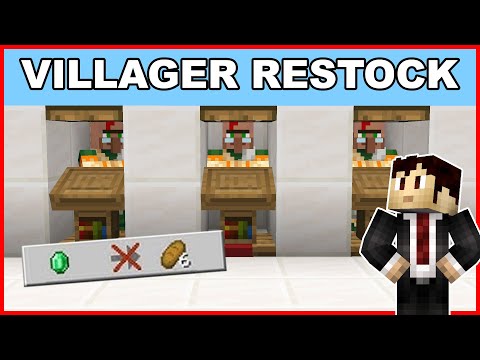
So, your villagers have run out of stock in Minecraft? Don’t panic! This is a common issue, and understanding the mechanics behind villager trading is key to keeping your emerald economy booming. The immediate answer is patience and proper setup. You’ll need to wait until they restock their trades. Make sure they have unobstructed access to their designated workstation and give them some time. Here’s a deeper dive into how the whole system works and how to keep your trades flowing smoothly.
Understanding Villager Trading and Restocking
Villager trading is a cornerstone of Minecraft’s gameplay. It allows players to acquire valuable items like enchanted books, ender pearls, and diamond gear in exchange for emeralds and other resources. However, villagers don’t have an unlimited supply of each trade. Each trade has a set number of uses before it becomes temporarily unavailable. This is where restocking comes in.
The core principle is simple: villagers need to work to replenish their stock. Each villager has a specific job site block that defines their profession (a lectern for a librarian, a smithing table for a toolsmith, etc.). Twice per in-game day, villagers will attempt to interact with their job site block. This interaction is what triggers the restocking process.
The exact timing of these restocks is determined by random ticks within specific time windows (usually during the day). This means you can’t precisely predict when a villager will restock, but you can ensure they have the opportunity to do so. If they can’t access or reach their workstation, there is a very low chance of them restocking.
Optimizing Your Villager Trading Hall
To maximize your villager trading efficiency and minimize restocking frustration, consider these strategies:
- Clear Access: Ensure each villager has a clear, unobstructed path to their job site block. This means no obstacles in the way, including blocks, other villagers, or even water. A simple 1x1x2 space is often sufficient.
- Workstation Placement: Place job site blocks strategically within your trading hall. This ensures that villagers can easily reach them, and also prevents other villagers from claiming them. Keep each villager and their job site near one another in individual cells.
- Time of Day: Villagers typically restock during their “workday,” which is generally during daylight hours. Make sure your trading hall is well-lit to encourage villager activity.
- Patience is Key: Restocking isn’t instantaneous. Allow villagers enough time to interact with their job site block after you’ve exhausted their trades. Don’t immediately assume something is wrong.
- Monitor Workstation Claims: Sometimes, a villager might mistakenly link to the wrong workstation. If you suspect this, break and replace the job site block near the intended villager to force them to relink.
- Avoid Over-Trading: Be mindful of how many times you trade with a villager consecutively. Over-trading can exhaust their stock and require a longer wait for restocking.
Troubleshooting Common Restocking Issues
Despite your best efforts, you might still encounter situations where villagers refuse to restock. Here are some common causes and solutions:
- Workstation Blocked: Double-check that the villager can physically reach their workstation. Even a single block obstructing their path can prevent restocking.
- Incorrect Workstation: Verify that the villager is connected to the correct type of job site block for their profession.
- Mob Griefing: In Bedrock Edition, certain mobs like zombies can break doors and potentially disrupt villager setups. Ensure your trading hall is adequately protected.
- Too Many Trades: Villagers have a limited number of trades available before they need to restock. Avoid excessively trading with the same villager without allowing them time to work.
- Game Bugs: While rare, game bugs can sometimes interfere with villager behavior. Try restarting your game or updating to the latest version.
- Cured Villagers Not Restocking: Some players have reported issues with cured villagers not restocking. This might be a bug. Try breaking and replacing their workstation to see if that solves the problem.
- Bedrock Edition Quirks: Villager mechanics can sometimes differ slightly between Java and Bedrock Editions. Be aware of any specific quirks or known bugs in the version you’re playing.
Frequently Asked Questions (FAQs)
Here are some common questions players have about villager restocking in Minecraft:
1. How many times can I trade with a villager before they run out of stock?
In Java Edition, villagers can have a maximum of 10 trades per level. In Bedrock Edition, they have 7-10 trade slots. Once those trades are exhausted, they need to restock.
2. Do villagers need to sleep to restock?
No, villagers do not need to sleep to restock. All they need is access to their workstation. Sleeping is only relevant for breeding and certain village mechanics.
3. How long does it take for a villager to restock?
Villagers typically restock twice per in-game day. The specific times are determined by random ticks, but it usually happens during their workday (daylight hours).
4. What happens if a villager can’t reach their workstation?
If a villager cannot reach their workstation, they will not be able to restock their trades. This is a crucial aspect to consider when building your trading hall.
5. Can villagers permanently run out of stock?
No, villagers cannot permanently run out of stock. They will always restock eventually, provided they have access to their workstation and the appropriate time passes.
6. Why won’t my librarian villager restock?
Possible reasons include: the villager cannot reach their lectern, the lectern has been removed, or another villager has claimed the same lectern. Try breaking and replacing the lectern near the librarian.
7. Do villagers raise prices if I hit them?
Yes, hitting a villager will increase their prices slightly. This affects all trades with that villager and can even influence prices in the entire village. Avoid harming villagers.
8. How can I reset a villager’s profession?
To reset a villager’s profession, break their current job site block. After a short time, they will lose their profession. Then, place a different job site block nearby, and they will adopt a new profession (if they haven’t already locked in their trades).
9. What fills a villager’s inventory?
Villagers can become willing to breed by having either 3 bread, 12 carrots, 12 potatoes, or 12 beetroots in one inventory slot. These items are related to villager breeding, not trading directly.
10. Can cured zombie villagers restock?
There have been reports of cured zombie villagers not restocking properly. This may be a bug in certain versions of the game. Try breaking and replacing their workstation or restarting your game.
11. What’s the best way to organize my villager trading hall?
Create individual cells for each villager with clear access to their specific workstation. This prevents them from claiming the wrong workstation and makes troubleshooting easier.
12. Do villagers need beds to restock?
No, villagers do not need beds to restock. Beds are essential for breeding and iron golem spawning, but not for trading.
13. How does the time of day affect villager restocking?
Villagers typically restock during their “workday,” which is generally daylight hours. Make sure your trading hall is well-lit to encourage villager activity.
14. Is there a difference in villager restocking between Java and Bedrock Editions?
While the core mechanics are similar, there can be slight differences in villager behavior between Java and Bedrock Editions. Be aware of any known bugs or quirks in the version you’re playing.
15. Where can I learn more about game-based learning and educational initiatives in gaming?
You can explore valuable resources and information about game-based learning on the GamesLearningSociety.org website. The Games Learning Society explores the connections between gaming and education.
By understanding the mechanics behind villager trading and following these tips, you can ensure a consistent supply of valuable goods in your Minecraft world. Remember that patience and proper setup are key to a thriving villager economy.