What Type of Cord Does Xbox Use? A Comprehensive Guide
Fast answer first. Then use the tabs or video for more detail.
- Watch the video explanation below for a faster overview.
- Game mechanics may change with updates or patches.
- Use this block to get the short answer without scrolling the whole page.
- Read the FAQ section if the article has one.
- Use the table of contents to jump straight to the detailed section you need.
- Watch the video first, then skim the article for specifics.
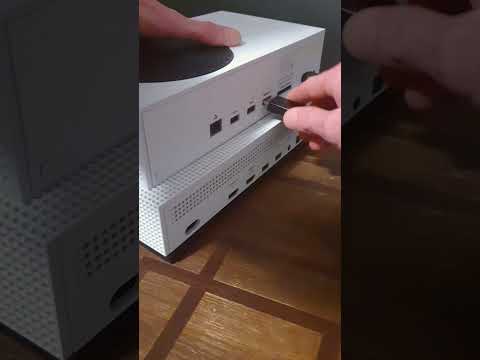
The question of what type of cord an Xbox uses isn’t as simple as it might seem. Depending on the model and the purpose, different cords are required. Let’s break it down: Xbox consoles primarily use HDMI cables for video output, various power cords depending on the model, and USB cables for controller charging and peripherals. The specific types of these cords can vary significantly between different Xbox generations and even models within those generations. In this article, we will delve into the specifics of each type of cord and answer some frequently asked questions to ensure you have a clear understanding of your Xbox’s connectivity needs.
Understanding Xbox Power Cords
The power cords for Xbox consoles are not universal. Microsoft has used different designs and specifications across various models, mainly due to internal vs. external power supply considerations.
Xbox One Power Cords
The original Xbox One console uses an external power brick with a proprietary connector. This means it requires a specific power cord to connect to the brick and then a separate cord from the brick to the wall outlet. The Xbox One S, however, features an internal power supply. This model uses a standard 2-slot, 18 AWG x 2C, 125V 10A power cord. This is a fairly common type of power cord, making it easier to find replacements if needed. Keep in mind, though, that despite the similarity, the Xbox One S power cord is not compatible with the original Xbox One.
Xbox Series X|S Power Cords
Both the Xbox Series X and Xbox Series S consoles have internal power supplies. They use a standard 2-prong power cord, very similar in design to the Xbox One S cord. It’s crucial to note that while many power cords might fit the socket, the specifications of these cords need to align with the console’s power requirements to ensure safe and efficient operation. Always check the ratings for voltage and amperage to prevent issues.
Key Differences in Power Cords
The significant difference in power cords comes down to whether the Xbox model features an internal or external power supply. Older Xbox One models rely on bulky external power bricks and proprietary connections, while newer models, including the One S and the Series X|S, have moved to simpler, internal power systems with detachable 2-prong cords.
HDMI Cables for Display
The HDMI (High-Definition Multimedia Interface) cable is the essential cord for connecting your Xbox to your TV, monitor, or other display device. It transmits both audio and video signals in digital format.
What HDMI Cable Comes with Xbox Consoles?
Most Xbox consoles, including the Xbox Series X|S, come packaged with an Ultra High Speed HDMI cable. This cable is designed to handle high-resolution and high refresh rate signals, including 4K at 120Hz.
Can You Use Any HDMI Cable?
While an Ultra High Speed HDMI cable is recommended for optimal performance, especially for the Series X and high-end setups, you can generally use any standard HDMI cable for less demanding settings such as 1080p. However, older or lower-quality HDMI cables might not support all the features your console and display offer, potentially resulting in reduced picture quality and refresh rate. For the best experience, especially with newer consoles, using the provided cable or a comparable quality cable is highly advisable.
USB Cables for Controllers and Peripherals
USB cables are crucial for connecting Xbox controllers and other peripherals to your console. USB technology has evolved, with different versions affecting the functionality and charging speeds.
USB Type for Xbox Controllers
Modern Xbox controllers, specifically the Xbox Series X/S controllers, use USB-C ports for charging and wired connections. Older Xbox One controllers utilize Micro USB for the same purpose.
USB-C Cable Considerations
The great news is, for charging and wired gaming, most standard USB-C cables will work with the Xbox Series X|S controller. However, ensure it’s rated as “Charge & Sync” for full functionality. There is often no practical need to use a branded Microsoft cable as any rated cable will provide the same functionality.
Xbox USB Ports
The Xbox consoles also feature USB Type-A ports that are useful for external storage, wired keyboards, and other compatible devices. It’s essential to use a USB 3.0 or higher compliant cable for storage devices to ensure optimal transfer speeds.
Controller Connectivity Methods
Controllers can connect to the Xbox consoles wirelessly or via a USB cable. For wired play, both Micro USB and USB-C cables can be used, depending on your controller type. Wireless connectivity for your controller typically is done using Xbox Wireless technology.
Frequently Asked Questions (FAQs)
1. Do all Xbox consoles use the same power cord?
No, different Xbox consoles use different power cords. The original Xbox One has an external power supply with a proprietary connector, while the Xbox One S, Xbox Series X, and Xbox Series S use different types of 2-prong power cords designed for their internal power supplies.
2. Can I use an Xbox One S power cord on an Xbox Series X?
No, while they both have internal power supplies, they use different connectors and are not interchangeable. Use only the power cord specifically designed for your console.
3. What type of HDMI cable do I need for my Xbox Series X?
The Xbox Series X works best with an Ultra High Speed HDMI cable, which supports features like 4K resolution at 120Hz and HDR. However, a standard HDMI cable will work for basic 1080p signals.
4. Does the Xbox Series S come with an HDMI cable?
Yes, the Xbox Series S comes with an Ultra High Speed HDMI cable.
5. Can I use any USB-C cable for my Xbox Series X/S controller?
Yes, most standard USB-C cables that are rated for “Charge & Sync” will work with the Xbox Series X/S controller.
6. What type of USB cable does the Xbox One controller use?
The Xbox One controller uses a Micro USB cable for charging and wired connections.
7. Can I use an Xbox One controller with an Xbox Series X/S?
Yes, but you may need to update your controller’s firmware.
8. Can any USB drive be used for external storage on Xbox?
No, it needs to be at least a USB 3.0 compliant drive to ensure optimal transfer speeds. Older USB drives might only work for media playback.
9. What if my Xbox One power supply is blinking or off?
A blinking or off LED on the external power supply of an original Xbox One could indicate a faulty power supply that needs replacing.
10. What does USB A look like?
USB Type-A is the rectangular port found on many devices for connecting peripherals.
11. What does a USB-C charger look like?
A USB-C connector is oval-shaped and thicker than a micro USB. It has no up or down orientation, allowing it to be plugged in either way.
12. What is the length of the USB-C cable included with Xbox Series X/S controllers?
The included USB-C cable is typically 9 feet long.
13. What is the difference between Xbox One and Xbox One S?
The Xbox One S is slimmer and has an internal power supply, unlike the original Xbox One, which is larger and has an external power brick. The ‘S’ stands for ‘slim’.
14. Why does my Xbox not turn on?
Common reasons include hardware, software, and power supply issues. Check the power connections, try another outlet, and ensure the console’s power supply is working correctly.
15. Can I use a USB hub with my Xbox?
You can use a USB hub to connect multiple peripherals, but using a powered hub can be beneficial if devices demand more power.