Level Up Your Game: Choosing the Best External Hard Drive for Gaming
Fast answer first. Then use the tabs or video for more detail.
- Watch the video explanation below for a faster overview.
- Game mechanics may change with updates or patches.
- Use this block to get the short answer without scrolling the whole page.
- Read the FAQ section if the article has one.
- Use the table of contents to jump straight to the detailed section you need.
- Watch the video first, then skim the article for specifics.
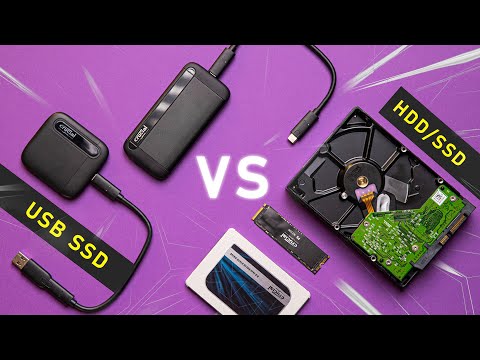
So, you’re looking to expand your gaming horizons and need more storage? Excellent! But wading through the sea of external hard drives can be daunting. Let’s cut right to the chase: For gaming, an external Solid State Drive (SSD) is unequivocally the best choice. While external Hard Disk Drives (HDDs) might seem tempting due to their lower price per gigabyte, the performance advantages of an SSD provide a significantly better gaming experience. We are talking faster load times, smoother gameplay, and a general boost in responsiveness.
Why SSDs Reign Supreme for Gaming
The core difference lies in how these drives store and access data. HDDs use spinning platters and a moving read/write head, which is inherently slower. SSDs, on the other hand, use NAND flash memory, an advanced technology that allows for near-instantaneous data access. This difference translates directly to your gaming experience in several ways:
- Reduced Loading Times: Say goodbye to staring at loading screens for what feels like an eternity. SSDs dramatically reduce the time it takes to load games, levels, and textures.
- Smoother Gameplay: Games that constantly stream data from storage, like open-world titles, will benefit enormously from the faster read speeds of an SSD. This translates to fewer stutters, smoother frame rates, and a more immersive experience.
- Improved Responsiveness: Even in less demanding games, an SSD can improve the overall responsiveness of your system. Menus load faster, actions are more immediate, and the entire experience feels snappier.
While you can technically play games from an external HDD, especially older or less demanding titles, be prepared for noticeably longer loading times and potential performance dips. For modern games, particularly those designed for the latest consoles and PCs, an external SSD is the only way to ensure an optimal gaming experience.
Key Considerations When Choosing an External SSD for Gaming
Okay, so an SSD is the way to go. But with so many options on the market, how do you choose the right one? Here are the critical factors to consider:
Interface and Speed
The interface determines how quickly data can be transferred between the SSD and your device. Look for SSDs that use USB 3.2 Gen 2 or Thunderbolt 3/4. These interfaces offer significantly faster transfer speeds than older USB standards.
- USB 3.2 Gen 2: Offers transfer speeds of up to 10Gbps (Gigabits per second).
- Thunderbolt 3/4: Offers transfer speeds of up to 40Gbps, making it ideal for demanding games and tasks.
While USB 3.1 Gen 1 (also known as USB 3.0) will work, it’s considerably slower at 5Gbps. Pay close attention to the specifications when shopping! Look for the read/write speeds specified by the manufacturer. Higher numbers mean faster performance. A good external SSD for gaming should have read/write speeds of at least 500MB/s (Megabytes per second), but ideally, you want something closer to 1000MB/s or higher to see a significant improvement.
Storage Capacity
How much storage do you need? That depends on the size of your game library and the types of games you play. Modern AAA titles can easily exceed 50GB, and some even push past 100GB.
- 500GB: A good starting point if you only plan to store a few games or focus on smaller, indie titles.
- 1TB: The sweet spot for most gamers, offering enough space for a decent-sized library of modern games.
- 2TB or Larger: If you have a large game collection or plan to download a lot of games, a 2TB or larger drive might be necessary.
Remember, it’s always better to have a little extra space than to run out.
Durability and Portability
Since it’s an external drive, durability is a factor. Look for SSDs with a rugged design and shock-resistant construction. Some models even come with IP ratings for water and dust resistance. Portability is also important. Consider the size and weight of the drive, especially if you plan to travel with it.
Price
SSDs are generally more expensive than HDDs, but the price gap has narrowed in recent years. Shop around and compare prices from different retailers to find the best deal. Keep in mind that you often get what you pay for. Cheaper SSDs may use lower-quality components or have slower speeds.
Beyond Storage: Optimizing Your Gaming Experience
Investing in a great external SSD is a good start, but here are a few extra tips to further optimize your gaming experience:
- Defragmentation: While SSDs don’t need defragmentation in the same way as HDDs, it’s still a good idea to occasionally run a TRIM command to optimize performance. Most operating systems do this automatically.
- Keep Drivers Updated: Make sure your USB drivers are up to date to ensure optimal performance.
- Close Unnecessary Programs: Close any unnecessary programs or processes running in the background to free up system resources for gaming.
- Consider RAM: Although we are discussing external hard drives for gaming here, remember that the amount of RAM in your computer is also important. 16GB of RAM is recommended for most modern games.
- Explore Learning Games: Once you’ve optimized your storage, why not explore games that can help you learn? The Games Learning Society at https://www.gameslearningsociety.org/ researches and promotes the use of games for educational purposes. Check out GamesLearningSociety.org for more information!
FAQs: Your Burning Questions About External Hard Drives and Gaming Answered
Here are some common questions about using external hard drives for gaming:
1. Can I install and play games directly from an external hard drive?
Yes, you can! That’s the whole point. However, the performance will depend on the type of drive (SSD or HDD) and the interface it uses.
2. Will games run slower on an external hard drive compared to an internal drive?
Potentially, yes. However, with a fast external SSD using USB 3.2 Gen 2 or Thunderbolt, the difference will be minimal and often unnoticeable.
3. Is it safe to play games from an external SSD?
Absolutely! As long as you properly eject the drive before disconnecting it, there’s no risk of data loss or damage.
4. What happens if I disconnect the external hard drive while a game is running?
The game will likely crash, and you may lose unsaved progress. Always save your game and properly eject the drive before disconnecting it.
5. Can I use any external hard drive for gaming, or are there specific models designed for gaming?
While any external hard drive will technically work, some models are specifically marketed for gaming and may offer features like faster speeds, rugged designs, and larger storage capacities.
6. How much storage space do I need on an external hard drive for gaming?
That depends on your game library. 1TB is a good starting point for most gamers, but you may need more if you have a large collection of games or plan to download a lot of new titles.
7. What’s the difference between an external SSD and an external HDD for gaming?
SSDs offer significantly faster speeds, resulting in shorter loading times, smoother gameplay, and improved responsiveness. HDDs are cheaper but much slower.
8. Does the USB port on my computer affect the performance of the external hard drive?
Yes! Use a USB 3.2 Gen 2 or Thunderbolt port for optimal performance. Older USB ports will bottleneck the drive.
9. Can I use an external hard drive to store games for my Xbox or PlayStation console?
Yes, both Xbox and PlayStation consoles support external storage for games. However, there may be limitations on which games can be played directly from the external drive (e.g., PS5 games can be stored, but not played).
10. How do I optimize an external hard drive for gaming?
Ensure you’re using a fast interface (USB 3.2 Gen 2 or Thunderbolt), keep your drivers updated, and occasionally run a TRIM command to optimize performance.
11. Can I use an external hard drive to back up my game saves?
Yes, you should definitely back up your game saves regularly to prevent data loss.
12. What’s the lifespan of an external SSD?
SSDs have a limited number of write cycles, but modern SSDs are very durable and should last for many years with normal use.
13. Does the brand of the external hard drive matter?
Reputable brands generally offer better quality and reliability. Research different brands and read reviews before making a purchase.
14. Can I use multiple external hard drives for gaming?
Yes, you can! This is a great way to expand your storage capacity even further.
15. Is it worth the extra cost to get an external SSD for gaming?
Absolutely! The performance benefits are well worth the investment, especially if you play modern, demanding games.
In conclusion, choosing the right external hard drive can significantly enhance your gaming experience. By prioritizing an external SSD with a fast interface and sufficient storage capacity, you’ll be well on your way to enjoying smoother gameplay, faster loading times, and a more immersive gaming experience overall. Happy gaming!