Where Can I Take My Xbox Controller to Get Fixed?
Fast answer first. Then use the tabs or video for more detail.
- Watch the video explanation below for a faster overview.
- Game mechanics may change with updates or patches.
- Use this block to get the short answer without scrolling the whole page.
- Read the FAQ section if the article has one.
- Use the table of contents to jump straight to the detailed section you need.
- Watch the video first, then skim the article for specifics.
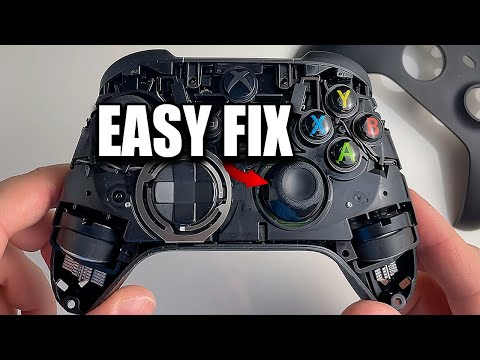
So, your trusty Xbox controller has betrayed you. Maybe it’s drifting, maybe a button is stubbornly sticking, or perhaps it’s simply given up the ghost entirely. Don’t despair! Getting your Xbox controller fixed is often easier and cheaper than buying a brand new one. You have several options, ranging from official services to third-party repair shops, and even a bit of DIY if you’re feeling brave. Here’s a comprehensive guide to where you can take your Xbox controller to get fixed, along with some essential information you should know.
Options for Xbox Controller Repair
Here’s a breakdown of the most common places to get your Xbox controller repaired:
-
Microsoft’s Official Repair Service: This is often the first place to start, especially if your controller is still under warranty. Microsoft offers repair and replacement services for controllers within the warranty period. You can check your controller’s warranty status on the Microsoft website. If it’s covered, the repair or replacement is free. If not, you’ll be charged a fee. Keep in mind that this often involves sending your controller in, meaning you’ll be without it for a few weeks.
-
Asurion/uBreakiFix: These stores are authorized repair centers that can fix a wide range of electronics, including Xbox controllers. They offer walk-in services, allowing you to get a diagnosis and repair quote quickly. They often handle non-warranty repairs on a case-by-case basis.
-
Best Buy Service Centers: Best Buy provides a one-stop-shop for technology needs, including in and out-of-warranty support for Microsoft accessories. They can often diagnose and repair Xbox controllers, providing another convenient option.
-
Local Electronics Repair Shops: Don’t underestimate the value of local repair shops! Many independent electronics repair businesses have skilled technicians who can fix controllers for a reasonable price. Search online for “electronics repair near me” and inquire about their experience with Xbox controllers.
-
DIY Repair: If you’re technically inclined and comfortable with disassembling electronics, you can attempt to repair your controller yourself. There are numerous online tutorials and videos demonstrating common controller repairs. You’ll need to purchase the necessary tools and replacement parts.
Factors to Consider When Choosing a Repair Option
Before you choose a repair option, consider these factors:
- Warranty Status: Is your controller still under warranty? If so, Microsoft’s official service is likely your best bet.
- Cost: Get quotes from multiple repair shops to compare prices. DIY repairs can be cheaper if you have the tools already, but factor in the cost of replacement parts.
- Turnaround Time: How long can you live without your controller? Microsoft’s service can take several weeks, while local repair shops might offer same-day or next-day service.
- Convenience: Do you prefer to drop off your controller at a local store, or are you comfortable shipping it to a service center?
- Repair Expertise: Does the repair shop have experience with Xbox controllers? Ask about their qualifications and guarantees.
Diving Deeper: Common Xbox Controller Problems and Their Solutions
Understanding common Xbox controller problems can help you diagnose the issue and choose the right repair option. Here are some frequent culprits:
- Stick Drift: This is a common problem where the analog sticks move on their own, even when you’re not touching them.
- Button Sticking: Buttons may become unresponsive or stick in the pressed position.
- Broken Bumpers/Triggers: The shoulder buttons (LB/RB) and triggers (LT/RT) can break due to wear and tear.
- Connectivity Issues: The controller may not connect to the Xbox console or PC.
- Power Problems: The controller may not turn on or may drain batteries quickly.
The DIY Route
If you’re feeling adventurous, DIY repair can be a rewarding (and potentially money-saving) option. Here’s what you’ll need:
- Repair Tools: A precision screwdriver set, plastic opening tools (spudgers), and tweezers are essential.
- Replacement Parts: You can purchase replacement analog sticks, buttons, bumpers, and other parts online.
- Online Tutorials: YouTube is your friend! Search for tutorials specific to your controller model and the problem you’re facing.
- Patience: DIY repair can be tricky, so take your time and be careful not to damage the controller further.
Frequently Asked Questions (FAQs)
Here are 15 FAQs to help you navigate the world of Xbox controller repair:
-
How much does it cost to get an Xbox controller fixed? Costs vary depending on the repair shop, the type of repair, and whether your controller is under warranty. Non-warranty repairs can range from $20 to $85.
-
Can I take my Xbox controller to Best Buy to get fixed? Yes, Best Buy Service Centers offer repair services for Xbox controllers, including both in-warranty and out-of-warranty repairs.
-
Does Microsoft repair controllers for free? If the controller is still under warranty, the repair/replacement is free. Otherwise, there will be a fee.
-
Where else can I bring my Xbox controller to get it fixed besides Asurion/uBreakiFix, or Best Buy? Consider local electronics repair shops. Search online for “electronics repair near me” and inquire about their experience with Xbox controllers.
-
How do I fix trigger and bumper buttons on my Xbox controller? Online tutorials are your best bet. Search for videos demonstrating how to replace broken bumpers and triggers on your specific controller model.
-
Does Xbox do free repairs? Repairs are free if your controller is under warranty. Check your device’s warranty status on the Microsoft website.
-
How do I fix my Xbox controller from drifting? Try cleaning the analog sticks with compressed air. If that doesn’t work, you may need to replace the analog stick module. You can also try increasing the deadzone in the configuration menu.
-
Does GameStop repair controllers? No, GameStop does not offer controller repair services.
-
How long does it take Microsoft to fix an Xbox controller? The average turnaround time for Microsoft’s repair service is 14 to 21 days, including shipping time.
-
Does Best Buy fix controller drift? Best Buy’s Geek Squad Protection often covers stick drift. Check with your local Best Buy for details.
-
How long is an Xbox controller warranty? Standard Xbox controllers typically have a 90-day warranty. Extended warranties may be available.
-
Do Xbox controllers come with warranty? Yes, new Xbox controllers come with a limited warranty.
-
How long do Xbox controllers usually last? With proper care, an Xbox controller can last for several years. However, heavy use can shorten its lifespan. Microsoft estimates that this gives the controller more than 10 years of life.
-
How do I know if my Xbox controller is dying? Signs of a dying controller include unresponsive buttons, stick drift, connectivity issues, and power problems.
-
Does Xbox controller warranty cover stick drift? Yes, stick drift is typically covered under the standard Xbox controller warranty.
Remember to always prioritize safety when working with electronics. Unplug the controller from any power source before attempting any repairs, and wear appropriate safety gear if necessary.
The world of gaming is always evolving, and staying up-to-date with the latest technology and learning trends is crucial. The Games Learning Society (GamesLearningSociety.org) explores how games can be used for learning and innovation. Check out the Games Learning Society to learn how gaming impacts education and society.