Diving Deep: Which Games Feature Discord Rich Presence?
Fast answer first. Then use the tabs or video for more detail.
- Watch the video explanation below for a faster overview.
- Game mechanics may change with updates or patches.
- Use this block to get the short answer without scrolling the whole page.
- Read the FAQ section if the article has one.
- Use the table of contents to jump straight to the detailed section you need.
- Watch the video first, then skim the article for specifics.
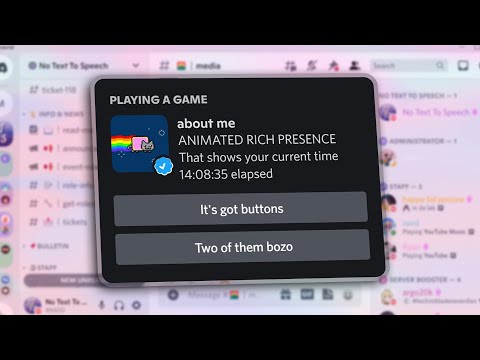
Discord’s Rich Presence feature is a fantastic way for players to showcase what they’re doing in a game directly on their Discord profile. It provides friends with in-depth, real-time information about your gaming activity, from the specific game mode you’re in to how long you’ve been playing. While not every game supports this feature, a growing number do. The games that natively support rich presence are:
- Call of Duty: WWII
- Divinity: Original Sin 2
- Payday 2
- Battlerite
- Duelyst
- SpeedRunners
- Tooth & Tail
- Foxhole
It’s important to note that the list can change as developers update their games and integrate Discord’s SDK (Software Development Kit). Moreover, some launchers, like the EA App, implement Rich Presence at a launcher level, extending the feature to multiple games published through that platform, as mentioned previously.
Understanding Discord Rich Presence
Discord Rich Presence is a powerful tool that goes beyond simply showing that you’re “Playing Minecraft.” It’s a dynamic display of information that game developers can customize. This means that instead of just seeing “Playing [Game Title]”, your friends might see “Playing [Game Title] – Level 15 – Exploring Dungeon X” or “Playing [Game Title] – In Match – 3 Minutes Remaining.” This level of detail adds a new dimension to how you connect and share your gaming experiences with your friends.
How Rich Presence Works
Rich Presence works through the use of the Discord SDK. Developers integrate this SDK into their games, allowing the game to communicate information directly to Discord. This communication is what enables the rich, detailed status updates that are displayed on your profile. The information sent can be anything from the current game mode to the player’s current level or even the specific activity they are engaged in.
The Benefits of Rich Presence
For players, Rich Presence offers a way to share their gaming experiences in a more engaging and informative way. It allows friends to see exactly what you’re doing and can spark conversations and encourage them to join you. For developers, it can increase engagement with their game and drive community building.
FAQs: Discord Rich Presence – Everything You Need to Know
Here are some frequently asked questions to help you understand Discord Rich Presence better:
1. How Do I Check If a Game Supports Rich Presence?
There’s no definitive list constantly updated by Discord. The best way to check is often through community forums, the game’s official website, or by simply observing your friends’ Discord statuses while they are playing the game. If you see detailed information beyond just the game title, it’s likely that the game supports Rich Presence.
2. How Can I Add Rich Presence to My Game?
To add Rich Presence to your game, you’ll need to create an application on the Discord Developer Portal and integrate the Discord SDK into your game’s code. You’ll need the Client ID from the application to initialize the SDK. The Discord Developer documentation provides detailed instructions and resources.
3. Is It Safe to Use Custom Rich Presence Tools?
Using custom Rich Presence tools can be risky. While some tools are safe and well-vetted, others may contain malware or violate Discord’s Terms of Service. It’s crucial to research any tool before using it and ensure it comes from a reputable source. An example cited in the text, custom-discord-rp, was deemed safe to use.
4. How Do I Disable Rich Presence on Discord?
You can disable Rich Presence by going to Discord Settings > Activity Privacy and toggling off the “Display current activity as a status message” option. This will prevent Discord from showing what game you’re playing.
5. How Do I Make Sure My Gaming Status is Visible on Discord?
To ensure your gaming status is visible, open Discord Settings, navigate to Activity Settings, and check the “Display current activity as a status message” box. Also, make sure the game you’re playing is detected. If it isn’t, click “Add it” and select the game’s executable.
6. What Are the Requirements for Discord Verification?
Discord verification is typically reserved for game developers, game publishers, professional esports teams, and verified musical artists on platforms like Spotify. You must be the server owner and an official representative of the group or individual.
7. Does Discord Verify Bots?
Yes, Discord requires verification for bots in 100 or more servers. This is to protect user privacy and security within the Discord ecosystem.
8. Can Discord See All the Games I Play?
Discord only displays your gaming activity if the game supports Rich Presence and if you have enabled activity status sharing in your Discord settings. Discord does not automatically track all games you play.
9. Can I Link My EA Account to Discord for Rich Presence?
Yes, linking your EA Account to Discord through the EA App enables Rich Presence for EA games. This provides a more detailed view of your in-game activity, such as your current status, game mode, and more.
10. How Does Discord Decide Who Needs Account Verification?
Discord might prompt you to verify your account if you’ve joined multiple servers in a short period, direct messaged multiple users who aren’t your friends, or if a server you’re trying to join requires verified accounts. This is a security measure to prevent spam and abuse.
11. How Do I Get VIP Status on a Discord Server?
VIP status varies depending on the server. Some servers offer VIP status to subscribers of specific services, while others grant it to active community members or contributors. Check the server’s rules or contact a moderator for information on how to obtain VIP status.
12. How Do I Get a Blue Check Mark on My Discord Server?
A blue check mark on Discord signifies that the server is verified. To get verified, you must be the server owner and an official representative of a business, brand, or public figure. You’ll also need to authenticate other relevant social media accounts to verify your identity.
13. Can Discord Detect Mobile Games I’m Playing?
Discord’s Android app is testing a feature that can detect mobile games you’re playing. This feature requires usage access to monitor your activity. This is an experimental feature that users can enable.
14. What Does “Idle” Status Mean on Discord?
An “Idle” status on Discord indicates that you have not interacted with Discord for a few minutes, similar to being “AFK” (Away From Keyboard).
15. What is the “Active Now” Panel on Discord?
The “Active Now” panel on the right side of your friends list displays friends who are currently playing games and have activity status enabled. It shows the game they’re playing and how long they’ve been playing it.
Enriching the Gaming Experience
Discord Rich Presence adds a valuable layer of engagement and connectivity to the gaming experience. By integrating the Discord SDK, developers can create a more immersive and social experience for their players, fostering stronger communities and driving engagement.
By understanding how Rich Presence works, players can also customize their experience and control what information they share. Whether you’re a developer looking to integrate Rich Presence into your game or a player wanting to learn more about the feature, this guide provides valuable information to help you get the most out of Discord’s Rich Presence. As games continue to evolve and integrate with social platforms, features like Rich Presence will become increasingly important for fostering vibrant and connected gaming communities.
The Games Learning Society continues to study the intersection of games and social interaction, providing valuable insights into how these technologies can be used to enhance the gaming experience. Explore their research at GamesLearningSociety.org.