Unveiling the Mystery: Who Verifies Games for Steam Deck?
Fast answer first. Then use the tabs or video for more detail.
- Watch the video explanation below for a faster overview.
- Game mechanics may change with updates or patches.
- Use this block to get the short answer without scrolling the whole page.
- Read the FAQ section if the article has one.
- Use the table of contents to jump straight to the detailed section you need.
- Watch the video first, then skim the article for specifics.
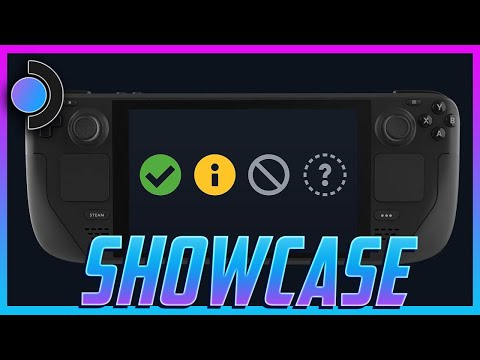
The burning question on every Steam Deck enthusiast’s mind: who exactly is behind the curtain, deciding which games get that coveted “Verified” badge? The short and direct answer is Valve, the creators of Steam and the Steam Deck itself, undertakes the rigorous process of verifying games for their handheld gaming PC. They have a dedicated team that meticulously tests games to ensure they meet specific criteria for optimal performance and user experience on the Steam Deck.
Diving Deeper into the Verification Process
Valve doesn’t just slap a “Verified” sticker on any random game. There’s a well-defined process and set of requirements a game must meet to earn its place in the Steam Deck’s hall of fame. This process is essential for maintaining the high standards Valve has set for its handheld device, ensuring that players have a seamless and enjoyable experience.
Here’s a breakdown of what Valve looks for during the verification process:
- Input Compatibility: Can the game be played comfortably using the Steam Deck’s built-in controls (trackpads, buttons, touchscreen)? Does the game automatically recognize and adapt to these inputs?
- Display Compatibility: Does the game display correctly on the Steam Deck’s screen? Are there any scaling issues, text legibility problems, or other visual glitches?
- Performance: Does the game run smoothly and maintain a playable frame rate on the Steam Deck’s hardware? Valve has certain performance benchmarks that games need to meet.
- System Defaults: Can the game be launched and played without requiring the user to manually adjust settings or delve into complex configurations?
- Seamless Experience: Does the game provide a generally hassle-free experience from start to finish, with no major crashes, freezes, or other game-breaking issues?
Games that meet all of these criteria are awarded the “Verified” badge, signaling to Steam Deck owners that they can expect a top-tier gaming experience. Games that function but might require tinkering with settings, or have minor issues, are often marked as “Playable.” And, of course, some games are simply “Unsupported” due to various compatibility or technical limitations.
The Importance of Community Feedback
While Valve’s internal testing is crucial, the community also plays a significant role in shaping the Steam Deck gaming experience. Through platforms like ProtonDB, players can share their experiences with running various games on the Steam Deck, providing valuable insights and feedback to both Valve and other users. This community-driven approach helps to identify potential issues and improve compatibility over time. You can even contribute your own experiences! This collaborative effort ensures that the Steam Deck’s game library continues to grow and improve. For more information about the fascinating intersection of games and learning, check out the Games Learning Society at https://www.gameslearningsociety.org/.
Why Verification Matters
The “Verified” system isn’t just about slapping a label on games. It’s about providing Steam Deck owners with a clear and reliable guide to the quality of their gaming experience. By knowing which games are officially supported, players can make informed decisions about what to play, minimizing frustration and maximizing enjoyment.
FAQs: Your Burning Steam Deck Verification Questions Answered
1. What happens if a game isn’t “Verified” but is listed as “Playable”?
“Playable” means that Valve has tested the game and found that it functions on the Steam Deck, but it might require some user intervention. This could include manually adjusting graphics settings, using the touchscreen for certain actions, or dealing with minor visual glitches. While the game is technically playable, the experience might not be as smooth or seamless as a “Verified” title.
2. Can I still play “Unsupported” games on my Steam Deck?
While Valve designates certain titles as “Unsupported,” that doesn’t necessarily mean they’re completely unplayable. Many users have found workarounds and tweaks to get unsupported games running on their Steam Decks. However, keep in mind that the performance and stability of these games may vary significantly, and you might encounter unexpected issues.
3. How often does Valve update the verification status of games?
Valve is constantly testing and re-evaluating games for Steam Deck compatibility. The verification status of a game can change over time as Valve releases updates to the Steam Deck’s operating system or as game developers release patches that improve compatibility. It’s always a good idea to check the Steam store page for the latest verification information.
4. Does the “Verified” status guarantee a perfect gaming experience?
While the “Verified” badge indicates that a game has met Valve’s standards for optimal performance and compatibility, it doesn’t guarantee a flawless experience. You might still encounter minor bugs or glitches, depending on the specific game. However, a “Verified” game is generally considered to be the most reliable and enjoyable option for Steam Deck owners.
5. What is Proton and how does it relate to Steam Deck verification?
Proton is a compatibility layer that allows Windows-based games to run on Linux-based operating systems like the one used by the Steam Deck. Valve actively develops and maintains Proton, continuously improving its ability to run a wider range of games. The Steam Deck’s verification process heavily relies on Proton’s capabilities. ProtonDB is an amazing source of community driven data about how well games run using Proton.
6. How can I check the verification status of a game in my Steam library?
When viewing your Steam library on the Steam Deck, each game will display a compatibility rating icon. A green checkmark indicates a “Verified” game, a yellow “i” indicates “Playable”, a grey question mark means “Untested,” and a crossed-out circle means “Unsupported.” You can also filter your library by compatibility rating to easily find games that are verified for the Steam Deck.
7. Do all new games automatically get tested for Steam Deck verification?
Valve aims to test as many games as possible, including new releases. However, due to the sheer volume of games on Steam, it’s impossible for Valve to test every single title immediately. The verification process is ongoing, and the list of verified games is constantly growing.
8. Can game developers influence the verification process?
Yes! Game developers can work with Valve to ensure that their games are compatible with the Steam Deck and meet the verification requirements. This collaboration can involve optimizing the game’s performance, adjusting the input controls, and addressing any compatibility issues. Developers that actively work with Valve are more likely to see their games achieve “Verified” status.
9. What if a game used to be “Verified” but is now listed as “Playable” or “Unsupported”?
This can happen if a game update introduces new compatibility issues or if Valve changes its verification criteria. If a game’s verification status changes, it’s usually a sign that the game might require some troubleshooting or adjustments to run properly on the Steam Deck.
10. Is there a way to request that Valve test a specific game for Steam Deck verification?
While there’s no official mechanism for requesting a specific game to be tested, you can provide feedback to Valve through the Steam forums or community channels. This feedback can help Valve prioritize which games to test and improve compatibility for.
11. How does anti-cheat software affect Steam Deck verification?
Many multiplayer games use anti-cheat software to prevent cheating. Some anti-cheat solutions are not compatible with the Steam Deck’s operating system, which can prevent these games from running properly. This is a major reason why some multiplayer games are listed as “Unsupported.”
12. Does the size of the game affect the verification process?
Generally, no. The size of the game isn’t the main factor in the verification process. Valve focuses on things like input compatibility, display issues, performance and system defaults.
13. Can I trust the community ratings on ProtonDB?
ProtonDB is a valuable resource for Steam Deck owners, as it provides community-driven ratings and feedback on game compatibility. However, it’s important to keep in mind that these ratings are subjective and based on individual user experiences. Your results may vary.
14. Is there a Steam Deck 2 coming out, and will that change which games are verified?
While there is no official release date, there is plenty of chatter about a Steam Deck 2 that is coming out in the future. If and when a new system releases, Valve is likely to begin a new round of verifications to ensure the best and most accurate experiences.
15. Where can I find the most up-to-date information on Steam Deck verified games?
The best place to find the most up-to-date information on Steam Deck verified games is the Steam store. Check the library on your Steam Deck itself for the most accurate results.
The Future of Steam Deck Verification
As the Steam Deck continues to evolve and Valve refines its verification process, we can expect even more games to become “Verified” and the overall gaming experience to improve. The continued collaboration between Valve, game developers, and the community will be key to unlocking the full potential of the Steam Deck.