Why Can’t I Join My Friend in Borderlands 3? Troubleshooting Co-op Issues
Fast answer first. Then use the tabs or video for more detail.
- Watch the video explanation below for a faster overview.
- Game mechanics may change with updates or patches.
- Use this block to get the short answer without scrolling the whole page.
- Read the FAQ section if the article has one.
- Use the table of contents to jump straight to the detailed section you need.
- Watch the video first, then skim the article for specifics.
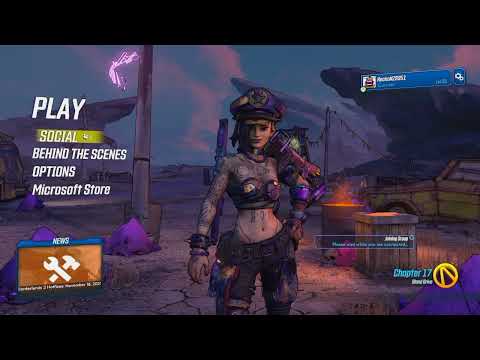
So, you’re ready to unleash some mayhem in Borderlands 3 with your friends, but something’s gone wrong. You can’t join their game, and they can’t join yours. This is a frustratingly common issue, but thankfully, there are several reasons why this might be happening, and correspondingly, many solutions you can try. The most common culprits are:
- Network Connectivity Problems: A poor or unstable internet connection is the number one reason for connectivity issues in online games.
- Firewall or Router Issues: Your firewall or router settings might be blocking Borderlands 3 from accessing the internet or communicating with other players.
- Game Settings and Privacy: Incorrect game settings, especially privacy settings, can prevent you from joining or being joined by others.
- Version Mismatch: If you and your friend are running different versions of Borderlands 3, you won’t be able to play together. This includes base game updates and DLC ownership.
- Platform Discrepancies (Crossplay Complications): While Borderlands 3 does offer crossplay, ensuring it’s enabled and properly configured can be tricky.
- Game Bugs: Occasionally, bugs within the game itself can cause connectivity problems.
Let’s delve deeper into each of these possibilities and explore how to fix them.
Troubleshooting Network Connectivity
Check Your Internet Connection
The first step is to ensure you have a stable and adequate internet connection. Conduct a speed test using a service like Speedtest.net. Pay attention to your download speed, upload speed, and ping. Borderlands 3 doesn’t require extremely high bandwidth, but a stable connection is crucial. Even a fast connection that is unstable can cause problems.
Troubleshoot a Poor Connection
If your speed test reveals issues, try the following:
- Restart your router and modem: This is a classic fix, but it often works. Unplug both devices, wait 30 seconds, plug the modem back in, wait for it to connect, and then plug the router back in.
- Use a wired connection: Wi-Fi can be unreliable. If possible, connect your computer or console directly to your router with an Ethernet cable.
- Close unnecessary applications: Streaming services, downloads, and other bandwidth-intensive applications can interfere with your game.
- Contact your ISP: If the problem persists, contact your internet service provider to inquire about potential outages or issues in your area.
Firewall and Router Configuration
Firewall Settings
Your firewall is designed to protect your computer or console from malicious software, but it can sometimes block legitimate programs like Borderlands 3.
- Check your firewall settings: Make sure Borderlands 3 is allowed through your firewall. You may need to add an exception for the game’s executable file.
- Temporarily disable your firewall: As a troubleshooting step, temporarily disable your firewall and see if that resolves the issue. If it does, you know the firewall is the culprit and you need to adjust its settings.
Router Configuration
Your router also has a firewall and may require configuration to allow Borderlands 3 traffic.
- Port Forwarding: Some games require specific ports to be open on your router. Check Borderlands 3’s official documentation or support website for a list of required ports and forward them in your router’s settings.
- UPnP (Universal Plug and Play): Enable UPnP in your router settings. This allows applications to automatically configure port forwarding. Note: this is a double edged sword and should be viewed with caution.
- Router Firmware: Ensure your router’s firmware is up to date. Outdated firmware can cause compatibility issues.
Game Settings and Privacy
Group Privacy Settings
Borderlands 3 has group privacy settings that determine who can join your game.
- Check your Group Privacy settings: Go to the main menu, select “Social,” and then “Privacy.” Make sure your group is set to “Friends Only” or “Public,” depending on who you want to be able to join. “Local Only” will prevent anyone from joining your game online.
- Verify your friend’s Group Privacy settings: Have your friend check their settings as well to ensure they are not accidentally blocking you.
SHiFT Account Issues
Borderlands 3 uses SHiFT, Gearbox’s online service, for crossplay and other features.
- SHiFT Account: Ensure you and your friend both have SHiFT accounts and are logged in.
- Crossplay Settings: Make sure crossplay is enabled in your game settings if you are trying to play with someone on a different platform. You’ll also need to set a crossplay display name.
Version Mismatch
Game Updates and DLC
- Check for updates: Ensure both you and your friend have the latest version of Borderlands 3 installed. Check for updates on your respective platforms (Steam, Epic Games Store, PlayStation, Xbox).
- DLC Compatibility: If you are trying to play DLC content, make sure both you and your friend own the DLC. Only the host needs to own the DLC for it to work in most instances.
Platform Discrepancies and Crossplay Complications
Enabling Crossplay
If you are playing on different platforms (e.g., PC and Xbox), make sure crossplay is enabled.
- Enable Crossplay: In the game’s options menu, look for a “Crossplay” setting and make sure it is turned on.
- SHiFT Account: As mentioned earlier, both players need a SHiFT account to enable crossplay.
- Platform Limitations: Remember that crossplay support can be limited on certain platforms. While Borderlands 3 supports crossplay across Xbox, Stadia, Steam, and Epic, PlayStation support was blocked at launch.
Game Bugs
Restart the Game
Sometimes, the simplest solution is the most effective.
- Restart Borderlands 3: Close the game completely and restart it.
- Restart Your System: Restart your computer or console. This can clear temporary files and resolve minor software glitches.
Verify Game Files
If you are playing on PC, you can verify the integrity of the game files to ensure that no files are corrupted.
- Steam: In Steam, right-click on Borderlands 3 in your library, select “Properties,” go to the “Local Files” tab, and click “Verify integrity of game files.”
- Epic Games Store: In the Epic Games Launcher, click the three dots next to Borderlands 3 in your library, select “Verify.”
Reinstall Borderlands 3
As a last resort, try reinstalling Borderlands 3. This will ensure that you have a fresh copy of the game and can resolve any persistent issues.
Additional Tips
- Check the Borderlands 3 Forums: The official Borderlands 3 forums and community websites are great resources for finding solutions to common problems.
- Contact Gearbox Support: If you have exhausted all other troubleshooting steps, contact Gearbox Support for assistance.
Gaming provides a wealth of opportunities for learning and development, extending far beyond entertainment. For more on the intersection of gaming and education, visit the Games Learning Society. Understanding game mechanics and collaborative problem-solving within the gaming environment can translate to real-world skills.
Frequently Asked Questions (FAQs)
1. Is Borderlands 3 cross-platform?
Yes, Borderlands 3 supports crossplay between Xbox, Stadia, Steam, and Epic platforms. However, PlayStation does not currently support crossplay with other platforms.
2. How do I enable crossplay in Borderlands 3?
To enable crossplay:
- Launch Borderlands 3.
- Look for the opt-in window that appears when the Crossplay Update is live.
- Set a Crossplay Display Name.
3. Why can’t I join my friend even though we are on the same platform?
Possible reasons include network issues, firewall settings, incorrect group privacy settings, or version mismatches. Follow the troubleshooting steps outlined above to identify and resolve the issue.
4. Do we both need the same DLC to play together?
Generally, the host of the game needs to own the DLC for it to be accessible to all players in the session. However, some content may require all players to own it.
5. How do I check my internet connection speed?
Use a website like Speedtest.net to test your download speed, upload speed, and ping.
6. What ports do I need to forward for Borderlands 3?
Check Borderlands 3’s official documentation or support website for a list of required ports.
7. How do I change my Group Privacy settings?
Go to the main menu, select “Social,” and then “Privacy” to adjust your Group Privacy settings.
8. What is a SHiFT account and why do I need one?
A SHiFT account is Gearbox’s online service used for crossplay and other features. You need one to enable crossplay and send items to friends across different platforms.
9. My friend’s name keeps disappearing in-game. How do I fix it?
This is a known bug. The only fix is to teleport to another area or re-join the game.
10. Can I play Borderlands 3 solo?
Yes, Borderlands 3 is designed to be playable both solo and in co-op. You can switch between single-player and co-op at any time.
11. What if my router’s firmware is outdated?
Updating your router’s firmware can resolve compatibility issues and improve network performance. Refer to your router’s manual for instructions on how to update the firmware.
12. Is Borderlands 3 co-op on Xbox?
Yes, Xbox One copies of Borderlands 3 include a digital upgrade to the Xbox Series X|S version, offering enhanced performance and local splitscreen support for up to 4 players.
13. How does cross-platform loot work in Borderlands 3?
You can use the in-game mail system to send items to your friends on other platforms using Gearbox’s SHiFT system.
14. What is Coopetition mode?
Coopetition mode is an alternative co-op mode where loot is not instanced, meaning players compete for the same items. You can change your Group Mode in settings.
15. Where can I find more help with Borderlands 3 issues?
Check the official Borderlands 3 forums, community websites, or contact Gearbox Support for assistance.
Hopefully, this guide has helped you troubleshoot your connectivity issues and get back to playing Borderlands 3 with your friends! Good luck, Vault Hunter!