Why Can’t I Make a Private Server in Roblox? Troubleshooting and Solutions
Fast answer first. Then use the tabs or video for more detail.
- Watch the video explanation below for a faster overview.
- Game mechanics may change with updates or patches.
- Use this block to get the short answer without scrolling the whole page.
- Read the FAQ section if the article has one.
- Use the table of contents to jump straight to the detailed section you need.
- Watch the video first, then skim the article for specifics.
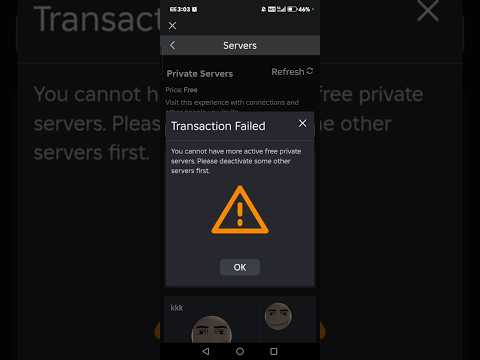
So, you’re eager to create your own private corner of the Roblox universe, a place where you and your friends can reign supreme. But you’re hitting a wall. The “cannot create any private servers” message mocks you from the screen. Frustrating, right? Let’s break down the common culprits and get you back on track to building your VIP hangout.
The inability to create a private server in Roblox typically stems from one of several key issues:
-
Game Restrictions: Not every Roblox experience supports private servers. The game developer has the final say. If the creator hasn’t enabled or configured private servers for their game, you’re simply out of luck. Check the game’s details page – the presence of a “Servers” tab is usually a good indicator that private servers are an option.
-
Account Restrictions or Permissions: Your account settings might be preventing you from accessing the feature. This is particularly relevant for younger players, where parental controls might be in play.
-
Roblox Outages or Server Issues: Sometimes, the problem isn’t you – it’s Roblox. Platform-wide outages or temporary server hiccups can disrupt various features, including private server creation.
-
Robux Deficiency: Creating a private server often costs Robux, Roblox’s in-game currency. You might not have sufficient Robux in your account to cover the initial purchase. Furthermore, some private servers operate on a subscription basis, requiring recurring payments.
-
Developer Settings: Even if private servers are generally enabled, the developer might have set the price prohibitively high, effectively preventing most players from creating one. They might also have disabled the feature temporarily.
-
Subscription Issues: If you have an existing private server subscription, issues with your payment method or insufficient Robux for renewal can prevent the creation of new servers. Roblox needs to know you’re good for the recurring payments.
-
Technical Glitches: Rarely, the issue could be a technical glitch on the Roblox platform. This is often resolved by refreshing the page, clearing your browser cache, or trying a different browser/device.
Now, let’s delve into more detail and explore the solutions for these potential problems.
Verifying Game Support for Private Servers
The first step is to ensure the game you’re trying to create a server for actually allows it.
-
Check the Game Details Page: Navigate to the game’s page on the Roblox website or app. Look for the “Servers” tab. If it’s there, proceed to the next steps. If it’s absent, private servers are not supported for that game.
-
Read the Game Description: Sometimes, developers will explicitly state whether or not private servers are available in the game description. Look for any mentions related to VIP servers, private servers, or similar terms.
-
Contact the Developer: If you’re unsure, consider reaching out to the game developer directly. Many developers have social media accounts or Discord servers where they interact with their community. Asking them directly is the most definitive way to get an answer.
Account Privacy Settings
Your Roblox account settings play a vital role in determining your access to various features.
-
Check Contact Settings: While not directly related to creating a private server, restrictions in your contact settings can sometimes indirectly affect your ability to interact with certain game features. Make sure your “Who can message me?” and “Who can invite me to private servers?” settings are appropriately configured. You can find these under the “Privacy” tab in your account settings.
-
Age Restrictions: For users under 13, parental controls and restrictions are automatically applied. These might limit access to certain features, including private server creation. If you are a parent, review the Roblox parental control settings to ensure they aren’t inadvertently blocking private server access. Unfortunately, users under 13 cannot change their age setting due to COPPA regulations.
Addressing Robux-Related Issues
Private servers aren’t free – they require Robux.
-
Check Your Robux Balance: Ensure you have enough Robux in your account to cover the initial cost of creating the private server. You can find your Robux balance in the upper-right corner of the Roblox website or app.
-
Understand Subscription Costs: Many private servers operate on a subscription basis. This means you’ll be charged a recurring fee (usually monthly) to keep the server active. Make sure you have enough Robux to cover the initial month’s cost, and that you have a plan to maintain sufficient Robux for future renewals.
-
Monitor Renewal Dates: Keep track of your private server renewal dates. If you don’t have enough Robux on the renewal date, the server will expire.
Troubleshooting Roblox Platform Issues
Sometimes, the problem lies with Roblox itself.
-
Check Roblox Status: Visit the Roblox status page (https://status.roblox.com/) to see if there are any ongoing outages or server issues. If there are, your inability to create a private server might be due to these problems.
-
Try Again Later: If there are no reported issues, try creating the private server again later. Temporary server hiccups can occur without being officially reported.
-
Clear Browser Cache and Cookies: Corrupted browser data can sometimes interfere with Roblox functionality. Clear your browser’s cache and cookies and then try again.
-
Try a Different Browser or Device: If the problem persists, try accessing Roblox from a different browser or device. This can help determine if the issue is specific to your current setup.
What to do When a Private Server is Inactive
Sometimes, you might have successfully created a private server in the past, but now you find it inactive. Here’s what to do:
-
Check Subscription Status: Verify that your subscription is still active and that you have enough Robux to cover the renewal fee.
-
Reactivate the Server: In the game’s settings, you can often find an option to reactivate the server. Look for a “Configure” button or similar option.
-
Understand Inactivity Settings: Some games have settings that automatically deactivate a private server after a period of inactivity. Check the game’s settings to see if this is the case, and adjust the inactivity timeout if necessary.
Seeking Roblox Support
If you’ve exhausted all other troubleshooting steps, it’s time to contact Roblox support.
-
Gather Information: Before contacting support, gather as much information as possible about the issue, including the game you’re trying to create a server for, your account details, and any error messages you’re encountering.
-
Submit a Support Ticket: Visit the Roblox support website and submit a support ticket. Be as detailed as possible in your description of the problem.
Understanding Roblox Error Codes
Although the article mentions some error codes (like 1001, 524, 533, 666, and 0), these are less directly related to creating a private server and more related to general Roblox connectivity issues. If you encounter any of these codes while attempting to create a server, troubleshooting your internet connection and checking the Roblox status page are good first steps. Error code 524, for example, often indicates a server timeout.
Beyond Troubleshooting: The Educational Power of Games
While you’re navigating the intricacies of Roblox, it’s worth remembering that games, like those found on Roblox, can be incredibly powerful educational tools. Organizations like the Games Learning Society recognize this potential and are dedicated to exploring how games can be used to enhance learning. Visit GamesLearningSociety.org to discover more about the intersection of gaming and education.
FAQs: Private Servers on Roblox
Here are 15 frequently asked questions to further clarify the ins and outs of private servers on Roblox:
1. Why does Roblox say “cannot create any private servers”?
This message typically appears when the game doesn’t support private servers, you don’t have enough Robux, or there’s a platform-wide issue.
2. How do I know if a Roblox game allows private servers?
Check the game’s details page for a “Servers” tab. If it’s there, private servers are likely supported.
3. How much Robux does a private server cost?
The cost varies depending on the game and is set by the game developer.
4. Are Roblox private servers free?
Some private servers can be free if the developer chooses to make them so, but most require a Robux payment.
5. How do I renew my Roblox private server?
The renewal fee is automatically deducted from your Robux balance each month.
6. What happens if I don’t have enough Robux to renew my private server?
The server will expire and become inactive.
7. Can I cancel my Roblox private server subscription?
Yes, you can cancel your subscription at any time. The server will remain active until the end of the current subscription period.
8. How do I fix an inactive private server in Roblox?
Check your subscription status, ensure you have enough Robux, and reactivate the server in the game’s settings.
9. Why is my friend unable to join my private server?
Make sure they are on your friends list and that the server’s privacy settings allow them to join. Also, ensure they have a compatible account (e.g., not restricted by parental controls).
10. Can I make a private server for every Roblox game?
No, only games that have enabled private server support allow you to create them.
11. What are the benefits of having a private server?
Private servers allow you to play with only your friends, control who joins the game, and sometimes offer administrative privileges.
12. Are Roblox private servers permanent?
No, they are subscription-based and expire if you don’t renew them.
13. Can a game developer change the price of a private server after I subscribe?
Yes, developers can change the price, and you’ll be required to update your subscription to match the new price.
14. What happens if a Roblox game is updated? Will my private server be affected?
Generally, game updates will automatically apply to your private server. However, significant updates could potentially cause temporary disruptions.
15. Is it possible to transfer ownership of a private server to another player?
No, Roblox does not currently offer a feature to transfer private server ownership.
Creating and managing private servers on Roblox can sometimes be tricky, but with the right knowledge and troubleshooting steps, you can overcome the common obstacles and enjoy your own private gaming space. Now get out there and start building!