Why Do I Need So Much Free Space to Update Modern Warfare?
Fast answer first. Then use the tabs or video for more detail.
- Watch the video explanation below for a faster overview.
- Game mechanics may change with updates or patches.
- Use this block to get the short answer without scrolling the whole page.
- Read the FAQ section if the article has one.
- Use the table of contents to jump straight to the detailed section you need.
- Watch the video first, then skim the article for specifics.
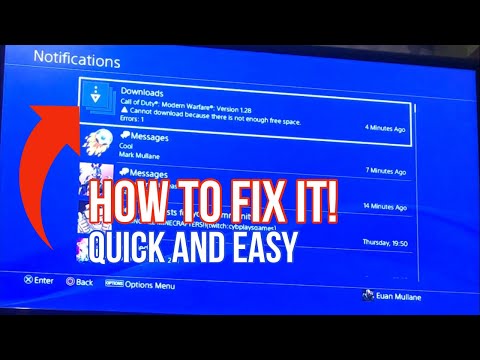
The need for a seemingly astronomical amount of free space to update Modern Warfare (and many other modern games) stems from a combination of factors revolving around how the update process itself works, the sheer size of game assets, and the way these assets are managed on your storage device. In essence, during an update, your system often needs to create a temporary copy of a significant portion of the game to integrate the new files. This “copy-then-replace” method, combined with already large file sizes, necessitates considerable free storage. The high-fidelity graphics, uncompressed textures, extensive audio files, and ever-growing content libraries contribute significantly to the overall size, often exceeding 100GB, and sometimes pushing towards 200GB or even 250GB for a full installation. This practice is a common approach to ensure the integrity of game files and a smooth updating process, though its impact on users’ storage space can be frustrating.
Understanding the Space Requirements
The issue isn’t simply the size of the update itself, but the process by which the update is applied. Many consoles and PCs utilize a system where they essentially duplicate large game files during the update process. This duplication is a safety measure, ensuring that if the update fails mid-process, the original game files remain intact and playable.
Imagine you have a 150GB game. When a 30GB update is released, your system might not just need 30GB of free space. Instead, it may need space for the 30GB update plus a temporary 150GB copy of the core game files, resulting in a need for 180GB of free space – or more. Once the update is successfully installed on the copy, the system replaces the old version with the updated version. The initial files are then removed. It’s a cumbersome but often necessary method to prevent game corruption.
The Role of Game Assets
Modern Warfare, like many AAA titles, boasts cutting-edge graphics, highly detailed environments, and incredibly realistic character models. These elements contribute significantly to the game’s massive file size.
- High-Resolution Textures: Textures are the images that are “wrapped” around 3D models to give them a realistic appearance. Higher resolution textures mean more detail and a more immersive visual experience, but they also take up significantly more space.
- Uncompressed Audio: High-quality sound effects, voice acting, and music all add to the game’s overall size. While compression techniques can reduce file sizes, uncompressed audio often offers superior sound quality, which developers may prioritize.
- Detailed Models: Character and environment models are increasingly complex, requiring more data to store the intricate details.
The Impact of Post-Launch Content
Modern Warfare is a “living game,” constantly evolving with new seasons, maps, weapons, and game modes. This post-launch content adds to the game’s overall footprint. Even if you don’t actively play certain modes (like the campaign or special ops), the files are often included in the core installation, bloating the size even further. This means you could have gigabytes of data that you’re not even using, which is still taking up space.
Optimization and Compression
Some critics argue that Modern Warfare could be better optimized and that the game files could be compressed more effectively. The developers continue to release patches and updates aimed at addressing these issues. However, it’s a constant balancing act between file size, performance, and visual fidelity. Striking the perfect balance isn’t always easy.
Other contributing factors
Call of Duty: Warzone‘s integration with Modern Warfare has significantly affected the game’s storage requirements. The shared assets, weapons, and character models between the two games mean that even players who don’t play Modern Warfare might still have its files on their system if they play Warzone. This duplication of assets further exacerbates the storage problem.
Modern gaming and learning
These complex processes and updates can be understood as a large complex system. The way players and developers interact with this large system is a key area of research in GamesLearningSociety.org.
Frequently Asked Questions (FAQs)
1. Why is Modern Warfare so much bigger than other games?
Modern Warfare is larger than many other games due to its high-resolution assets, uncompressed audio, detailed character models, and the inclusion of content for multiple game modes (campaign, multiplayer, special ops, Warzone). Continual updates and seasonal content further increase the game’s size over time.
2. Can I delete parts of Modern Warfare to free up space?
Yes, you can uninstall specific game modes (campaign, multiplayer, special ops) to free up storage space. However, Warzone typically cannot be uninstalled separately, as it’s integrated into the core game files.
3. How do I delete parts of Modern Warfare on PlayStation or Xbox?
On PlayStation and Xbox:
- Go to the game’s main menu.
- Navigate to the “Options” or “Settings” menu.
- Look for a “Game Installs” or “Content Packs” section.
- Select the content you want to uninstall and confirm your selection.
4. Is it true that Modern Warfare needs double the space for updates?
Yes, in many cases, your system (especially on consoles like PlayStation) requires roughly double the game’s size to download and install updates. This is due to the copy-then-replace method used to ensure the integrity of the game files during the update process.
5. Why are Modern Warfare updates so large?
Modern Warfare updates are often large because they include new content, bug fixes, graphical enhancements, and sometimes significant changes to the game’s core systems. The high-resolution assets and uncompressed audio also contribute to the large update sizes.
6. Will compressing the game files help reduce the overall size?
Compression can help reduce the game’s size, but there’s a trade-off between file size and performance. Highly compressed files can take longer to load, potentially impacting the game’s performance. Developers must find a balance between these factors.
7. Is Modern Warfare the biggest game in terms of file size?
Modern Warfare is among the biggest, but other games like Red Dead Redemption 2 and certain versions of Call of Duty: Black Ops Cold War can also require substantial storage space. The “biggest” game often changes as new titles are released and updated.
8. Why can’t I just download the update directly without needing so much extra space?
The copy-then-replace method is a safety measure designed to prevent data corruption during the update process. Directly overwriting the existing game files carries a higher risk of errors, which could render the game unplayable.
9. Does the platform I play on (PC, PlayStation, Xbox) affect the game’s file size?
Yes, the platform can affect the game’s file size. PC versions sometimes offer higher resolution textures or uncompressed audio options, which can increase the overall size compared to console versions.
10. What happens if I don’t have enough space to update Modern Warfare?
If you don’t have enough space, the update will fail to download or install. You’ll need to free up storage space by deleting unnecessary files, uninstalling games you no longer play, or upgrading to a larger storage device.
11. Does having an SSD (Solid State Drive) help with Modern Warfare’s file size issues?
While an SSD won’t reduce the game’s file size, it can significantly improve loading times and overall game performance. SSDs are much faster than traditional HDDs, allowing the game to access and load assets more quickly.
12. Will future updates make Modern Warfare even bigger?
It’s highly likely that future updates will continue to increase Modern Warfare‘s file size as new content, features, and enhancements are added. Game developers are constantly pushing the boundaries of graphical fidelity and content richness, which translates to larger file sizes.
13. Are there any tools or utilities that can help me manage Modern Warfare’s storage space?
Some platforms offer built-in tools for managing storage space, allowing you to identify and remove unused files or applications. You can also consider using third-party storage management utilities to help optimize your hard drive.
14. Why do I need to redownload large portions of the game even after a small update?
Sometimes, small updates require significant file replacements or modifications, triggering a larger download than expected. This can be due to changes in core game systems, texture updates, or other underlying modifications.
15. Is there anything game developers can do to reduce the size of future games?
Developers are constantly exploring new compression techniques, optimization strategies, and content delivery methods to reduce game sizes. However, there’s always a trade-off between file size, visual quality, and performance. As technology advances, we may see more innovative solutions for managing game storage.