Why Do PS5 Controllers Get Stick Drift So Easily?
Fast answer first. Then use the tabs or video for more detail.
- Watch the video explanation below for a faster overview.
- Game mechanics may change with updates or patches.
- Use this block to get the short answer without scrolling the whole page.
- Read the FAQ section if the article has one.
- Use the table of contents to jump straight to the detailed section you need.
- Watch the video first, then skim the article for specifics.
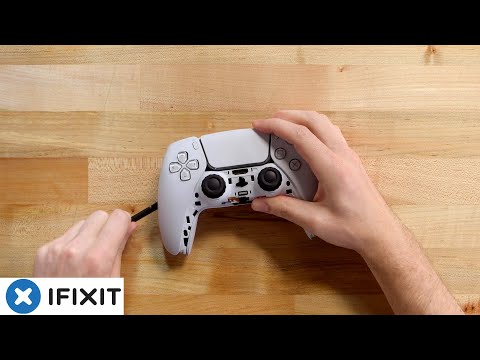
The dreaded stick drift – that frustrating phenomenon where your in-game character or cursor moves on its own, seemingly possessed – is a common grievance among gamers, especially those wielding the PlayStation 5’s DualSense controller. While it’s a problem that plagues all controllers to some degree, the PS5’s controller seems particularly susceptible, leaving many to wonder: Why do PS5 controllers get stick drift so easily?
The short answer is a confluence of factors, primarily related to physical wear and tear, the design of the joystick mechanism, and, to a lesser extent, environmental contaminants. Here’s a breakdown:
The core issue lies within the potentiometers, the tiny analog sensors located inside the joysticks. These potentiometers are responsible for translating your thumbstick movements into the in-game actions you see on the screen. They achieve this by using a resistive material that changes electrical resistance based on the position of the stick. Over time and with repeated use, this resistive material degrades and wears away. This degradation leads to inaccurate readings, causing the controller to register phantom movements even when the stick is untouched – this is stick drift.
Adding to this problem is the fact that the potentiometers are constantly in contact with springs designed to return the thumbsticks to their neutral position. These springs are also prone to wearing down over time. As they wear, they might not return the stick to its exact center point, or they might make contact in a way that causes an incorrect reading. This further exacerbates stick drift issues.
Another key contributor is the build-up of debris. Dust, skin oils, and other particles can infiltrate the thumbstick assembly. This debris can interfere with the proper functioning of the potentiometers and springs. This accumulation not only disrupts the electrical conductivity but can also physically impede the free movement of the stick components.
Furthermore, the inherent design of the joysticks contributes to the problem. The joysticks are designed with moving parts, and any moving parts subjected to repetitive friction will degrade over time. This is further compounded by the intensive, often forceful, inputs gamers apply during gameplay. In essence, every movement, every flick, and every aggressive direction change takes a toll on these components.
Finally, while less common, software issues and controller firmware can also contribute to stick drift. Out-of-date firmware can sometimes cause misinterpretations of sensor input. Similarly, a glitch or bug in the software of a specific game might amplify the underlying hardware issue.
The “Premature Obsolescence” Factor
Interestingly, a PS5 controller teardown has revealed that some internal components are inherently prone to wear and tear, suggesting that DualSense drift was almost inevitable. The lifespan of tech, in general, has been shortening to encourage more purchases, and it appears controllers are no exception. This “planned obsolescence” factor contributes to a situation where controllers might wear out more rapidly than in the past, intensifying the stick drift problem.
Ultimately, stick drift isn’t a matter of if, but a matter of when for most gamers. The combination of physical wear, dust and debris build-up, and the design of the components all contribute to why PS5 controllers seem prone to this frustrating issue. While some measures can help delay or mitigate stick drift, understanding the underlying causes is the first step in addressing this widespread gaming problem.
Frequently Asked Questions (FAQs)
H3 1. Can cleaning my PS5 controller fix stick drift?
Yes, cleaning can often alleviate or temporarily fix stick drift. Use compressed air to remove dust and debris from the thumbstick area. You can also use a cotton swab lightly dampened with isopropyl alcohol to gently clean around the thumbsticks. Make sure the alcohol completely dries before you use your controller.
H3 2. Does updating my PS5 controller’s firmware help with stick drift?
Yes, sometimes. An outdated firmware may have bugs causing misinterpretations of sensor input. Updating to the latest firmware can sometimes help resolve stick drift caused by software glitches.
H3 3. How do I update my PS5 controller’s firmware?
Connect the DualSense controller to your PS5 console using a USB cable. Go to Settings > Accessories > Controller > Software Update. Follow the on-screen instructions to complete the update.
H3 4. Is there a way to reset my PS5 controller to fix stick drift?
Yes, resetting the controller can sometimes solve minor software glitches that may cause drift. You can reset your controller by using a pin or paperclip to press the small reset button on the back of the controller.
H3 5. Will turning off and on the Bluetooth on my PS5 fix stick drift?
Sometimes, yes. A Bluetooth glitch might be causing a communication issue between the console and the controller, and restarting Bluetooth can sometimes fix these glitches and can impact stick drift. Go to Settings > Accessories > Controller > Communication Method and toggle Bluetooth off then back on.
H3 6. What are DualSense Edge Deadzones, and how can they help?
Deadzones are the areas around the thumbstick’s neutral position where movements are not registered in-game. Adjusting the DualSense Edge controller’s deadzones through settings can minimize or ignore minor drift, essentially masking the issue. However, this doesn’t fix the underlying hardware problem and can limit the precision of the controller in some games.
H3 7. Is stick drift covered by my PS5 warranty?
Yes, the PlayStation 5 DualSense controller is under warranty for one year from the date of purchase of it or the PS5 it came with. If the controller is still under warranty, Sony might repair or replace it for free, but you’ll likely need to pay for shipping.
H3 8. Will Sony fix my PS5 controller for free if it has stick drift?
If your controller’s warranty is still valid, Sony may fix it for free or send a replacement. Contact Sony support with the troubleshooting results if needed.
H3 9. Is it possible to fix stick drift by opening the controller and replacing parts?
Yes, skilled individuals can replace worn potentiometers, springs, or other components. However, this voids your warranty and requires specialized tools and expertise. If not done carefully, you may cause irreversible damage to your controller.
H3 10. Do all controllers eventually get stick drift?
Yes, all controllers that use potentiometers are susceptible to stick drift over time. However, not all controllers will develop stick drift in the same timeframe or severity.
H3 11. How long do PS5 controllers usually last?
The longevity of a PS5 controller varies depending on usage. Battery life averages 6-12 hours. However, the life span of the joystick components can vary depending on use. Some users may experience stick drift within months, while others may not encounter the issue for much longer.
H3 12. What controllers have the least stick drift?
Controllers utilizing Hall effect sensing joysticks like the GuliKit KingKong 2 PRO are often claimed to be resistant to stick drift. They use magnets and sensors rather than potentiometers which eliminate the problem of resistive material wear.
H3 13. Why does controller drift get worse over time?
As stated, the wear on the potentiometers and springs will worsen over time, leading to more significant drift and less reliable performance of the thumbsticks. Additionally, debris accumulation will only further worsen the problem.
H3 14. Can I prevent stick drift on my PS5 controller?
While you can’t prevent it entirely, you can minimize the risks by keeping your controller clean, storing it away from dust and moisture, and avoiding excessive force during gameplay. Cleaning your controller frequently, and not eating while gaming, is recommended to prolong the lifespan of the controller.
H3 15. Is it worth buying a warranty from Gamestop to replace a controller that gets stick drift?
GameStop’s warranty program might be beneficial for some users prone to stick drift, as they often offer free replacements for defective controllers. Consider the cost of the warranty against the potential cost of replacing a new controller to determine if it’s the right option for you. However, it’s important to note that a replacement will not be resistant to drift and is likely to also experience this issue.