Understanding PS4 Game Labels on Your PS5: A Comprehensive Guide
Fast answer first. Then use the tabs or video for more detail.
- Watch the video explanation below for a faster overview.
- Game mechanics may change with updates or patches.
- Use this block to get the short answer without scrolling the whole page.
- Read the FAQ section if the article has one.
- Use the table of contents to jump straight to the detailed section you need.
- Watch the video first, then skim the article for specifics.
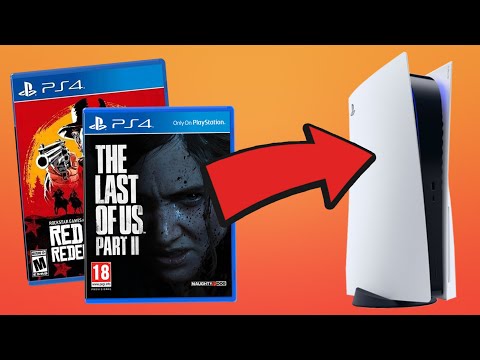
The presence of a “PS4” label alongside some games on your PS5 can be confusing, but it’s a straightforward issue. It simply indicates that you’re either playing the PlayStation 4 version of a game on your PS5 or that the PS4 version is installed on your console alongside the PS5 version. This often happens when a game offers cross-gen compatibility, allowing players who own both consoles to seamlessly transition between them.
Why the PS4 Label? Understanding Cross-Gen Games
The key to understanding the PS4 label lies in the concept of cross-generation compatibility. Many game developers release their titles on both PS4 and PS5, offering players the option to purchase and play the game regardless of which console they own. When you download or install a game that has both PS4 and PS5 versions, the console will sometimes install both versions. Here’s why:
-
Save Data Compatibility: The PS5 separates save files based on generation. PS4 game saves and PS5 game saves are stored in different locations. If you plan to switch between playing on a PS4 and a PS5, having both versions installed allows you to easily transfer your save data and continue your progress.
-
Accidental Installation: Sometimes, players accidentally download the PS4 version of a game even when the PS5 version is available. This can happen when navigating the PlayStation Store or restoring game licenses. The PS5 interface clearly indicates which version you’re about to download, but it’s easy to make a mistake, especially when installing quickly. If it says “PS4” next to the title, you’ve downloaded the PS4 version. If there’s an arrow next to “PS4,” it means you haven’t downloaded the PS4 version, but easily could.
-
Physical Disc Insertion: If you insert a PS4 game disc into your PS5, the console will recognize it as a PS4 game and label it accordingly. The PS5 is backward compatible with the overwhelming majority of PS4 games, allowing you to play them directly from the disc.
-
Preference for PS4 Version: In some rare cases, a player might prefer the PS4 version of a game, either due to nostalgia, performance reasons, or specific features that are only present in the PS4 version.
Distinguishing Between Versions and Managing Installations
The PS5 user interface generally makes it clear which version of a game you’re launching. When selecting a game from your library, look for the “PS4” or “PS5” label prominently displayed next to the game title.
To manage your game installations and free up storage space, you can delete either the PS4 or PS5 version of a game from your console. Go to Settings > Storage to view the installed games and choose which versions to remove.
Frequently Asked Questions (FAQs) about PS4 Games on PS5
Here are some frequently asked questions to further clarify the topic of PS4 games on the PS5:
1. Can I play PS4 games on my PS5?
Absolutely! The PlayStation 5 is backward compatible with the vast majority of PlayStation 4 games. You can insert physical PS4 game discs into the PS5 and play them, as well as download digital PS4 software you’ve purchased from the PlayStation Store.
2. Will my PS4 games look better on PS5?
While some PS4 games may receive upgrade patches specifically designed to improve visuals and gameplay on the PS5, most PS4 games will look similar on both consoles. The PS5 offers faster loading times and more stable frame rates, enhancing the overall experience. The biggest difference is that PS5 is capable of streaming at 4K resolution, while PS4 is limited to 1080p, unless you have PS4 Pro, which also has 4K output.
3. How do I upgrade a PS4 game to the PS5 version?
If a game offers a PS4 to PS5 upgrade, you can find the upgrade option on the PlayStation Store or within the game hub on your PS5. The upgrade may be free or require a fee, depending on the game. If you want to upgrade a digital PS4 game to PS5, search for your PS4 game either in the PlayStation Store or your game library under the “Your Collection” tab.
4. Why are some of my PS4 games locked on PS5?
A lock symbol on a game indicates that it’s not currently accessible within your library. This might be because the license is not active or there is an issue with the game. To remove the lock symbol, go to settings and select System Storage Management. Select Unlock under the game that has this issue.
5. How do I stop the PS4 version of a game from automatically installing on my PS5?
If you have the PS5 version installed, the console might automatically install the PS4 version upon startup. To prevent this, immediately go to uploads/downloads after booting up the console and “cancel and delete” the PS4 installation.
6. Why do I have two versions of a game on my PS5?
The PS5 separates save files based on generation. This allows you to have both the PS4 and PS5 versions installed, each with its own separate save data.
7. What are the performance differences between playing a PS4 game on PS4 versus PS5?
The PS5 generally offers faster loading times, more stable frame rates, and potentially improved resolution compared to the PS4 when playing PS4 games. Some games may also benefit from the PS5’s enhanced processing power, resulting in smoother gameplay.
8. Can I transfer my PS4 save data to the PS5 version of a game?
Yes, in many cases, you can transfer your PS4 save data to the PS5 version of a game. The transfer method varies depending on the game, but it often involves uploading the save data to the cloud or transferring it via a USB drive.
9. What PS4 games are not compatible with PS5?
Only a handful of PS4 games are not compatible with the PS5. These include:
- Afro Samurai 2 Revenge of Kuma Volume One
- Hitman Go: Definitive Edition
- Just Deal With It!
- Robinson: The Journey
- Shadwen
- TT Isle of Man – Ride on the Edge 2
- We Sing
10. Is it better to play the PS4 version or the PS5 version of a game on the PS5?
The PS5 version is generally the preferred option, as it’s specifically designed to take advantage of the PS5’s hardware capabilities. This often results in improved graphics, performance, and additional features.
11. How do I switch from the PS4 version to the PS5 version of a game?
The easiest way is to ensure only the PS5 version is installed. If both are present, select the version you wish to play from the game hub. Look for the “PS4” or “PS5” label next to the game title to confirm which version you’re launching.
12. Will PS4 games get free PS5 upgrades?
Whether a PS4 game receives a free PS5 upgrade depends on the developer’s decision. Some developers offer free upgrades, while others charge a fee for the upgraded version.
13. Does playing PS4 games on PS5 use more storage space?
If you have both the PS4 and PS5 versions of a game installed, it will consume more storage space. Each version of the game has its own separate installation files.
14. Can a PS5 be blacklisted and how does it affect my PS4 games?
Yes, a PS5 can be blacklisted by Sony, typically for violating their terms of service, such as attempting to bypass security features. If your console is blacklisted, you won’t be able to access PlayStation Network, which could affect your ability to download or play digital PS4 games, even those you’ve already purchased.
15. How does data transfer from PS4 to PS5 impact PS4 versions appearing?
Transferring data from your PS4 to your PS5 may copy both PS4 game installations and save data. This means the PS4 versions of games may appear on your PS5 after the transfer. You can then choose to delete the PS4 versions if you only want to play the PS5 versions.
The Future of Cross-Gen Gaming
The era of cross-generation gaming is likely to continue for the foreseeable future. As new consoles are released, developers will increasingly focus on creating games that can be enjoyed by players on both older and newer hardware. This ensures a wider audience and allows players to upgrade to new consoles without losing access to their favorite games. Understanding the nuances of cross-gen compatibility, such as the presence of the “PS4” label on your PS5, will help you navigate the ever-evolving landscape of gaming.
Furthermore, understanding the educational aspects of gaming is becoming increasingly important. Organizations such as the Games Learning Society, found at GamesLearningSociety.org, explore how games can be used as powerful tools for learning and development. Exploring their research can provide a deeper understanding of the value and potential of gaming in various contexts.