Why Does Everyone Leave GTA? Understanding Mass Exits in Grand Theft Auto Online
Fast answer first. Then use the tabs or video for more detail.
- Watch the video explanation below for a faster overview.
- Game mechanics may change with updates or patches.
- Use this block to get the short answer without scrolling the whole page.
- Read the FAQ section if the article has one.
- Use the table of contents to jump straight to the detailed section you need.
- Watch the video first, then skim the article for specifics.
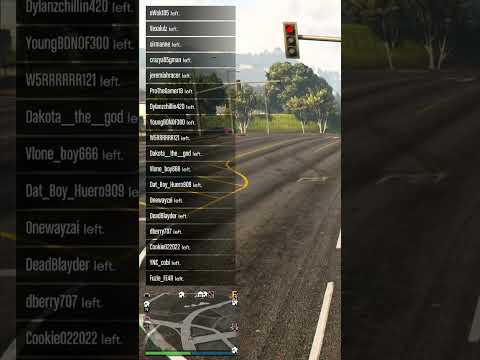
The sudden departure of all other players from your Grand Theft Auto Online (GTA Online) session can be a frustrating experience, leaving you alone in a previously bustling lobby. The primary reason behind this phenomenon is usually poor internet connection or network instability on the part of one or more players. Unlike some games where a temporary disconnect might only kick the offending player out, GTA Online is designed to prioritize session stability, requiring all participants to maintain a relatively consistent connection. When a player’s connection falters significantly, the game often triggers a mass exodus to prevent widespread lag and disruption for the remaining players.
This isn’t always a server-side problem, although those do happen occasionally. More often than not, it stems from a client-side issue related to a player’s internet setup, causing a chain reaction where everyone else is booted from the lobby. Essentially, the game is prioritizing a smooth experience for the majority over the inconvenience of a sudden lobby reset. This article will delve deeper into the common causes of mass departures in GTA Online and address some frequent questions about the game.
Understanding the Core Issue: Network Synchronization
GTA Online works on a peer-to-peer network model. Instead of relying heavily on dedicated servers for every action, player consoles/PCs often act as hosts within a session. This means each player’s connection to others is direct, and there’s no centralized server constantly policing the whole group. This architecture can be efficient in terms of scaling the number of players, but also introduces vulnerabilities when a connection falters.
When a player experiences significant lag or disconnects, their client might get out of sync with others, causing inconsistencies in the game state for the remaining players. To avoid a cascading effect of lag, glitches and instability, GTA Online often forces everyone to leave the session. The remaining players then rejoin a fresh session automatically.
This system, while sometimes annoying, is designed to prevent a much more frustrating experience of a session grinding to a halt. It’s effectively the game’s way of “rebooting” itself to maintain playability when connection problems arise.
Common Causes of Mass Exits
While a player’s internet connection is the most common issue, there are other factors contributing to sudden session collapses:
- Poor Internet Connection: As the article mentioned, a weak or unstable internet connection is the biggest culprit. This includes fluctuations in bandwidth, high ping times, packet loss and general wireless instability.
- Firewall and Router Issues: Overly restrictive firewall settings on your router or computer can interfere with GTA Online’s connection to other players.
- Modems and Router Quality: Older or low-quality modems and routers can have trouble handling the demands of online gaming, leading to disconnects.
- Network Congestion: If your home network has several devices using the internet simultaneously, there can be congestion, impacting your connection stability when playing online.
- Temporary Server Issues: While rare, server-side problems can occasionally occur and result in mass disconnects. These are usually resolved quickly by Rockstar Games.
- Game Bugs: While less common, a bug or glitch in the game itself can sometimes cause widespread disconnects in a specific session.
- Internet Throttling: Some ISPs throttle internet speeds at peak times or for specific types of traffic, which can cause issues with the game. You can deliberately attempt to throttle your internet speed to cause an immediate mass exit to obtain your own solo public session.
- VPN Issues: Using a VPN (Virtual Private Network) can sometimes introduce instability and lead to disconnections in GTA Online due to its routing of the connection
Why a Mass Exit is the “Best-Case Scenario” in This Situation
Although frustrating, mass disconnects are often the better option compared to a severely lagged or unstable session. Imagine if GTA Online did not trigger a mass exit and simply continued as normal, with one or more players having a terrible connection.
The resulting consequences would be:
- Lag: Severe delays in player movement and actions.
- Rubber Banding: Players and vehicles rapidly jumping back to previous positions on the map due to inconsistent data.
- Glitches: Various in-game glitches and anomalies that can impact gameplay.
- Crashes: Game crashes can cause frustration, and ultimately make it harder to play the game.
By performing a mass exit, the game attempts to quickly rectify these problems, essentially providing a “clean slate” to continue gaming.
How to Improve Your Connection and Reduce Mass Exits
Here are a few steps you can take to reduce the likelihood of experiencing mass exits in GTA Online:
- Use a wired connection: Ethernet connections are generally more stable and offer better speeds than wireless (Wi-Fi) connections.
- Restart your modem and router: This simple step can often resolve temporary connection issues.
- Update your router’s firmware: Outdated firmware can impact your router’s performance.
- Check your internet speed: Make sure you are getting the speeds that you are paying for from your ISP, and consider upgrading if needed.
- Reduce network congestion: Limit the number of devices using your internet at the same time, especially while gaming.
- Open required ports on your router: Some games need specific ports to be opened in your router’s firewall to function correctly. A quick search on your desired game, plus the words “ports required” will get you information about the desired ports to open.
- Temporarily disable firewalls and antivirus: If you’re using non-Windows based firewalls or antivirus systems. Check if that resolves the issue.
- Consider a gaming router: If you have a large household or gaming is a frequent hobby, a gaming router offers superior connection performance.
- Contact your ISP: If the issue persists, it may be related to your ISP and their service quality to you. Contact them to troubleshoot and potentially fix the issue.
- Keep your game up-to-date: Ensure you’re running the latest version of the game, as patches often contain fixes for network-related bugs.
Frequently Asked Questions (FAQs)
1. Why is my GTA 5 crashing?
High graphics settings can sometimes cause GTA V to crash. Try setting the graphics settings to “Normal” or lower. Other causes can include outdated drivers and corrupt game files.
2. Will GTA Online be replaced?
While Grand Theft Auto 6 will undoubtedly bring changes, GTA Online will likely remain a key part of the franchise due to its enduring popularity and revenue generation. It isn’t expected to go anywhere any time soon.
3. How does GTA 5 end?
The main story of GTA 5 concludes with Michael, Franklin, and Trevor saying their goodbyes and parting ways after completing the final heist.
4. Why is GTA 5 so popular again?
GTA 5’s resurgence in popularity is largely due to the thriving role-playing community within the game, known as GTA RP. This provides a very immersive and different experience for players.
5. Is Trevor gone from GTA?
Trevor is not dead after the events of the main story. He is mentioned to have become a “guru” or “lifestyle coach” by other characters after his departure from the main story.
6. Can you get Trevor back after killing him?
No, if you chose to kill Trevor in the final mission, he is permanently gone. If you want to keep all main characters alive, choose option C in the final story mission.
7. Who betrayed Trevor?
Michael planned and betrayed both Trevor and Brad in the prologue to establish his new life away from crime, death and depravity.
8. How old is Trevor in GTA 5?
Trevor Phillips is 49 years old in Grand Theft Auto V.
9. Which GTA game has the longest story?
Grand Theft Auto: San Andreas has the longest main story among the GTA series at around 31.5 hours long.
10. Why is GTA 6 taking so long to develop?
GTA 6’s long development time is partly due to the difficulty of writing satire in modern times, with real life seemingly mimicking the outrageous scenarios typically seen in the game. They also want to create a brand new game engine to support the game.
11. Is GTA 5 still the best game ever?
GTA 5 is considered one of the best games ever made by many players due to its massive open world, immersive story, and the freedom to do virtually anything.
12. Why does Trevor forgive Michael?
Trevor initially hated Michael for the past betrayal, but ultimately recognized Michael’s usefulness for their final big heist and decided to move past their differences, at least temporarily.
13. Who sleeps longer in GTA?
Trevor sleeps 12 hours, Franklin sleeps 8 hours, and Michael sleeps 6 hours.
14. What to do in GTA 5 after killing Trevor?
While you can still complete side missions with Michael and Franklin, you will be unable to get 100% game completion if you chose to kill Trevor.
15. How much will GTA 6 cost?
GTA 6 is expected to be priced at least $69.99, but may be higher for deluxe or collector’s editions due to high development costs.
Conclusion
Mass exits in GTA Online are primarily caused by network connection issues from individual players, often related to bandwidth or instability. While frustrating, it is designed to maintain a more stable gaming experience for the majority of players. By understanding the reasons behind mass departures and taking steps to improve your own connection, you can minimize interruptions and enjoy GTA Online with fewer disruptions.