Why Does GTA Online Keep Kicking Everyone Out?
Fast answer first. Then use the tabs or video for more detail.
- Watch the video explanation below for a faster overview.
- Game mechanics may change with updates or patches.
- Use this block to get the short answer without scrolling the whole page.
- Read the FAQ section if the article has one.
- Use the table of contents to jump straight to the detailed section you need.
- Watch the video first, then skim the article for specifics.
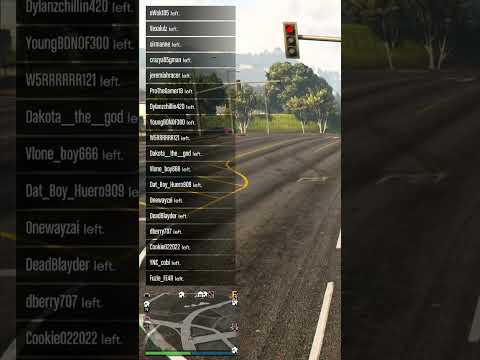
The frustration is real: you’re cruising in Los Santos, about to pull off a heist, or just hanging with friends, and suddenly poof, everyone vanishes. You’re alone in the lobby, wondering what happened. The simple answer is almost always due to connection issues. GTA Online is a complex beast, and maintaining a stable connection for dozens of players simultaneously is challenging. These issues can stem from your internet connection, Rockstar’s servers, or even other players’ connections. A single hiccup in any of these areas can trigger a domino effect, causing players to disconnect and the session to fracture.
Understanding the Root Causes
Several factors contribute to the “everyone leaving” phenomenon:
-
Poor Internet Connection: This is the most common culprit. GTA Online demands a stable and reasonably fast internet connection. Packet loss, high ping, or frequent disconnects on your end can trigger the issue. Even temporary fluctuations can cause the game to believe you’ve timed out, resulting in your forced exit and potential disruption for others.
-
Rockstar’s Server Issues: GTA Online’s servers aren’t perfect. Overloads, maintenance, or unforeseen technical glitches can lead to widespread connection problems. When the server struggles to manage the load, players may experience disconnections or find themselves isolated in empty lobbies.
-
NAT Type Restrictions: NAT (Network Address Translation) type affects how your router handles connections. A Strict NAT type can significantly limit your ability to connect with other players, leading to connection instability and session dropouts. Ideally, you want an Open NAT type.
-
Firewall and Router Configurations: Overly restrictive firewall settings or improperly configured router settings can block necessary communication between your console or PC and Rockstar’s servers. This interference can result in disconnections and the “everyone leaving” scenario.
-
Modders and Hackers: While less common nowadays thanks to Rockstar’s improved security, malicious players using mods or hacks can still disrupt sessions, forcibly disconnecting other players, or causing widespread instability in a lobby.
-
Game Bugs and Glitches: Occasionally, bugs within the game itself can cause disconnections. These are usually addressed in patches and updates, but can be frustrating while they persist.
-
Distance to other players: While not as common as other reason, distance to other players does influence how stable the connection of a Lobby is. If players who are far away from each other in the real world are playing on the same GTA Online lobby, you may find that the lobby is unstable.
Troubleshooting Your Connection
Before blaming Rockstar’s servers or nefarious modders, take these steps to troubleshoot your own connection:
-
Power Cycle Your Network Hardware: The age-old advice still rings true. Unplug your modem and router (if separate) for at least five minutes. This allows them to reset and refresh their connections.
-
Check Your Internet Speed: Run a speed test to ensure you’re getting the bandwidth you’re paying for. Pay attention to both download and upload speeds, as well as ping. GTA Online requires sufficient upload speed for stable gameplay.
-
Hardwire Your Connection: If possible, connect your console or PC directly to your router using an Ethernet cable. This eliminates the potential for Wi-Fi interference and provides a more stable connection.
-
Check Your NAT Type: Access your router’s settings (usually through a web browser) and check your NAT type. If it’s Strict or Moderate, try enabling UPnP (Universal Plug and Play) or setting up port forwarding for GTA Online. Consult your router’s manual for specific instructions.
-
Review Firewall Settings: Ensure your firewall isn’t blocking GTA Online. You may need to add exceptions for the game’s executables.
-
Update Network Drivers (PC): Outdated network drivers on your PC can cause connection problems. Update to the latest drivers from your motherboard or network card manufacturer’s website.
-
Monitor Network Activity: Use the Windows Resource Monitor (or similar tools on other platforms) to monitor your network activity while playing. Look for any spikes in latency or packet loss that might indicate a problem.
Frequently Asked Questions (FAQs)
Here are 15 frequently asked questions about connection issues in GTA Online:
1. Why do I keep losing connection on GTA Online?
As explained above, it’s usually due to a combination of factors related to your internet connection, Rockstar’s servers, or network configurations. Start by troubleshooting your own connection before assuming it’s a server issue.
2. How do I check my NAT type?
The method varies depending on your console or platform.
- PlayStation: Navigate to Settings > Network > View Connection Status. Your NAT type will be displayed.
- Xbox: Go to Settings > Network > Network settings > Test NAT Type.
- PC: Check your router’s settings through a web browser. The NAT type is usually displayed in the router’s status or connection information.
3. What is the best NAT type for GTA Online?
An Open NAT type provides the best connection stability and allows you to connect with the most players.
4. How do I change my NAT type?
- Enable UPnP (Universal Plug and Play) in your router settings. This is the easiest solution, but it can pose security risks.
- Set up port forwarding for GTA Online. This is a more secure option but requires more technical knowledge. Consult your router’s manual for specific instructions.
- Place your console or PC in the DMZ (Demilitarized Zone). This is the least secure option and should only be used as a last resort.
5. What ports does GTA Online use?
Rockstar Support lists the following ports:
- TCP: 80, 443
- UDP: 6672, 61455, 61456, 61457, 61458
6. Will a better router improve my GTA Online connection?
Potentially, yes. A higher-quality router with better processing power and updated firmware can handle network traffic more efficiently, leading to a more stable connection.
7. How do I reduce lag in GTA Online?
- Improve your internet connection.
- Play on servers closer to your location.
- Lower your graphics settings.
- Close unnecessary background applications.
8. Is GTA Online down right now?
Check Rockstar’s official support website or social media channels for announcements about server outages or maintenance. There are also third-party websites that track the status of GTA Online servers.
9. How do I create a solo public session in GTA Online?
One method is to temporarily throttle your internet bandwidth. This will cause other players to disconnect, leaving you alone in a public lobby. However, this method is not officially supported and may have unintended consequences. A better way is to change the MTU setting of your network, so that you are put into a solo lobby when you join. This will persist until you change back to the default settings.
10. Can I get banned for using mods in GTA Online?
Yes, using unauthorized mods in GTA Online can result in a ban. Only use mods in single-player mode.
11. What is the Oppressor Mk II, and why is it so hated?
The Oppressor Mk II is a flying motorcycle equipped with missiles and countermeasures. It’s hated because it’s often used by griefers to easily destroy other players’ vehicles and cargo.
12. How do I report a cheater or griefer in GTA Online?
Use the in-game reporting system. Go to the player’s profile and select “Report Player.” Provide details about the incident.
13. What’s the best way to make money in GTA Online?
The Cayo Perico Heist is currently the most lucrative method. You can complete it solo for maximum profit.
14. Does Rockstar reset accounts with modded money?
Rockstar may reset your character if they suspect you’ve received modded money, although this is less common than outright bans for using cheats.
15. Can learning more about games enhance skills relevant to other fields?
Absolutely! Understanding game design, mechanics, and player behavior can improve skills applicable to education, technology, and even social sciences. Organizations like the Games Learning Society at GamesLearningSociety.org explore these connections in depth.
Staying Connected
Dealing with disconnections in GTA Online can be incredibly frustrating, but by understanding the potential causes and taking proactive steps to troubleshoot your connection, you can significantly improve your experience and spend more time enjoying the chaos and camaraderie of Los Santos.