Why Does it Say Outdated Server on Minecraft Bedrock?
Fast answer first. Then use the tabs or video for more detail.
- Watch the video explanation below for a faster overview.
- Game mechanics may change with updates or patches.
- Use this block to get the short answer without scrolling the whole page.
- Read the FAQ section if the article has one.
- Use the table of contents to jump straight to the detailed section you need.
- Watch the video first, then skim the article for specifics.
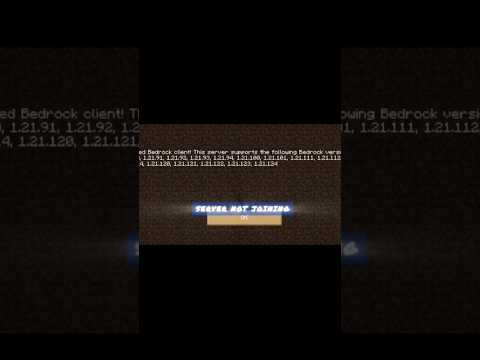
The outdated server error on Minecraft Bedrock occurs when there’s a mismatch between the server version and the version of Minecraft the player is using, resulting in the player being unable to connect to the server. To resolve this issue, players can try switching game versions in the launcher or changing the Minecraft server’s version if they are the owner, ensuring that both the client and server are running the same version of the game.
Understanding the Outdated Server Error
The outdated server error is a common issue faced by Minecraft players, particularly those playing on Minecraft Bedrock Edition. This error can be frustrating, especially when players are eager to join their friends’ servers or play on their favorite Minecraft servers. To better understand and resolve this issue, it’s essential to explore the possible causes and solutions.
Causes of the Outdated Server Error
The primary cause of the outdated server error is a version mismatch between the player’s Minecraft version and the server version. This can occur when the player’s game is not updated to the latest version, or the server is running an older version of the game. Other causes may include network issues, firewall settings, or router configuration problems.
Frequently Asked Questions (FAQs)
Q1: How Do I Update My Bedrock Server?
To update your Bedrock server, navigate to the FTP File Access area, log in with your credentials, check the bedrock_server option, and delete it. Then, return to the main panel and restart the server to update it.
Q2: What to Do if Minecraft Bedrock Says Outdated Client?
If Minecraft Bedrock says outdated client, update your game to the latest version to match the supported version of the game server.
Q3: Why Won’t My Servers Work on Minecraft Bedrock?
If your servers won’t work on Minecraft Bedrock, try restarting your device, switching between wired and wireless connections, or connecting with another network connection.
Q4: How Do I Change My Minecraft Server Version?
To change your Minecraft server version, log into your control panel account, click on Server Type, and select the new version from the Version dropdown menu.
Q5: How Do I Fix Could Not Connect Outdated Client Minecraft 1.17?
To fix the could not connect outdated client error in Minecraft 1.17, update your game to the latest version or switch to a different server version.
Q6: How Do I Play an Older Version of Minecraft?
To play an older version of Minecraft, change the game version in the launcher, create a new installation, and select the desired version from the VERSION list.
Q7: How Do I Get an Outdated Minecraft Server?
To get an outdated Minecraft server, check your network and restart your router, update Minecraft, change the Minecraft version, or disable all antivirus applications.
Q8: Why is My Minecraft Not Letting Me Play Servers?
If Minecraft is not letting you play on servers, try disabling your firewall, restarting your modem/router, or logging out and back in to refresh your profile’s authentication.
Q9: Why Can’t I Play Multiplayer on Bedrock?
If you can’t play multiplayer on Bedrock, ensure you’re not using a beta version, leave the beta version and restart the game, or check your console’s online subscription service.
Q10: Can You Get Banned on Bedrock Servers?
Yes, players can get banned on Bedrock servers if they violate the Community Standards, resulting in restrictions on playing on servers, joining Realms, hosting or joining multiplayer games, or using the marketplace.
Q11: What Does it Mean When a Realm Says Outdated Client?
When a realm says outdated client, it means you’re using an older game version, and you need to update your game to connect to the realm.
Q12: How Do I Fix Outdated Client on Realm?
To fix the outdated client error on realm, update your game to the latest version, ensuring your game files are up-to-date.
Q13: How Do I Join Bedrock 2023 Servers?
To join Bedrock 2023 servers, access your control panel, locate your Server Address, open Minecraft on your device, and connect to the server using the Server Address and Port.
Q14: What Does Outdated Server Mean in Minecraft?
The outdated server error in Minecraft occurs when there’s a version mismatch between the server version and the player’s Minecraft version.
Q15: How Do I Connect to My Bedrock Server?
To connect to your Bedrock server, navigate to the Servers tab, press the Add Server button, enter your Server Name, Server Address, and Port, and press Play to join the server.
By understanding the causes and solutions to the outdated server error on Minecraft Bedrock, players can quickly resolve the issue and enjoy playing on their favorite servers with friends. Remember to always keep your game and server versions up-to-date to avoid any connection problems.