Why Does My PS Vita Charge So Slowly?
Fast answer first. Then use the tabs or video for more detail.
- Watch the video explanation below for a faster overview.
- Game mechanics may change with updates or patches.
- Use this block to get the short answer without scrolling the whole page.
- Read the FAQ section if the article has one.
- Use the table of contents to jump straight to the detailed section you need.
- Watch the video first, then skim the article for specifics.
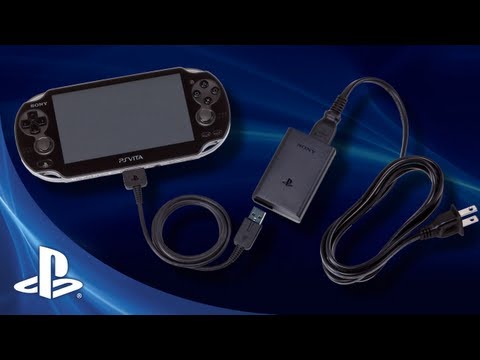
The PS Vita, a beloved handheld gaming console, is known for its impressive library of games and its portability. However, a common frustration among users is the seemingly slow charging speed. The primary reason for this sluggish charging often boils down to the power requirements of the device and the limitations of the charging source being used. The PS Vita requires a 5V power supply delivering at least 1.5 amps to charge optimally. Using a charger that provides less than this, such as an older iPod USB charger or a low-powered computer USB port, will result in significantly slower charging or, in some cases, no charging at all.
The device is designed to negotiate with the charging source to regulate the power received for charging. When connected to a weak charger, the Vita pulls the current it needs, which will be less if the source cannot meet the device’s requirement. As a result, the battery will take longer to charge. Over time, due to usage, the battery itself may degrade and affect the charging rate. Also, damage to charging port, charging cable and the internal circuitry of the console could also slow down the charging speed. Essentially, the slow charging is frequently a combination of inadequate power supply and the health of your Vita battery.
Understanding PS Vita Charging: Power and Requirements
The PS Vita was designed to be charged with a specific power input. The recommended charger outputs 5 volts and 1.5 amps (or higher). This is crucial because the amperage, not just the voltage, determines the speed at which the battery charges. Think of it like a water hose: voltage is the water pressure, and amperage is the water flow. A higher amperage means more power is delivered to the battery, leading to faster charging times.
The Role of Your Charger
Using a charger with less than 1.5 amps will greatly impact the charging time. Older USB chargers, especially those intended for phones or devices like iPods, often provide only 0.5 to 1 amp. These chargers are simply not equipped to deliver the power needed for the Vita to charge efficiently. This can result in the device charging at a snail’s pace or not charging at all if the power output is insufficient.
USB Ports on Computers: A Common Culprit
Similarly, many computer USB ports, particularly older ones, provide a limited power output. A standard USB 2.0 port often only provides 0.5 amps, which is inadequate for the PS Vita. USB 3.0 ports generally offer higher power output (up to 0.9 amps) but still might not be the optimum for the Vita to charge at its fastest rate. Charging through a computer may also be slower as the computer’s operating system might reduce current draw to save energy or when the computer is in use. Therefore, using the proper wall charger with sufficient amperage is essential for quicker charging.
Battery Degradation
Another factor affecting charging speed is the condition of the battery. Like all rechargeable batteries, the PS Vita battery degrades over time. As the battery ages, it loses its capacity to hold a charge and can also impact charging rates. This is why older Vitas may take significantly longer to charge compared to newer ones. Heat is also a major cause of battery degradation, so avoiding keeping your Vita in hot environments while charging will help to prolong battery life.
Cable Issues
Sometimes, the problem isn’t the charger or the Vita, but the USB cable itself. Over time, USB cables can become damaged or worn, leading to a decrease in the power they can transmit. Try a different cable to determine if that is the issue.
Troubleshooting Slow Charging: A Step-by-Step Guide
Before assuming your PS Vita is faulty, there are several troubleshooting steps you can take to address slow charging issues:
- Verify Your Charger: Ensure your charger is rated for 5V and 1.5 amps or higher. This is the most critical step. Using a charger from a modern smartphone that is rated for fast charging will usually work.
- Try a Different Outlet: Ensure there is nothing wrong with the wall outlet by plugging in other devices and if none of them seem to charge check your house’s fuse box.
- Test a Different Cable: Use a different USB cable to rule out the cable as the source of the issue. Make sure the cable is also in a working condition by connecting it to other devices.
- Restart the System: Sometimes a simple restart can fix software glitches that might interfere with charging. You can try a full system restart using the recovery menu by holding the PS button, power button, and the R button.
- Rebuild Database: Also in the recovery menu, you can select to rebuild the database as sometimes corrupted data could cause issues with charging.
- Charge While Off: Try charging your Vita when it’s completely turned off. This avoids it pulling power to stay powered on and may help with charging speed.
- Avoid Using While Charging: Playing games while charging can cause your Vita to overheat, slow down the charging speed and potentially damage the battery over time. It’s better to wait until the Vita has a full charge before playing games.
If these steps fail to improve charging speed, there might be a hardware problem such as a damaged battery, worn port, or motherboard issue, which will need professional repair.
Frequently Asked Questions (FAQs)
Here are some frequently asked questions that you may find useful when it comes to PS Vita charging:
1. How long does it take to charge a PS Vita fully?
A full charge from empty can take approximately 4 hours, whereas from a low battery warning, it should take around 2 hours. The charging indicator light will turn from orange to blue when fully charged.
2. Is it safe to play my PS Vita while it’s charging?
Yes, it is safe to play while charging, but it may cause the device to overheat, and your touch screen could become less responsive while charging. This could also cause the charging to slow down.
3. Does the PS Vita stop charging when the battery is full?
Yes, the PS Vita will stop charging when the battery reaches full capacity. However, leaving it plugged in for prolonged periods (overnight or days) can lead to gradual battery degradation. Although modern devices have intelligent charging systems that stop the device from overcharging, it’s still best to unplug it when fully charged.
4. Can I charge my PS Vita with a phone charger?
Yes, you can charge the PS Vita with any USB charger that is rated for 5V and 1.5 amps or higher. Most modern smartphone chargers will work fine.
5. Why is my PS Vita not charging even with the correct charger?
If your Vita isn’t charging with the correct charger, try using a different charging cable, another outlet, or restarting your device. If the issue persists, there might be a hardware problem that requires professional attention.
6. How do I know if my PS Vita is charging when it’s dead?
When charging, the PS button will light up orange. Once fully charged, the light will turn off. The battery icon on the screen will also display “(Charging)” when charging, and the battery icon is green when fully charged.
7. Can I use my PS Vita without a battery if it’s plugged into a wall outlet?
No, the PS Vita cannot operate without a battery, even when connected to a wall outlet. A battery must be present for it to power on.
8. How long does a PS Vita battery last?
The original (1000 model) PS Vita typically lasts for 3-5 hours of gaming on a full charge. The Slim (2000 model) has a slightly longer battery life of around 4-6 hours. Battery life will vary based on screen brightness, sound volume, and game load.
9. How long does a PS Vita battery last before it needs replacing?
PS Vita batteries typically last for 2-3 years. However, this lifespan can be affected by usage frequency and battery maintenance practices. Heat is the biggest enemy for battery life.
10. Can my PS Vita overheat?
Yes, the PS Vita can overheat if used extensively while charging or when kept in its case when it’s not powered off or in standby mode. Overheating can potentially damage the console, so ensuring proper ventilation is essential.
11. Does the PS Vita save game data to the cartridge?
Some games will save directly to the cartridge, while others will save internally. In general, the game’s save data is saved as a “bubble” on your system. If the bubble is deleted, the save data will be deleted.
12. Can I charge my PS Vita overnight?
While it is safe to charge overnight as modern devices will stop charging once full, repeatedly doing so can degrade the battery over time. It’s generally advisable to unplug it once it’s fully charged.
13. Is it safe to use any micro-USB cable to charge my PS Vita?
Yes, any micro-USB cable that works with most cell phones will charge the PS Vita, provided the charger can provide 1.5 amps. A cable with a high quality connector will offer a more stable connection.
14. What’s the difference between the PS Vita 1000 and 2000?
The PS Vita 2000 (Slim) has a slightly longer battery life, 1GB of internal memory, and uses a Micro-USB charging cable. The original PS Vita 1000 has a superior OLED screen, but a proprietary charging port. Visually, the 1000 model has oval-shaped menu buttons, while the 2000 has rounded buttons.
15. Is the PS Vita worth buying in 2023?
Yes, the PS Vita still has a dedicated fan base and remains a worthwhile investment for gamers who appreciate its large game library and portability. Even today, the PS Vita still holds up as a fun console.
By understanding the power requirements, troubleshooting common issues, and keeping the above tips in mind, you can keep your PS Vita charging efficiently and enjoy countless hours of gaming.