Why Isn’t My Compass Pointing to My Bed in Minecraft? The Ultimate Guide
Fast answer first. Then use the tabs or video for more detail.
- Watch the video explanation below for a faster overview.
- Game mechanics may change with updates or patches.
- Use this block to get the short answer without scrolling the whole page.
- Read the FAQ section if the article has one.
- Use the table of contents to jump straight to the detailed section you need.
- Watch the video first, then skim the article for specifics.
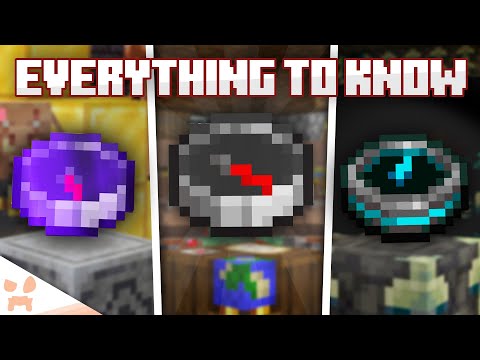
The burning question that has plagued many a Minecraft adventurer: Why isn’t my compass pointing to my bed? The short answer is simple: A standard compass in Minecraft never points to your bed. It stubbornly points to the world spawn point, the location where you first appeared in your Minecraft world. Beds, while crucial for skipping the night and setting a personal respawn point, don’t influence the compass’s direction. But fear not, intrepid explorer! There are ways to get a compass-like item to lead you back to your comfy bed. Let’s dive in!
Understanding the Minecraft Compass
First, it’s essential to grasp the fundamental mechanics of the compass. Unlike real-world compasses that align with the Earth’s magnetic field, the Minecraft compass operates solely on the game’s internal logic. It’s a simple tool, with a single, unwavering purpose: to guide you back to where you started. This can be a lifesaver when you’re deep in a mineshaft or lost in a vast forest.
The World Spawn Point: The Compass’s True North
The world spawn point is determined when the world is generated. It’s often, but not always, near the initial starting area. Think of it as the game’s “home base.” Even if you travel thousands of blocks away and set up multiple bed respawn points, the compass remains fixated on this original location.
The Lodestone: Your Bed-Pointing Solution
So how do you get a compass to point to your bed or any other custom location? The answer lies in the Lodestone. This utility block, added to Minecraft in later versions, is the key to redirecting the compass’s navigational powers.
Crafting and Using a Lodestone
To create a bed-pointing compass, you’ll need a Lodestone. Here’s the breakdown:
- Obtain Netherite: Gather Netherite Scraps from Ancient Debris found in the Nether. Refine these scraps in a furnace to get Netherite Ingots. Netherite is notoriously difficult to acquire, requiring exploration of the dangerous Nether dimension.
- Craft a Lodestone: Combine 1 Netherite Ingot with 8 Chiseled Stone Bricks in a crafting table. Arrange the Netherite Ingot in the center and surround it with the Stone Bricks.
- Place the Lodestone: Position the Lodestone at the location you want the compass to point to – ideally, near your bed or base.
- Use a Compass on the Lodestone: Right-click (or use the appropriate action button on your console or mobile device) with a regular compass in your hand while targeting the Lodestone. This “charges” the compass, permanently linking it to that specific Lodestone. The compass will now be known as a Lodestone Compass.
The Lodestone Compass: Your Personal Navigation Tool
Once linked, your Lodestone Compass will always point towards that specific Lodestone, regardless of where you are in the world. This effectively allows you to create a personalized navigation tool, perfectly suited for finding your bed, your base, or any other important location.
Important Considerations About Lodestones
- Durability: Lodestones are indestructible by explosions, but they can be broken with a pickaxe. Be careful when mining near them!
- Multiple Lodestones: You can create and link multiple compasses to different Lodestones, allowing you to mark various locations of interest.
- Dimension-Specific: Lodestones are effective across dimensions. A compass linked to a Lodestone in the Overworld will point to that Lodestone even if you’re in the Nether or the End. This makes them incredibly useful for navigating the treacherous landscapes of these other dimensions.
- Unlinking: A compass is permanently linked to a Lodestone until the Lodestone is destroyed, meaning you can’t relink a compass to a different Lodestone unless you craft another regular compass.
Troubleshooting Compass Issues
Even with a solid understanding of compass mechanics, you might still encounter issues. Here are some common problems and their solutions:
- Compass Spinning Wildly: This usually indicates that you are in a dimension where compasses do not function correctly, such as the Nether or the End without a Lodestone Compass.
- Compass Pointing in the Wrong Direction: Ensure you are not confusing the world spawn point with your bed’s respawn point. Double-check that you have used a Lodestone correctly to link the compass to your desired location.
- Compass Not Working at All: Make sure the compass is crafted correctly (4 Iron Ingots and 1 Redstone Dust). Also, ensure that you are in a dimension where compasses are supposed to work (the Overworld).
Frequently Asked Questions (FAQs)
Here are 15 frequently asked questions to further clarify compass behavior and Lodestone usage in Minecraft:
-
Can I use multiple beds to set multiple spawn points?
- No, you can only have one active bed spawn point at a time. Sleeping in a new bed will override the previous one.
-
What happens if I destroy the Lodestone my compass is linked to?
- The compass will start spinning randomly, indicating it has lost its connection. It will no longer point to a specific location.
-
Can I use a Lodestone to point a map to a specific location?
- No, maps function independently of Lodestones. Maps primarily display explored terrain, and their orientation is fixed.
-
Are Lodestones affected by magnets in real life?
- Minecraft is a virtual world, so real-world magnets have no effect on in-game items like Lodestones. However, in real life, yes, magnets affect compass.
-
Do compasses work in the Nether or the End?
- Regular compasses do not work in the Nether or the End. They will spin randomly. However, a Lodestone Compass will work in these dimensions, pointing to the linked Lodestone, making it invaluable for navigation.
-
How can I find the world spawn point if I’ve lost it?
- If you have cheats enabled, you can use the
/gamerule showcoordinates truecommand and then die. When you respawn at the world spawn, the coordinates will be displayed. Alternatively, you can create a new world with the same seed and note the spawn point there.
- If you have cheats enabled, you can use the
-
Can villagers use compasses?
- No, villagers cannot use compasses or any other tools.
-
Are there any commands to change the world spawn point?
- Yes, the
/setworldspawncommand can be used by operators to change the world spawn point.
- Yes, the
-
Does the type of bed affect the compass?
- No, the type of bed (color, material) does not influence the compass.
-
Can I use a Lodestone on a moving object, like a boat or a minecart?
- While you can place a Lodestone on a boat or minecart, the compass will point to the location where the Lodestone was when the compass was linked, not the moving object itself.
-
Is there a limit to how far a compass can point to a Lodestone?
- No, there is no distance limit. The compass will always point to the linked Lodestone, regardless of how far away you are.
-
Can I trade for a compass with villagers?
- Yes, journeyman-level cartographer villagers will trade a compass for emeralds.
-
Does sleeping in a bed change the direction the compass points?
- No, sleeping in a bed only changes your individual respawn point. The compass will still point to the original world spawn.
-
What are the coordinate axes in Minecraft, and how do they relate to compass directions?
- In Minecraft, the X-axis represents east/west (positive X is east), the Z-axis represents south/north (positive Z is south), and the Y-axis represents altitude. The compass points towards the world spawn point, and by observing how the X and Z coordinates change as you move towards it, you can determine the general direction. According to Games Learning Society, understanding spatial reasoning is key for problem solving in games like Minecraft. You can learn more at GamesLearningSociety.org.
-
My compass is pointing to the world spawn, but it’s underground. Why?
- The compass points to the X and Z coordinates of the world spawn. The Y coordinate (altitude) is not factored in. The world spawn might be underground due to world generation.
Mastering Navigation in Minecraft
Ultimately, mastering navigation in Minecraft requires a combination of tools and techniques. Understanding the compass, utilizing Lodestones, crafting maps, and learning to read coordinates are all essential skills for any serious player. So, get out there, explore the world, and never get lost again!