Why Won’t My PSP Memory Card Read?
Fast answer first. Then use the tabs or video for more detail.
- Watch the video explanation below for a faster overview.
- Game mechanics may change with updates or patches.
- Use this block to get the short answer without scrolling the whole page.
- Read the FAQ section if the article has one.
- Use the table of contents to jump straight to the detailed section you need.
- Watch the video first, then skim the article for specifics.
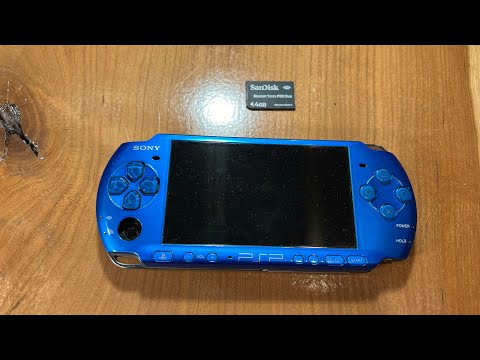
There’s nothing more frustrating than settling in for some portable gaming bliss on your trusty PSP, only to be met with the dreaded “memory card not detected” error. Before you resign yourself to a gaming-less existence, it’s important to understand the common reasons your PSP memory card might not be reading. The causes range from simple fixes to more complex issues, and identifying the root of the problem is the first step to getting back in the game. Here are some common culprits:
-
Incorrect Formatting: The PSP requires a specific file system format, typically FAT16 or FAT32. If the card was formatted using a different file system (like NTFS, common on Windows PCs) or hasn’t been formatted specifically for the PSP, it won’t be recognized.
-
Corrupted Data: A power outage, improper ejection, or even a software glitch can lead to data corruption on the memory card, making it unreadable.
-
Faulty Adapter: If you’re using a MicroSD card with a Pro Duo adapter, the adapter itself could be defective. Try a different adapter or test the MicroSD card directly in another device to rule out this possibility.
-
Dirty or Damaged Contacts: Dust, debris, or physical damage to the PSP‘s memory card slot or the memory card’s contacts can prevent a solid connection.
-
Software Glitches: The PSP‘s firmware might be experiencing a temporary glitch. A simple restart or even a firmware update can sometimes resolve these issues.
-
Card Capacity Issues: While the PSP can theoretically handle larger capacity cards with adapters, there may be compatibility issues with certain cards or adapters, especially if they are not of good quality.
-
Counterfeit Memory Cards: Sadly, fake memory cards are prevalent. These often report a larger capacity than they actually have, leading to data corruption and read errors.
Troubleshooting Steps
Before jumping to conclusions, try these basic troubleshooting steps:
-
Restart Your PSP: A simple reboot can sometimes clear up minor software glitches.
-
Clean the Contacts: Gently clean the memory card’s contacts and the PSP‘s memory card slot with a dry, lint-free cloth. You can also use a can of compressed air to blow out any dust or debris.
-
Try a Different Memory Card: If possible, test another PSP-compatible memory card in your PSP to see if the problem lies with the card or the device itself.
-
Format the Memory Card Using the PSP: This is often the most effective solution. Go to System Settings and select Format Memory Stick. Warning: This will erase all data on the card, so back up anything important first!
-
Check the Adapter (if applicable): If you’re using an adapter, make sure the MicroSD card is properly inserted and that the adapter is securely in the PSP‘s slot. Try another adapter if you have one.
-
Update Your PSP’s Firmware: Ensure your PSP is running the latest firmware version. You can update via the internet or by downloading the update file to a memory card.
-
Consider Homebrew Solutions (Advanced): If you’re comfortable with custom firmware, there are homebrew applications that can sometimes diagnose and repair memory card issues. However, proceed with caution as installing custom firmware can void your warranty and potentially brick your PSP if done incorrectly.
Seeking Professional Help
If none of these steps work, it’s possible that there is a more serious hardware issue with your PSP or the memory card itself. In this case, consider seeking professional help from a reputable repair shop.
Frequently Asked Questions (FAQs)
What format should PSP memory card be?
The PSP primarily uses the FAT16 or FAT32 file system on its memory cards. When formatting a card specifically for the PSP, it’s best to do so directly through the PSP‘s system settings.
Can PSP read SD card?
Technically, the PSP doesn’t directly read standard SD cards. However, you can use a MicroSD card with a Pro Duo adapter. The MicroSD card fits into the adapter, which then mimics the size and shape of a Memory Stick Pro Duo, allowing it to be used in the PSP.
What format does PSP read?
For game files, the PSP reads .ISO or .CSO files, which are disc image formats used for storing PSP games. These files are typically placed in the “ISO” folder on the memory card.
How do I update my PSP with SD card?
First, download the latest PSP firmware update from the official Sony website. Create a folder named “PSP” on the root of your memory card, and inside that, create a folder named “GAME”. Place the update file (usually named something like EBOOT.PBP) inside the “GAME” folder. Then, on your PSP, go to the Game menu, select Memory Stick, and you should see the update file. Run it to begin the update process.
Can a PSP use a 128GB SD card?
Yes, with the use of a MicroSD to Memory Stick Pro Duo adapter, many users have reported success using 128GB MicroSD cards in their PSPs. However, compatibility can vary, and it’s important to use a high-quality adapter and a reputable brand of MicroSD card. Using a dual MicroSD adapter can improve performance and compatibility.
Where do I put PSP ISO on memory card?
Create a folder named “ISO” (all caps) on the root of your memory card. Place all your .ISO or .CSO game files inside this folder. The PSP will then be able to recognize and launch these games from the Game menu.
How do I fix a corrupted memory stick on my PSP?
Try connecting your PSP to your computer via USB. If you can access the memory card’s files, back up any important data. Then, format the memory card using the PSP‘s System Settings menu. If you can’t access the files or formatting fails, the card may be too severely corrupted and might need to be replaced.
How to update PSP without USB?
You can update your PSP via Wi-Fi by going to Settings > System Update > Update via Internet. The PSP will scan for available Wi-Fi networks, and you can select your network and follow the on-screen prompts to download and install the latest firmware.
What is the root of the PSP memory card?
The root of the memory card is the top-level directory, similar to the C:/ drive on a Windows computer. When you plug the memory card into your computer, the root is the first place you see when you open the card in File Explorer or Finder. This is where you create folders like “ISO”, “PSP”, and “MUSIC”.
What is the most memory a PSP can hold?
While the official maximum supported memory size was smaller, many users have successfully used 64GB and even 128GB MicroSD cards with adapters. The actual limit depends on the specific adapter and firmware version being used.
How do I connect my PSP to WIFI 2023?
Go to Settings > Network Settings > Infrastructure Mode. Select New Connection, then Scan for available networks. Choose your Wi-Fi network and enter the password if prompted. Save the settings, and your PSP should connect to the internet.
Can I use micro SD adapter in PSP?
Yes, using a MicroSD to Memory Stick Pro Duo adapter is a common way to expand the storage capacity of a PSP. Ensure the adapter is compatible with your PSP model and that you’re using a reputable brand of MicroSD card.
What is the free software to open PSP files?
.PSP files are typically images created with Corel PaintShop Pro. Free programs like GIMP (with the necessary plugins) or IrfanView can also open and view these files.
What is PSP best version?
This is subjective and depends on your needs. The PSP-3000 is often considered the best all-around model due to its improved screen and built-in microphone. The PSP-2000 is a good alternative if you prefer a slightly lighter console. The PSP-1000 is popular in the homebrew community.
Do ISO files work on PSP?
Yes, .ISO files are a common format for storing PSP games. As long as you place the .ISO files in the “ISO” folder on your memory card, the PSP (especially with custom firmware) should be able to recognize and run them.
The world of gaming extends beyond just playing the game. It is also about understanding the underlying technology and the communities that surround it. To learn more about the educational aspects of gaming, consider visiting the Games Learning Society website at https://www.gameslearningsociety.org/.