Will Wii Work Without Sensor? Understanding the Wii Sensor Bar
Fast answer first. Then use the tabs or video for more detail.
- Watch the video explanation below for a faster overview.
- Game mechanics may change with updates or patches.
- Use this block to get the short answer without scrolling the whole page.
- Read the FAQ section if the article has one.
- Use the table of contents to jump straight to the detailed section you need.
- Watch the video first, then skim the article for specifics.
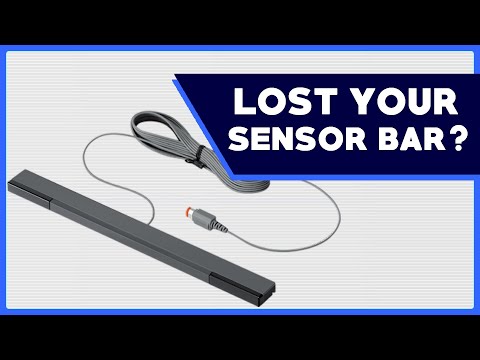
The short answer is: it depends. While some Wii games can be played without the sensor bar, especially those that primarily use the Classic Controller or rely on motion controls without pointing, many games require it, at least initially, to navigate menus or utilize pointer functionality. The sensor bar is essentially a source of infrared light that the Wii Remote uses to determine its position on the screen. Without it, your ability to accurately point and interact with the Wii console can be severely limited.
Think of the Wii sensor bar as a helpful guide, providing crucial feedback for the Wii Remote to understand where it’s pointing on your TV screen. It is an integral component to the Wii’s interactive gameplay. Now let’s get into detail about this topic.
The Role of the Wii Sensor Bar
The Wii Sensor Bar is more accurately described as a light bar. It doesn’t “sense” motion in the way you might think. Instead, it emits infrared light from two points. The Wii Remote, equipped with an infrared camera, detects these light sources. By triangulating the position of these two points of light, the Wii console can determine where the remote is pointing on the screen.
This allows for precise pointer control, crucial for many Wii games, especially those that involve aiming, shooting, or navigating menus.
Alternatives to the Official Sensor Bar
The good news is that the Wii Sensor Bar doesn’t need to be the official Nintendo product to work. Any source of two infrared light points will do! This leads to some creative alternatives:
- Candles: Placing two lit candles roughly the same distance apart as the Wii Sensor Bar can mimic its functionality. Exercise caution, of course! This is not an activity for children, and be sure to practice fire safety.
- Infrared LEDs: A DIY enthusiast could build a custom sensor bar using infrared LEDs powered by a USB connection.
- Wireless Sensor Bars: There are third-party wireless sensor bars available that run on batteries, eliminating the need to plug into the Wii console.
The key is to provide two distinct points of infrared light for the Wii Remote to track.
Navigating the Wii Menu Without a Sensor Bar
Even if you don’t have a sensor bar, you might still be able to navigate the Wii Menu. If you have a Pro Controller or Classic Controller, you can often use the directional pad and buttons to select options and launch games.
In many cases, you might need the sensor bar initially to get to the Disc Channel. However, once in a game that supports the Pro Controller or doesn’t require pointing, you can often play without it.
Wii Games That Don’t Need a Sensor Bar
Not all Wii games rely heavily on the sensor bar. Here are some examples of games that are either playable without it or require it only minimally:
- Games That Support the Classic Controller: Many older titles, especially those originally released on previous consoles, can be played entirely with the Classic Controller, bypassing the need for pointing.
- Games That Focus on Motion Controls (Without Pointing): Some sports games like Tennis, Bowling, Baseball, Golf, and Boxing in Wii Sports don’t require precise pointer control. The motion sensors in the Wii Remote are sufficient for gameplay.
- Games That are Multi-Player: Some games may allow player 1 to use the Wii Remote and sensor bar, but players 2-4 could use the Pro Controller.
It’s important to note that games like Wii Sports Resort, which heavily rely on precise motion controls and pointing for activities like archery, frisbee, swordplay, and wakeboarding, are practically unplayable without a working sensor bar.
Troubleshooting a Non-Functional Sensor Bar
Before resorting to alternatives, try these troubleshooting steps:
- Check the Connections: Ensure the sensor bar is securely plugged into the correct port on the back of the Wii console (the orange port).
- Inspect the Cord: Look for any frayed wires, kinks, or damage to the sensor bar’s cable.
- Clear Obstructions: Make sure nothing is blocking the sensor bar from emitting infrared light.
- Adjust Sensitivity: In the Wii’s System Settings, navigate to the Sensor Bar menu and adjust the sensitivity. The goal is to see only two blinking lights when pointing the Wii Remote at the TV.
- Placement: Is the sensor bar correctly placed above or below the TV, according to your system settings?
Conclusion: Understanding the Wii Sensor Bar’s Importance
While it’s possible to play some Wii games without a sensor bar, it’s a crucial component for the full Wii experience. It allows for precise pointer control, which is essential for navigating menus and enjoying many of the system’s most popular titles. If your sensor bar isn’t working, try troubleshooting steps or consider alternative infrared light sources.
To dive deeper into the educational potential of gaming, explore the Games Learning Society at https://www.gameslearningsociety.org/. The organization is dedicated to the topic of how people learn through playing games.
Frequently Asked Questions (FAQs)
1. Can I play Super Mario Bros. on Wii without a sensor bar?
Yes, but you might need the sensor bar initially to navigate to the Disc Channel from the Wii Home Menu. Once the game is running, if you are using a Classic Controller or Pro Controller, you likely will not need the sensor bar for gameplay, however this is only possible if it is an original version, and not the NES remix version from Wii U.
2. What Wii games do not require a sensor bar at all?
Certain sports games in Wii Sports such as Tennis, Bowling, Baseball, Golf, and Boxing don’t need the pointer or sensor bar. These games primarily rely on motion controls. Also, some Virtual Console games that use the Classic controller exclusively do not require the use of the Wii Remote or sensor bar.
3. Does Wii Fit need a sensor bar?
Not really. The sensor bar doesn’t transmit data for Wii Fit. It only provides power to the Wii Board, but the game can still be played without the sensor bar.
4. Can you use Wii Motion Plus without a sensor bar?
The sensor bar is required to calibrate the Wii Motion Plus at the initial setup. Although it is not constantly used during gameplay, it is needed for configuration of the Wii Remote.
5. What does the Wii sensor bar connect to?
The Wii Sensor Bar plugs into the Sensor Bar connector on the back of the Wii console. It’s typically an orange-colored port.
6. What does the Wii sensor bar actually do?
The Wii Sensor Bar emits infrared light that the Wii Remote uses to determine its position and orientation in relation to the TV screen. This allows for precise pointer control in games and menus.
7. Can I use a wireless sensor bar on a Wii?
Yes, you can use a wireless sensor bar. These usually run on batteries and offer more flexibility in terms of placement, eliminating cable clutter.
8. Do you need Wii Motion Plus for Wii Sports?
While not strictly required for all sports, Wii Motion Plus enhances motion detection accuracy. Many Wii Remotes have it built-in, but some require the attachment.
9. Should the Wii sensor bar be above or below the TV?
You can place the sensor bar either above or below the TV. In the Wii settings, be sure to indicate the correct sensor location for optimal performance.
10. How can I make my Wii sensor bar work better?
Adjust the sensor bar’s sensitivity in the Wii System Settings. Make sure that you point the Wii Remote at the television and use the + and – buttons to adjust the sensitivity until only two blinking lights appear.
11. Why do you need Wii Motion Plus?
Wii Motion Plus provides more precise motion tracking, allowing the Wii Remote to detect even subtle movements, which enhances the gameplay experience in certain games.
12. How far away should the Wii sensor bar be?
The recommended distance for using the Wii Remote Pointer is 3 to 8 feet from the sensor bar.
13. Do you need the motion sensor on the Wii Remote?
The Sensor Bar is necessary when the Wii Remote controls the on-screen pointer, and it is also needed for a lot of motion-based games.
14. What kind of plug is a Wii sensor bar?
The sensor bar cord terminates in a proprietary connector that plugs into the orange port on the back of the Wii console. This connector carries power to the sensor bar, the power may come from USB or a normal AC adapter.
15. How do I play Wii games without a sensor bar?
You can play Wii games without a sensor bar if they support the Classic Controller or rely solely on motion controls without the need for pointing. You can also play with the Pro Controller or Classic Controller if the game supports it, but without the ability to point or access the Disc Channel. In this case, the game may need to be downloaded, or installed on the Wii harddrive.