Are PS5 Joysticks Replaceable? A Deep Dive into DualSense Repair
Fast answer first. Then use the tabs or video for more detail.
- Watch the video explanation below for a faster overview.
- Game mechanics may change with updates or patches.
- Use this block to get the short answer without scrolling the whole page.
- Read the FAQ section if the article has one.
- Use the table of contents to jump straight to the detailed section you need.
- Watch the video first, then skim the article for specifics.
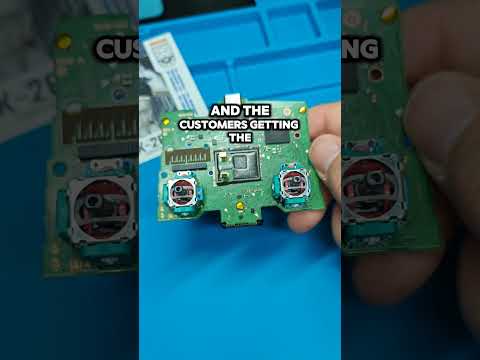
Yes, PS5 joysticks are replaceable, but the process and ease of replacement depend heavily on which PS5 controller you own and your level of technical skill. While standard DualSense controllers require more involved disassembly and soldering for full joystick replacement, the DualSense Edge™ controller offers user-replaceable stick modules, simplifying the process significantly. This article will delve into the intricacies of joystick replacement on PS5 controllers, exploring repair options, costs, and preventative measures.
Understanding Joystick Replacement on PS5 Controllers
The bane of many gamers is stick drift, where the in-game character or cursor moves without any input from the player. This frustrating issue is often caused by wear and tear, debris buildup, or component failure within the joystick module. While stick drift can sometimes be temporarily resolved with software solutions or cleaning, often the only permanent fix is joystick replacement.
DualSense Controller Joystick Replacement
Replacing the joysticks on a standard DualSense controller is not a simple task for the average user. It typically involves the following steps:
- Disassembly: Carefully opening the controller without damaging its delicate internal components.
- Desoldering: Removing the old joystick module from the circuit board using a soldering iron.
- Soldering: Attaching the new joystick module to the circuit board, ensuring proper connections.
- Reassembly: Putting the controller back together.
This process requires soldering skills, specialized tools (soldering iron, desoldering pump, screwdrivers), and a significant amount of patience. Mistakes can lead to further damage to the controller, potentially rendering it unusable. Therefore, unless you are comfortable with electronics repair, it’s generally recommended to seek professional repair services.
DualSense Edge™ Controller Joystick Replacement
The DualSense Edge™ wireless controller offers a far more user-friendly solution: replaceable stick modules. This means that if you experience stick drift, you can simply swap out the faulty module with a new one without any soldering or complex disassembly. The process is designed to be quick and easy, allowing you to get back to gaming in minutes.
This modular design is a significant advantage for serious gamers who value precision and reliability. By investing in the DualSense Edge™ and stocking up on replacement stick modules, you can ensure that you always have a controller in optimal condition.
Repair Options and Costs
If you’re not comfortable performing the joystick replacement yourself, several options are available:
- Professional Repair Services: Companies like uBreakiFix by Asurion specialize in controller repairs, including joystick replacement. These services typically offer a diagnostic assessment and a quote before proceeding with the repair.
- Sony PlayStation Support: If your controller is still under warranty, you may be able to get it repaired or replaced by Sony. Contact PlayStation support to inquire about your options. Even if the controller is out of warranty, it’s worth contacting them as they might offer a solution.
- GameStop: GameStop offers warranties on controllers that cover stick drift, providing a replacement if the issue occurs.
The cost of repair varies depending on the severity of the issue and the service provider. Generally, expect to pay between $19.95 to $85, but this can fluctuate based on the specific repair needed.
Preventing Stick Drift
While joystick replacement is sometimes unavoidable, there are steps you can take to minimize the risk of stick drift:
- Keep your controller clean: Regularly clean your controller with a soft, dry cloth to remove dust and debris.
- Store your controller properly: When not in use, store your controller in a case or cover to protect it from dust and damage.
- Avoid excessive force: Be gentle with the joysticks and avoid applying excessive force, as this can accelerate wear and tear.
- Update your controller software: Keep your controller software up to date, as updates may include fixes for stick drift issues.
- Consider KontrolFreek: KontrolFreek controller accessories can sometimes provide an extra layer of protection and improved grip, reducing wear on the joysticks.
Frequently Asked Questions (FAQs)
1. How do I know if my PS5 controller has stick drift?
If your in-game character or cursor moves without you touching the joysticks, or if the movement is erratic or unpredictable, you likely have stick drift. You can also test for stick drift using the controller settings on your PS5.
2. Is stick drift covered under the PS5 controller warranty?
Yes, stick drift is generally covered under the standard one-year warranty from Sony. Contact PlayStation support for assistance if your controller is still under warranty.
3. Can I fix stick drift myself without replacing the joystick?
Sometimes, stick drift can be temporarily resolved by cleaning the joystick mechanism with compressed air or isopropyl alcohol. However, this is not always effective, and the issue may return. Resetting the controller by using the button on the back of the controller is also a valid way to try to fix it.
4. Where can I buy replacement joysticks for my PS5 controller?
Replacement joysticks for standard DualSense controllers can be purchased from online retailers like Amazon or eBay. Replacement stick modules for the DualSense Edge™ controller can be purchased directly from Sony or authorized retailers.
5. How long does it take for Sony to repair or replace a PS5 controller?
Sony aims to return your repaired or replaced controller within 15 days of receiving it.
6. How long does a PS5 controller typically last?
The lifespan of a PS5 controller can vary depending on usage and care. Some reports suggest a lifespan of around 4 to 7 months before significant degradation may occur, but this is just an average.
7. Does GameStop fix stick drift for free?
No, GameStop does not fix stick drift for free, but they offer warranties that cover stick drift. If your controller has a warranty from GameStop, you can get a replacement.
8. How do I reset my PS5 controller?
To reset your PS5 controller, look for a small hole on the back of the controller near the L2 button. Use a paperclip or similar object to gently press and hold the button inside the hole for five seconds.
9. Is the DualSense Edge™ controller worth the investment?
If you are a serious gamer who values precision, customization, and the convenience of replaceable stick modules, the DualSense Edge™ controller may be a worthwhile investment.
10. What is the most common problem with PS5 controllers?
The most common problem with PS5 controllers is stick drift, followed by issues with the L2/R2 triggers, and battery life.
11. Can I use a PS4 controller on my PS5?
While you can use a PS4 controller on your PS5, it’s primarily limited to playing PS4 games. You’ll need a DualSense controller to fully enjoy PS5 games and their unique features.
12. Are third-party PS5 controllers any good?
Some third-party PS5 controllers offer unique features or designs, but it’s essential to research and read reviews before purchasing. Quality and compatibility can vary significantly.
13. Where can I send my PS5 controller to get cleaned?
You can send your PS5 controller to services like uBreakiFix® by Asurion to get it professionally cleaned.
14. What causes stick drift on PS5 controllers?
Stick drift is primarily caused by wear and tear on the internal joystick sensors. These sensors can become clogged with dust, debris, or “thumb gunk,” leading to inaccurate readings.
15. How can understanding game design principles through organizations like the Games Learning Society impact controller longevity?
Understanding game design, which organizations like the Games Learning Society at GamesLearningSociety.org promote, can indirectly influence controller longevity. By being more aware of how games are designed to utilize controller functions, players might develop more efficient and less stressful gameplay habits on their controllers, potentially extending their lifespan. Ultimately, fostering a deeper understanding of game mechanics and human-computer interaction, as advocated by Games Learning Society, can lead to more informed and considerate use of gaming equipment.