Can You Still Upgrade PS4 Games to PS5 for Free? A Comprehensive Guide
Fast answer first. Then use the tabs or video for more detail.
- Watch the video explanation below for a faster overview.
- Game mechanics may change with updates or patches.
- Use this block to get the short answer without scrolling the whole page.
- Read the FAQ section if the article has one.
- Use the table of contents to jump straight to the detailed section you need.
- Watch the video first, then skim the article for specifics.
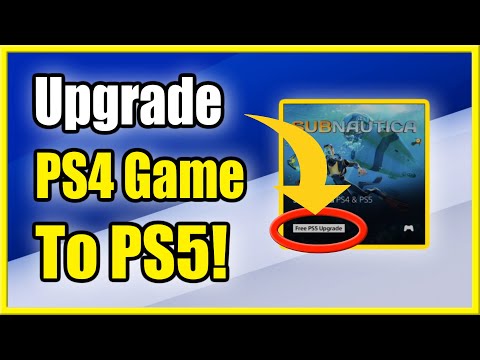
The short answer is yes, you can still upgrade some PS4 games to their PS5 versions for free, but it’s not a universal feature. The availability of free upgrades depends on the specific game and the publisher’s policies. Some publishers offer free upgrades as a perk, while others may require a purchase or have limited-time upgrade offers that have since expired. Let’s dive deeper into how this works and what you need to know.
Understanding PS4 to PS5 Upgrades
The Upgrade Landscape
When the PlayStation 5 launched, one of the most exciting features was its ability to play most PlayStation 4 games. However, simply playing a PS4 game on a PS5 doesn’t automatically make it a next-gen experience. To truly leverage the PS5’s power, many developers offered upgraded versions of their PS4 titles. These upgrades could include improved resolution, frame rates, textures, and sometimes even entirely new content.
Free vs. Paid Upgrades
Not all upgrades are created equal. Some publishers generously offered free upgrades to anyone who owned the PS4 version of their game. Others took a different approach, charging a fee for the PS5 version, even if you already owned the PS4 copy. In some cases, publishers offered a limited-time free upgrade window, meaning you had to claim the upgrade before a specific date.
How to Check for Upgrades
The best way to check if a game has a free PS5 upgrade is to visit the PlayStation Store. Search for the game in question and look for an option that says “PS4 & PS5” or mentions a free upgrade. If you own the game digitally, the PS5 version may appear in your game library ready for download. If you own a physical PS4 disc, insert it into your PS5. If a free upgrade is available, you should see an option to download the PS5 version from the game’s hub on the PS5 dashboard.
PS4 to PS5: Saving Your Game Progress
Transferring Saves is Possible!
If you’re upgrading a PS4 game to its PS5 counterpart, you’ll be relieved to know that you can usually transfer your save data. This means you can pick up right where you left off, without losing hours of progress.
The Transfer Methods
There are several ways to transfer your save data from PS4 to PS5:
- PlayStation Plus Cloud Storage: If you have a PlayStation Plus subscription, you can upload your save data to the cloud from your PS4 and then download it to your PS5.
- USB Drive: You can copy your save data to a USB drive from your PS4 and then copy it to your PS5. This is a reliable option if you don’t have PlayStation Plus.
- Network Transfer: The PS5 allows you to transfer data directly from your PS4 over your local network.
Following the Transfer Steps
To use a USB drive, go to Settings > Application Saved Data Management > Saved Data in System Storage > Copy to USB Storage Device on your PS4. Select the game and the save data you want to transfer. Then, on your PS5, go to Settings > Saved Data and Game/App Settings > Saved Data (PS4) > USB Drive > Copy to Console Storage.
Optimizing Your PS5 Experience
Settings and Automatic Updates
To ensure your games are always up-to-date, enable automatic updates on your PS5. Go to Settings > Saved Data and Game/App Settings > Automatic Updates and enable “Auto-Download” and “Auto-Install”. This way, your PS5 will download and install updates even when it’s in Rest Mode.
Backwards Compatibility: Expanding Your Game Library
The PS5’s backwards compatibility is a huge boon. It allows you to play a vast library of PS4 games, expanding your gaming options. While some PS4 games receive enhanced performance on the PS5, not all do. Still, the ability to play your existing PS4 games on your new console is a major selling point.
The Drawbacks: PS3, PS2, and PS1 Discs
While the PS5 offers impressive backwards compatibility with PS4 games, it does not play PS3, PS2, or PS1 game discs. This is due to hardware differences and the PS5’s optical drive not being able to read older disc formats. However, some classic games from these older consoles are available digitally through PlayStation Plus Premium or as individual purchases on the PlayStation Store.
Is the PS5 Worth It?
Improved Visuals and Performance
If you’re considering upgrading from a PS4 to a PS5, the biggest draw is the significantly improved visuals and performance. The PS5 is capable of running games at 4K resolution with high frame rates, and it supports technologies like ray tracing for more realistic lighting.
Faster Loading Times
Another major benefit is the dramatically faster loading times thanks to the PS5’s solid-state drive (SSD). Games load in seconds rather than minutes, making for a much more seamless and enjoyable gaming experience.
Should You Upgrade?
If you’re serious about gaming and want the best possible experience, the PS5 is definitely worth the upgrade. However, if you’re happy with your PS4 and don’t mind slightly longer loading times and lower resolution, you can certainly continue to enjoy your PS4 for the time being. Selling your old PS4 or PS4 Pro can also offset the cost of the new console.
Frequently Asked Questions (FAQs)
1. Can all PS4 games be upgraded to PS5?
No, not all PS4 games offer a PS5 upgrade. The availability of an upgrade depends on the game publisher’s decision.
2. How do I know if a game has a free PS5 upgrade?
Check the PlayStation Store for the game. Look for an option that says “PS4 & PS5” or mentions a free upgrade. For physical copies, insert the disc and check the game hub on your PS5.
3. Do I need to buy the PS5 version if I already own the PS4 version?
It depends on the game. Some games offer free upgrades, while others require you to purchase the PS5 version.
4. What happens if I bought a PS4 game digitally?
If a free upgrade is available, the PS5 version may appear in your game library ready for download.
5. What if I own a physical PS4 game disc?
Insert the disc into your PS5. If a free upgrade is available, you should see an option to download the PS5 version from the game’s hub on the PS5 dashboard.
6. Can I transfer my saved data from PS4 to PS5?
Yes, you can transfer your saved data using PlayStation Plus cloud storage, a USB drive, or network transfer.
7. How do I transfer save data using a USB drive?
On PS4, go to Settings > Application Saved Data Management > Saved Data in System Storage > Copy to USB Storage Device. On PS5, go to Settings > Saved Data and Game/App Settings > Saved Data (PS4) > USB Drive > Copy to Console Storage.
8. Do I need PlayStation Plus to transfer save data?
No, you can use a USB drive to transfer save data without PlayStation Plus.
9. Can PS5 play PS3, PS2, or PS1 game discs?
No, the PS5 does not play PS3, PS2, or PS1 game discs due to hardware limitations.
10. Will PS4 games look better on PS5?
Some PS4 games may have an upgrade patch allowing for improved visuals and gameplay on the PS5.
11. How do I ensure my games are automatically updated on PS5?
Go to Settings > Saved Data and Game/App Settings > Automatic Updates and enable “Auto-Download” and “Auto-Install”.
12. What are the benefits of upgrading to a PS5?
Improved visuals, faster loading times, and access to next-gen games.
13. Is it worth buying a PS5 if I already have a PS4?
If you want the best possible gaming experience with improved visuals and faster loading times, then yes, it is worth the upgrade.
14. What PS4 games are not compatible with the PS5?
A small number of PS4 games are not compatible with the PS5, including Afro Samurai 2 Revenge of Kuma Volume One, Hitman Go: Definitive Edition, Just Deal With It!, Robinson: The Journey, Shadwen, TT Isle of Man – Ride on the Edge 2, and We Sing.
15. Where can I learn more about games and education?
You can learn more about the intersection of games and education at the Games Learning Society website: https://www.gameslearningsociety.org/.