Can You Upgrade Your PS5 Hard Drive? The Definitive Guide
Fast answer first. Then use the tabs or video for more detail.
- Watch the video explanation below for a faster overview.
- Game mechanics may change with updates or patches.
- Use this block to get the short answer without scrolling the whole page.
- Read the FAQ section if the article has one.
- Use the table of contents to jump straight to the detailed section you need.
- Watch the video first, then skim the article for specifics.
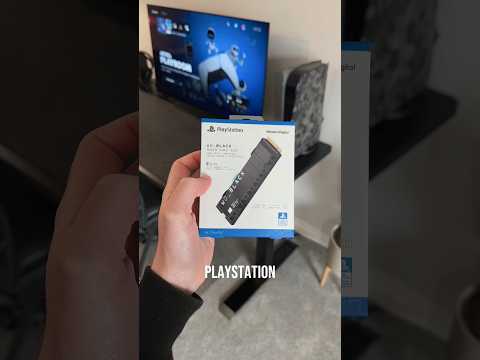
The short answer? Yes, and no. It’s a little more nuanced than a simple yes or no. While you can’t replace the internal drive, you can significantly expand your PS5 storage using the built-in NVMe SSD expansion slot. You can also use an external hard drive, but there are limitations. Let’s dive into the details of how to supercharge your PS5 storage.
Understanding PS5 Storage Options
The PlayStation 5 boasts a custom 825GB internal SSD, a significant leap over the PS4’s hard drive, promising lightning-fast loading times and a smoother gaming experience. However, only around 667GB of this is actually usable for games, apps, and save data. For avid gamers, this space can fill up quickly, especially with modern titles often exceeding 50GB and some breaching the 100GB mark. Sony recognized this and provided multiple avenues for storage expansion, each with its own pros and cons.
Internal SSD Expansion: The Preferred Method
The primary way to upgrade your PS5’s storage is by installing a compatible NVMe SSD into the designated expansion slot. This is the recommended method for expanding storage for PS5 games because it maintains the console’s high-speed performance. Think of it as adding another internal drive, seamlessly integrating with the system.
Here’s what you need to know about the NVMe SSD expansion:
- Compatibility: Not just any SSD will work. Sony has specific requirements for PS5-compatible SSDs:
- Interface: PCIe Gen4 x4 NVMe SSD
- Capacity: 250GB – 8TB
- Form Factor: M.2 Type 2230, 2242, 2260, 2280, or 22110
- Socket Type: Socket 3 (Key M)
- Sequential Read Speed: 5500MB/s or faster
- Cooling Structure: A heatsink is required to prevent overheating and ensure stable performance. Many SSDs come with pre-installed heatsinks; if yours doesn’t, you’ll need to purchase one separately.
- Installation: While not overly complicated, installing an SSD requires a screwdriver and a bit of careful handling. Sony provides clear instructions (and there are countless videos online) to guide you through the process.
- Performance: The key benefit of using an internal SSD is seamless performance. PS5 games run just as smoothly as they do on the console’s internal storage, with no noticeable difference in loading times or gameplay.
- Cost: High-performance NVMe SSDs can be expensive, especially for larger capacities. However, prices have been steadily dropping, making this option more accessible.
External USB Storage: An Option with Caveats
The PS5 also supports external storage via USB ports, but with significant limitations.
Here’s the rundown on external USB storage for the PS5:
- What You Can Store: You can store both PS5 and PS4 games on an external drive, but you can only play PS4 games directly from it. To play PS5 games, you must transfer them back to the internal SSD or the expanded NVMe SSD.
- Why the Limitation? The USB connection simply isn’t fast enough to meet the demands of PS5 games. The internal SSD is designed for incredibly fast data access, which is crucial for the console’s performance.
- Benefits: External storage is a convenient way to archive games you’re not currently playing, freeing up space on your internal storage without needing to redownload them. It’s also a simple and cost-effective solution for PS4 games, allowing you to enjoy them directly from the external drive.
- Requirements:
- Interface: SuperSpeed USB 5 Gbps or later (USB 3.0 or later)
- Capacity: 250GB – 8TB
- Performance: Expect significantly slower loading times and potentially stuttering or frame rate drops if you attempt to play PS5 games directly from an external drive (which you can’t, anyway!).
Why Can’t You Replace the Internal SSD?
The PS5’s internal SSD is soldered directly to the motherboard. This means it’s permanently affixed and cannot be removed or replaced by the user. This design choice, while limiting upgrade options, allows for optimized integration and performance. The system is built around this specific SSD, and replacing it would likely void your warranty and potentially damage the console.
Choosing the Right Storage Solution
Deciding whether to use an internal NVMe SSD or an external hard drive for storage depends on your gaming habits, budget, and technical comfort.
- For optimal performance with PS5 games: An internal NVMe SSD is the clear winner.
- For archiving PS5 games and playing PS4 games: An external hard drive is a viable and affordable option.
- For budget-conscious gamers: Starting with a smaller NVMe SSD and supplementing with an external hard drive can be a good compromise.
Ultimately, upgrading your PS5 storage is a worthwhile investment for any serious gamer. It provides more space for your growing game library and can significantly enhance your overall gaming experience.
You can learn more about gaming technology and its impact on learning at the Games Learning Society through GamesLearningSociety.org.
Frequently Asked Questions (FAQs) About PS5 Hard Drive Upgrades
Here are 15 of the most common questions about upgrading your PS5’s hard drive, answered in detail:
1. Is PS5 hard drive upgradable?
Yes, the PS5 hard drive is upgradable, but not in the traditional sense. You cannot replace the internal SSD. Instead, you can expand the storage capacity by adding a compatible NVMe SSD to the internal expansion slot or by using an external hard drive via USB.
2. Can you swap hard drive in PS5?
No, you cannot swap the internal hard drive in the PS5 like you could in the PS4. The internal drive is soldered to the motherboard.
3. Can you add a hard drive to PS5?
Yes, you can add an external hard drive to the PS5 via the USB ports. However, you can only play PS4 games directly from the external drive. PS5 games must be transferred back to the internal SSD or the expanded NVMe SSD to play.
4. Can you put a 4TB SSD in a PS5?
Yes, you can install a 4TB NVMe SSD in the PS5’s expansion slot, provided it meets the compatibility requirements (PCIe Gen4 x4, 5500MB/s read speed, heatsink, etc.). This greatly increases your storage capacity.
5. Can I put 8TB SSD in PS5?
Yes, the PS5 supports up to 8TB of storage on a compatible internal M.2 SSD.
6. Is 4TB too much for PS5?
Whether 4TB is “too much” depends on your gaming habits. If you have a large library of PS5 games and plan to download many more, a 4TB SSD is a worthwhile investment. If you primarily play a few games, a smaller capacity may suffice.
7. How big of an SSD can you put in a PS5?
The PS5 supports NVMe SSDs with capacities ranging from 250GB to 8TB.
8. What is the largest external hard drive for PS5?
The maximum capacity for an external hard drive connected to the PS5 via USB is 8TB.
9. Can you use 2 hard drives on PS5?
Yes, you can connect multiple external hard drives to the PS5, but the console can only read one at a time. You’ll need to switch between them in the settings.
10. Can you upgrade PS5 RAM?
No, the PS5’s RAM (system memory) cannot be upgraded. It’s integrated into the console’s architecture.
11. Does PS5 have 2 SSD slots?
No, the PS5 only has one NVMe SSD expansion slot.
12. How many games can PS5 hold?
The number of games the PS5 can hold depends on their size. With the standard 667GB of usable storage, you can typically store between 10-15 large PS5 games. Upgrading with a larger SSD significantly increases this number.
13. Does PS5 have SSD upgrade?
Yes, the PS5 has an SSD upgrade slot that allows you to expand its storage capacity with a compatible NVMe SSD.
14. Is upgrading PS5 storage worth it?
Yes, upgrading PS5 storage is generally worth it, especially for avid gamers. It allows you to store more games, eliminating the need to constantly delete and redownload titles. An internal NVMe SSD also ensures optimal performance for PS5 games.
15. What type of hard drive can a PS5 use?
The PS5 can use two types of hard drives:
- Internal: Compatible PCIe Gen4 x4 NVMe SSD with specific speed and size requirements.
- External: Any external hard drive that uses SuperSpeed USB 5 Gbps or later (USB 3.0 or later) with a capacity between 250GB and 8TB.
Expanding your PS5’s storage is a game-changer, ensuring you’re always ready to dive into the latest and greatest titles without the storage anxiety. Choose the solution that best fits your needs and budget, and enjoy the expanded possibilities!